Portable SSDs as Compact External Flash Storage
A portable SSD is a compact device that stores files in flash memory and connects to another device through a cable. It uses solid-state storage with no moving parts and functions as external storage rather than storage installed inside the host device, making portable SSDs a form of external flash storage.
A portable SSD is a compact device that stores files in flash memory and connects to another device through a cable.
People use a portable SSD to carry files, create backups, expand available capacity, or transfer data between compatible devices. Its usable speed is limited by the slowest supported part of the connection between the drive, cable, port, and host device, while compatibility requires the connection type and operating-system support to match. For example, a portable SSD connected through a supported cable and port can provide accessible storage for a laptop, whereas an unsupported connector prevents that transfer path from working.
People use a portable SSD to carry files, create backups, expand available capacity, or transfer data between compatible devices.
The terms portable SSD and external SSD often describe the same storage category, while an external hard drive stores data on moving magnetic components instead of flash memory. Capacity, speed, durability, compatibility, use case, and budget determine whether a portable SSD is suitable for a particular storage need.
Table of Contents
What a Portable SSD Is
A portable SSD is an external solid-state storage device that uses flash memory to store and move files. It connects to a computer or tablet through a cable and contains no moving parts. Its primary purpose is to provide reusable external storage so files can be transferred, backed up, and carried between compatible devices.
It connects to a computer or tablet through a cable and contains no moving parts.
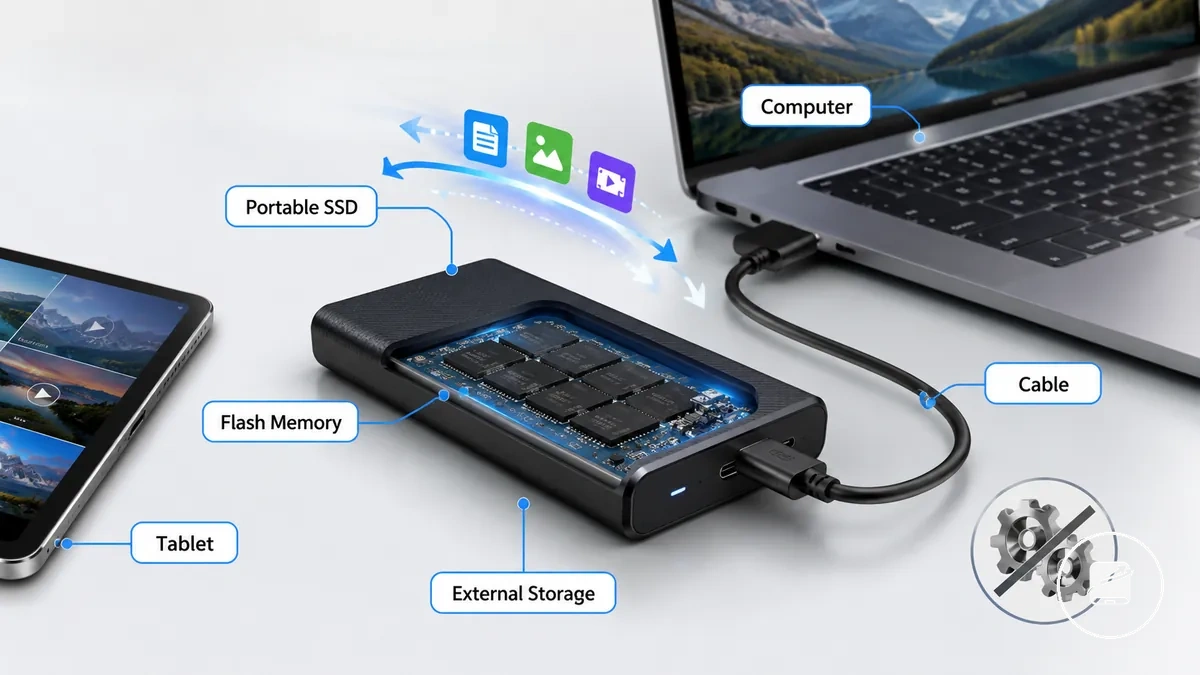
What a portable SSD is becomes clearer by looking at its physical form and external storage role. The image below labels the portable SSD body, cable connection, and host device to show how it functions as external file storage.
The core traits of a portable SSD include flash memory, an external enclosure, a cable connection, portability, and reusable storage for files. A portable SSD usually refers to a ready-to-carry external drive rather than an internal SSD installed inside a computer. Optional features, such as hardware encryption, rugged housing, or different connector types, vary by product and are not part of the basic definition.
A portable SSD usually refers to a ready-to-carry external drive rather than an internal SSD installed inside a computer.
For example, you can save work documents, photos, or videos to a portable SSD, disconnect it, and connect it to another compatible computer or tablet to continue using the same files from the external storage device.
How a Portable SSD Stores and Transfers Data
A portable SSD stores data in flash memory and transfers it through a USB connection managed by an internal controller. Flash memory retains data without continuous power, the controller manages read and write operations, and the USB cable and port provide the connection path between the portable SSD and the host device. How a portable SSD stores and transfers data relies on these three components working together.
How a portable SSD stores and transfers data relies on these three components working together.
How a portable SSD stores and transfers data becomes easier to understand by following the storage and connection path shown below. The diagram illustrates how flash memory, the controller, the USB interface, and the connected device work together during file transfer.
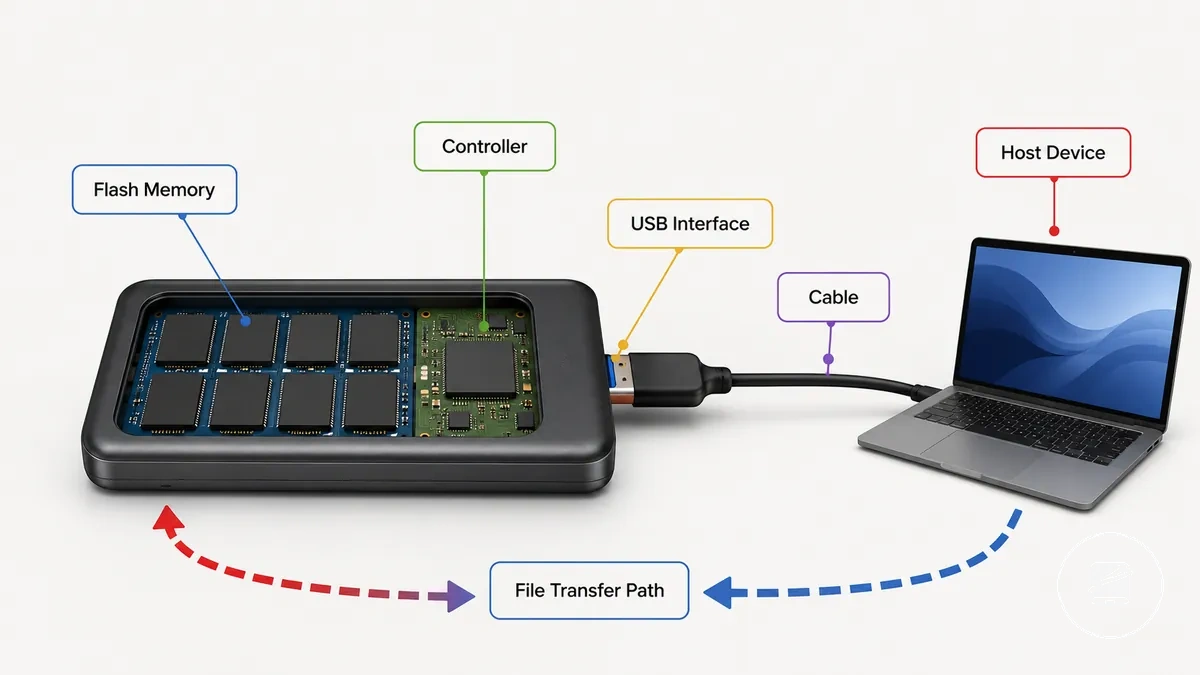
Flash memory stores data as non-volatile storage, so files remain saved even after external power is removed. The controller organizes where data is stored, manages read and write requests, and coordinates communication between the flash memory and the USB interface. Because a portable SSD has no moving parts, normal data retention does not depend on continuous power.
Because a portable SSD has no moving parts, normal data retention does not depend on continuous power.
When the portable SSD is connected through a USB cable to a compatible USB port, the operating system can recognize the device and provide access to its file system for file transfer. Data travels between the host device and the portable SSD through the USB connection while the controller manages each read and write operation. Actual transfer performance depends on the combined capabilities of the USB port, cable, drive design, file size, and host device rather than on the portable SSD alone.
Data travels between the host device and the portable SSD through the USB connection while the controller manages each read and write operation.
For example, you can copy photos from a computer to a portable SSD, disconnect the drive, and connect it to another compatible computer to access the same files without storing them permanently on the original device.
NAND Flash Memory and the SSD Controller
NAND flash memory and the SSD controller perform separate but connected roles inside a portable SSD. NAND flash stores data in non-volatile storage cells with no moving parts, while the SSD controller manages read and write operations and communication between the storage and the connected device. The illustration below labels these two internal functions to distinguish data storage from data management.
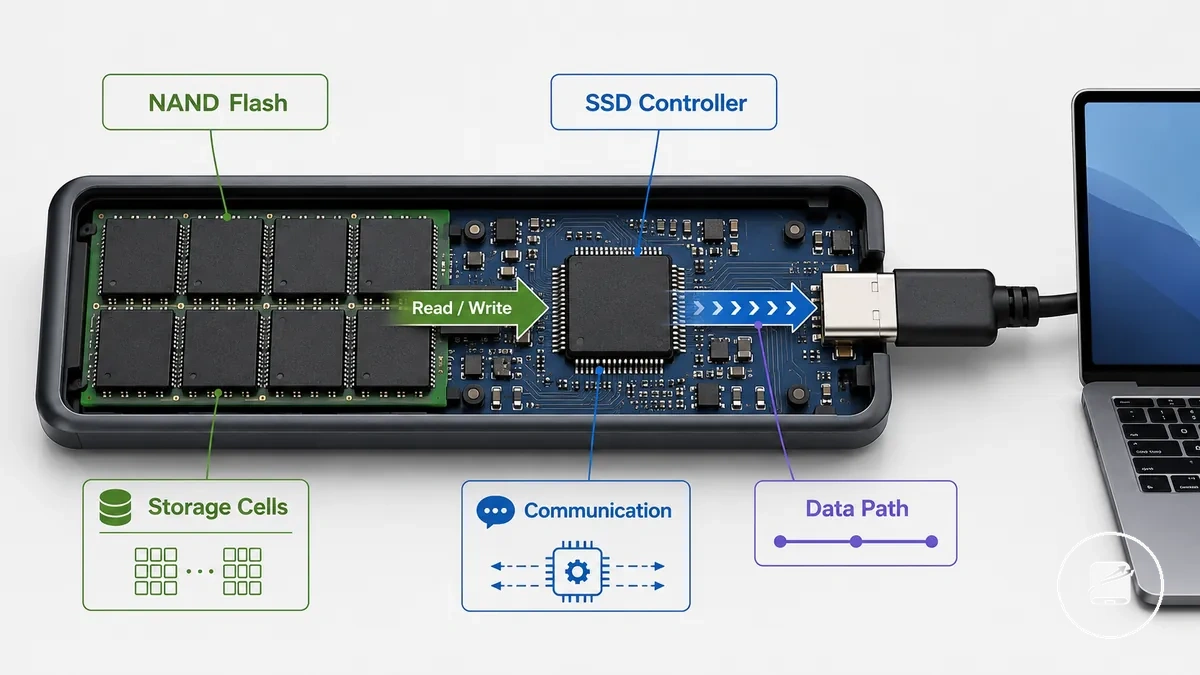
- NAND flash: Retains data without continuous power by storing it in flash memory cells with no moving parts. The stored files remain available until they are intentionally deleted, overwritten, or the storage is reformatted.
- SSD controller: Manages read and write requests, coordinates communication with the host device, and helps distribute write activity across the NAND flash to support normal wear management. User-visible responsiveness, transfer behavior, and reliability conditions are influenced by the controller together with the drive design, workload, and file size rather than by the controller alone.
Users normally do not inspect or handle NAND flash or the SSD controller because both components operate inside the portable SSD enclosure. For example, when you copy a folder of photos to a portable SSD, the NAND flash stores the files while the SSD controller manages the data path and communication between the drive and the connected computer.
USB Interface, Enclosure, Cable, and Power
The USB interface, enclosure, cable, and power form the external connection system that allows a portable SSD to connect to a host device. Together, these parts determine how the drive is physically connected, protected, powered, and recognized for file transfer. The annotated illustration below identifies the USB interface, enclosure, cable, and power connection.
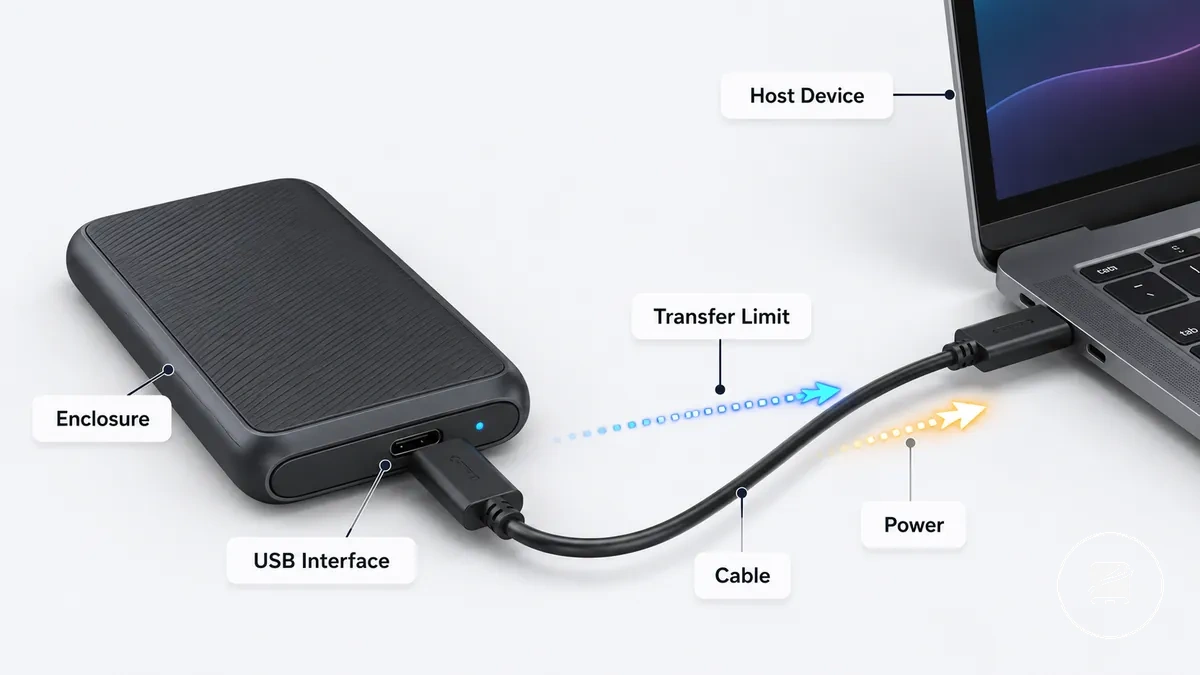
| Part | Attribute | Condition | User effect |
|---|---|---|---|
| USB interface | Provides the data connection through a supported USB port and interface standard | Host device has a compatible USB port | Device recognition and data transfer are available |
| Enclosure | Protects the internal storage components | Used under normal operating conditions | Helps protect the drive from everyday physical handling |
| Cable | Carries data and power between the drive and the host device | Cable connector and interface standard match both devices | Transfer limit is constrained by the supported cable and connection |
| Power | Supplied through the USB connection | Host device provides sufficient USB power | The portable SSD can be recognized and operate normally |
Recognition, compatibility, and transfer behavior are determined by the combined interaction of the USB interface, cable, port, operating system support, and available USB power. For example, a portable SSD connected with a compatible USB-C cable to a supported USB port can be recognized by the host device, while an incompatible connector or unsupported interface standard prevents the intended connection.
For broader connection criteria, see portable SSD ports and devices .
Connection behavior should be assessed by considering the interface standard, cable type, host device, and power delivery together because each part contributes to the overall connection outcome. For broader connection criteria, see portable SSD ports and devices.
Portable SSDs Compared with Nearby Storage Terms
A portable SSD is often described with storage terms that overlap because some names refer to form factor, others describe the connection method, and others identify the internal storage technology. The main terms are portable SSD, external SSD, external hard drive, and internal SSD.
| Term | What it usually means | What changes for the user |
|---|---|---|
| Portable SSD | An external flash storage device designed to be carried and connected to another device. | Provides portable flash storage through an external connection. |
| External SSD | An external solid-state drive that uses flash storage. The term commonly overlaps with portable SSD. | The wording emphasizes the connection method, although many devices are also portable SSDs. |
| External hard drive | An external storage device that uses a spinning drive instead of flash storage. | Uses different internal technology while providing external storage for files. |
| Internal SSD | A built-in SSD installed inside a computer rather than connected externally. | Forms part of the computer's internal storage and requires internal installation. |
The comparison mainly distinguishes whether a storage term describes portability, connection method, or storage technology. A portable SSD and an external SSD often identify the same type of flash storage device, while an external hard drive identifies a storage device with a spinning drive. An internal SSD also uses flash storage, but its form factor and installation location differ because it is built into the computer. For example, a USB-connected flash storage device carried between computers is typically described as both a portable SSD and an external SSD.
The comparison mainly distinguishes whether a storage term describes portability, connection method, or storage technology.
These terms clarify the meaning of related storage labels without ranking products or recommending one option over another. Detailed comparisons of external hard drives, internal SSDs, and purchase criteria are covered separately because this section focuses only on terminology boundaries.
Portable SSD vs External SSD Wording
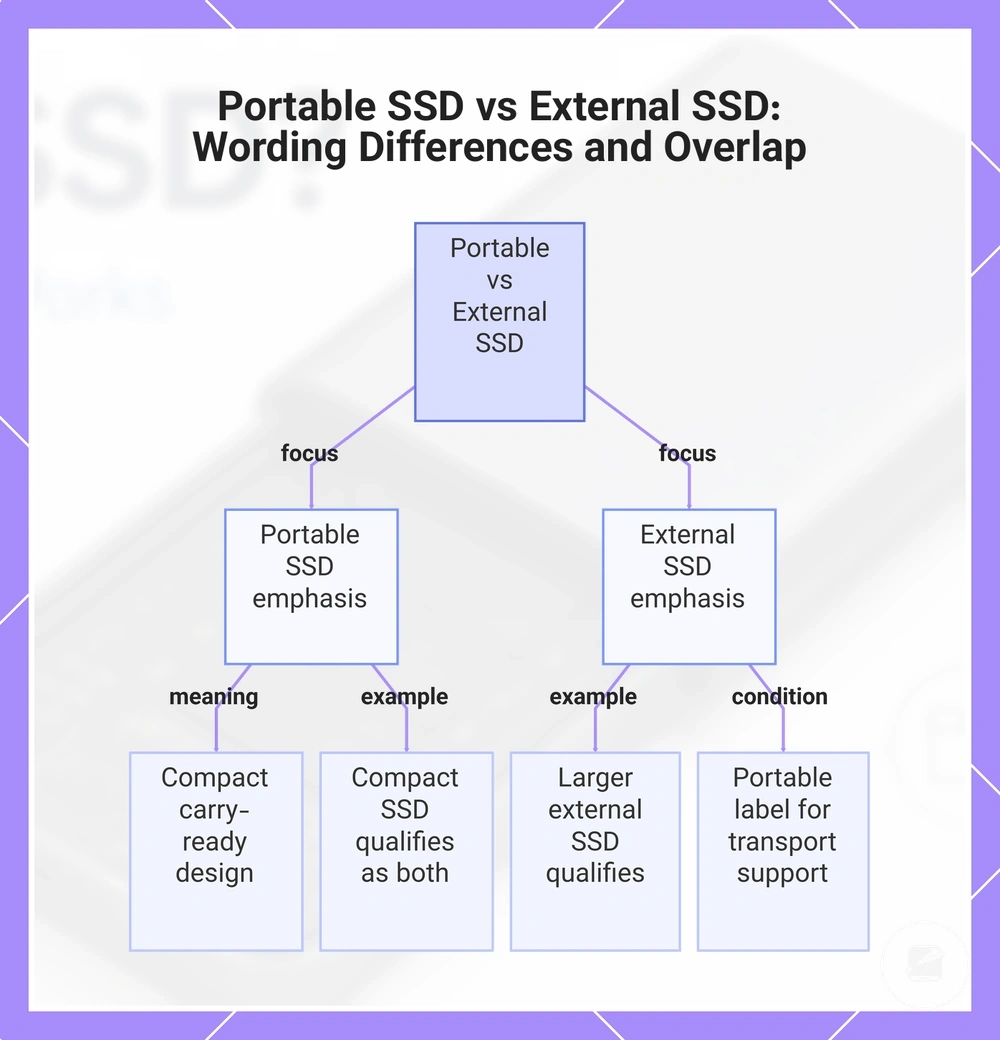
A portable SSD emphasizes a compact, carry-ready design, while an external SSD emphasizes that the storage device sits outside the computer and uses an external connection. The wording highlights different aspects of the device rather than a fixed hardware difference, so portable SSD and external SSD can overlap.
For example, a compact SSD with its own enclosure and cable can be described as both a portable SSD and an external SSD.
For example, a compact SSD with its own enclosure and cable can be described as both a portable SSD and an external SSD. A larger external solid-state drive also qualifies as an external SSD because it remains outside-the-computer, but the portable SSD label is more appropriate when the enclosure and connection support convenient transport.
This chart shows how the terms portable SSD and external SSD emphasize different aspects and when they overlap.
This chart shows how the terms portable SSD and external SSD emphasize different aspects and when they overlap.
Portable SSD vs External Hard Drive Basics
A portable SSD and an external hard drive both provide external file storage, but they use different storage methods. A portable SSD stores data in flash storage with no moving parts, while an external hard drive stores data on spinning magnetic storage with moving parts.
| Feature | Portable SSD | External hard drive |
|---|---|---|
| Storage method | Flash storage | Spinning magnetic storage |
| Moving parts | No moving parts | Contains moving parts |
| Speed tendency | Typically faster data access and file transfers | Typically slower data access and file transfers |
| Shock tolerance | Generally higher because there are no moving parts | Generally lower because physical impacts can affect moving parts |
| Noise | Silent during normal operation | May produce audible spinning or clicking sounds during operation |
| Cost or capacity tendency | Often higher cost per unit of capacity | Often higher available capacity at a lower cost per unit of storage |
These differences describe general design characteristics rather than fixed rules for every device because capacity, cost, and durability differ across product classes and usage conditions. For a more detailed feature-by-feature comparison, see portable SSD compared with a hard drive.
What Portable SSDs Are Commonly Used For
A portable SSD is commonly used when files need to move between devices or remain accessible away from a primary computer. Portable SSDs are used when file transfer, external storage, and portability matter more than keeping data on a single device.
- File transfer: Fast transfer speeds help move large files between compatible computers and other supported devices more efficiently.
- Backup: A portable SSD can serve as a backup drive when its capacity is sufficient for the data being copied and backups are performed regularly.
- Photos and videos: Media storage benefits from enough capacity to hold large photo and video collections while keeping them portable.
- Work files: External storage allows documents, presentations, design assets, and other work files to remain available across multiple compatible devices.
- Gaming library: A portable SSD can store a gaming library when the target device supports the required connection, compatibility, and available storage.
- Travel storage: A compact portable drive with a suitable cable makes it easier to carry important files during travel while reducing reliance on a single device.
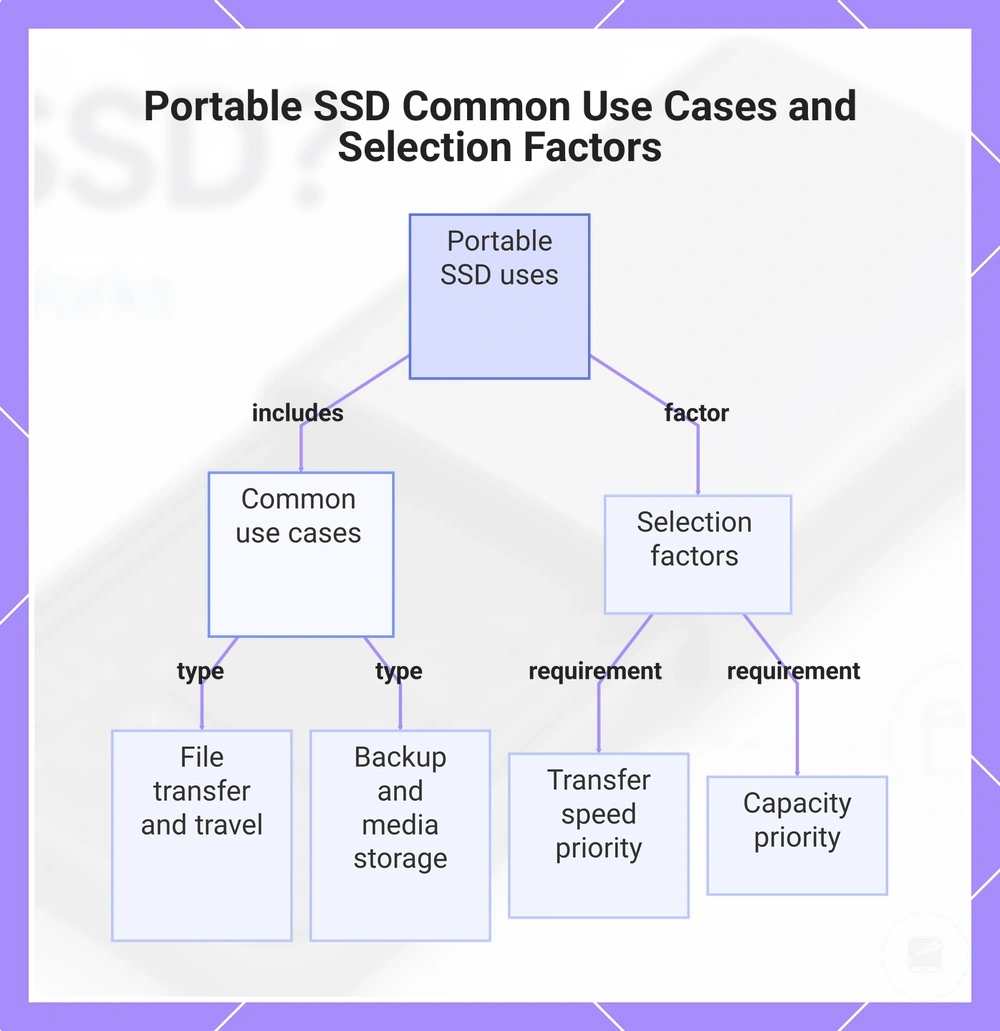
The most suitable use depends on the required capacity, file size, device compatibility, and transfer frequency. Frequent movement of large files places greater value on transfer speed, while backup and long-term media storage often place greater emphasis on available capacity.
The most suitable use depends on the required capacity, file size, device compatibility, and transfer frequency.
This chart shows the common use cases for portable SSDs and the key factors that determine the most suitable use based on capacity, speed, and compatibility.
Advantages and Limits of Portable SSDs
Portable SSDs provide both advantages and limits, so their overall value depends on the intended use case rather than a single feature. The main trade-off involves speed, portability, durability, capacity, cost, compatibility, and file size, making the most suitable choice dependent on how the storage will be used.
| Attribute | Possible advantage | Practical limit |
|---|---|---|
| Speed | Typically transfers large files faster than many external hard drives when the host device and interface support higher transfer speeds. | Performance is limited by the connected device, interface, and workload. |
| Portability | Compact size makes the drive easy to carry between locations and devices. | A compatible cable and supported connection are required. |
| Durability | No moving parts generally improve shock tolerance during normal handling. | Physical damage, water exposure, or other unsuitable conditions can still damage the drive. |
| Capacity | Available in multiple capacity options for different storage needs. | Higher capacities usually come with a higher purchase cost. |
| Cost | The added speed and portability can justify the cost for frequent file transfers. | Lower-cost storage options may provide more capacity for the same budget. |
| Compatibility | Many portable SSDs work with supported computers, tablets, game systems, and other compatible devices. | The drive must match the required connector, operating system support, and storage format. |
The advantages of a portable SSD include fast file transfer, compact portability, and improved durability because flash storage has no moving parts. These benefits are most useful when users frequently move large files, carry storage between devices, or need quick access to external data. For example, moving a large video project between a desktop computer and a laptop is often faster and more convenient with a portable SSD than with slower external storage.
The overall trade-off depends on capacity requirements, compatibility, budget, file size, and the intended use case.
The limits of a portable SSD include higher cost per unit of capacity than many external hard drives and possible compatibility restrictions with older hardware or unsupported file systems. Users with very large storage requirements or infrequent file transfers may find a higher-capacity storage option more practical. The overall trade-off depends on capacity requirements, compatibility, budget, file size, and the intended use case.
Speed, Durability, and Portability Advantages
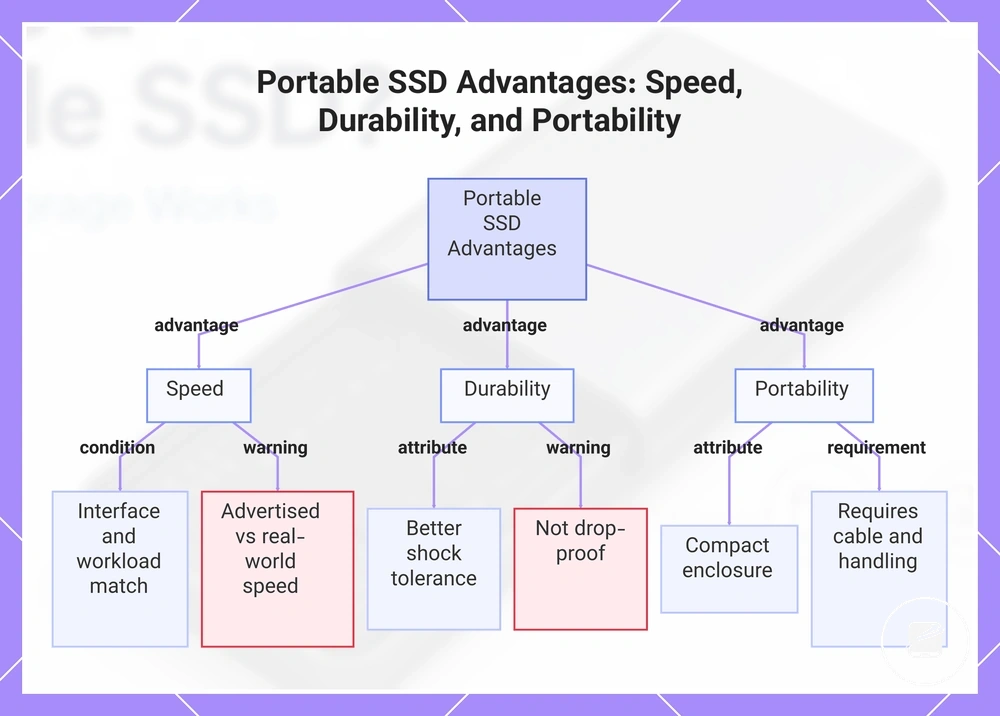
Portable SSDs combine speed, durability, and portability through solid-state storage with no moving parts inside a compact enclosure. This design supports faster file transfers on compatible interfaces, better shock tolerance than spinning drives during normal handling, and easier carrying between devices, linking these advantages to solid-state storage and compact design.
- Speed: Faster transfer is possible when the portable SSD, cable, and port all support the same interface and the workload matches the drive's capabilities. Advertised speed and real-world speed can differ because the drive, cable, port, file size, and workload all influence transfer performance; for more detail, see portable SSD performance.
- Durability: Solid-state storage contains no moving parts, so a portable SSD generally provides better shock tolerance than a spinning hard drive during ordinary transport. This advantage does not mean the drive is drop-proof or resistant to every environmental condition.
- Portability: A compact enclosure makes the drive easier to carry between compatible devices and locations. Carrying convenience still requires a suitable cable, a supported port, and appropriate handling to help protect the drive.
This chart shows the three main advantages of portable SSDs—speed, durability, and portability—along with key conditions and limitations for each.
Cost, Capacity, Lifespan, and Care Limits
Portable SSDs have limits that are best understood as trade-offs rather than failures. Cost, capacity, lifespan, and care become more important under specific storage conditions, so the most suitable storage choice depends on the intended workload and storage need.
- Cost and capacity: Portable SSDs often have a higher price per capacity than many external hard drives. This trade-off matters when storing very large archives or long-term file collections because achieving the same capacity usually costs more.
- Lifespan: Flash memory has finite write endurance, so frequent and sustained write workloads contribute more wear than occasional file transfers. For typical personal or office use, write endurance is generally a long-term consideration rather than an immediate limitation.
- Cable dependence and heat: A compatible cable and stable connection are required for reliable operation, and sustained transfers can cause the enclosure to become warm. Higher operating temperature during heavy workloads may reduce transfer performance until the drive cools.
- Care and long-term storage: Safe handling helps reduce the risk of physical damage during travel, while long backup retention or very large archives may make other storage options a more practical trade-off depending on retention goals and required capacity.
When a Portable SSD Is Worth Considering
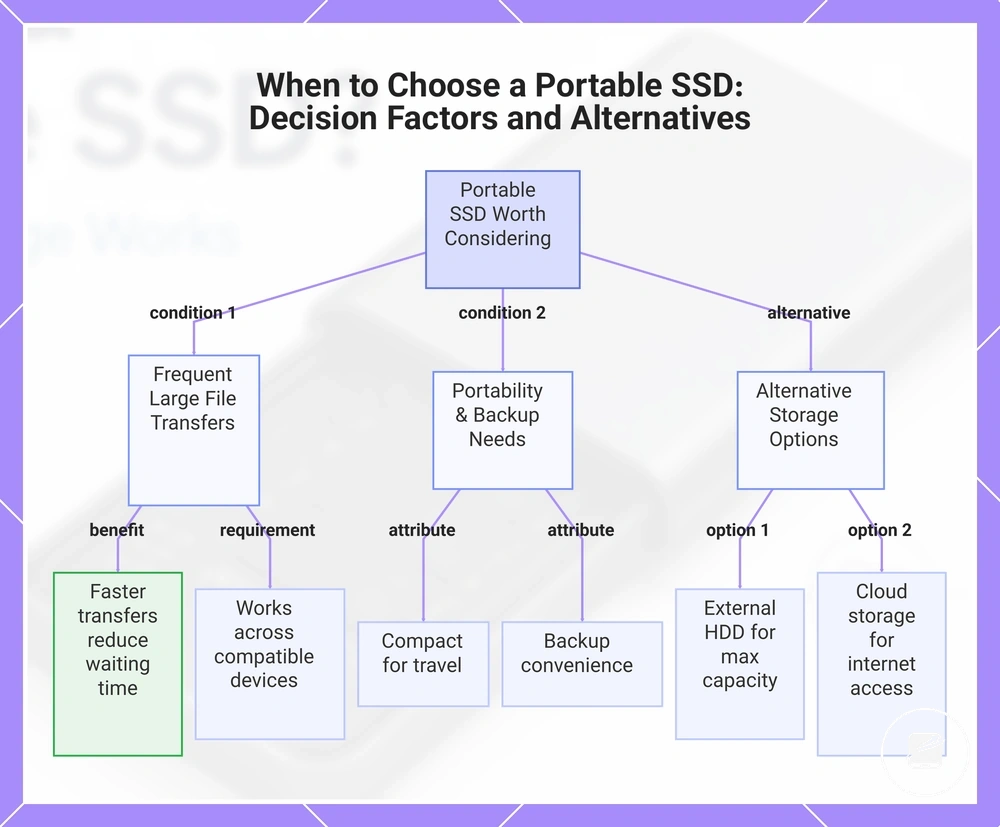
A portable SSD is worth considering when your storage situation benefits from faster file transfers, portability, and reliable external storage rather than the lowest cost per capacity. Its suitability depends on your speed need, device compatibility, capacity requirements, budget, and how often you move large files, so the right choice depends on your storage need and constraints.
Device compatibility, available capacity, and budget should all support the intended workload before choosing this type of storage.
A portable SSD is often a practical fit when you transfer large files frequently, work across multiple compatible devices, or need portable storage during travel. Quiet operation and backup convenience also make it suitable when you want external files readily available without relying on a single computer. Device compatibility, available capacity, and budget should all support the intended workload before choosing this type of storage.
Quiet operation and backup convenience also make it suitable when you want external files readily available without relying on a single computer.
An external hard drive may be enough when maximum capacity is more important than transfer speed, while cloud storage may be enough if reliable internet access meets your file access needs. An internal SSD may suit users who only need additional storage inside one computer, and a smaller flash drive can be sufficient for occasional transfers of smaller files. After comparing these decision factors, exploring different portable SSDs can help place each storage option in the broader context of your storage requirements.
- If you move large files between compatible devices frequently, a portable SSD is likely to be a practical fit because faster transfers can reduce waiting time.
- If portability matters for travel or mobile work, a compact drive with the required cable and compatible device support is often a suitable choice.
- If backup convenience and quick external file access are priorities, a portable SSD is worth considering because it keeps important data easy to carry.
- If your budget is limited and you need a very large archive, an external hard drive is often the more practical trade-off because it usually provides more capacity for the same budget.
- If internet-based access across multiple locations is your main requirement, cloud storage may provide enough flexibility without carrying a physical drive.
- If you only need occasional transfers of smaller files, a smaller flash drive may be enough instead of a portable SSD.
This chart shows the main conditions that make a portable SSD worth considering and compares it to alternative storage options.
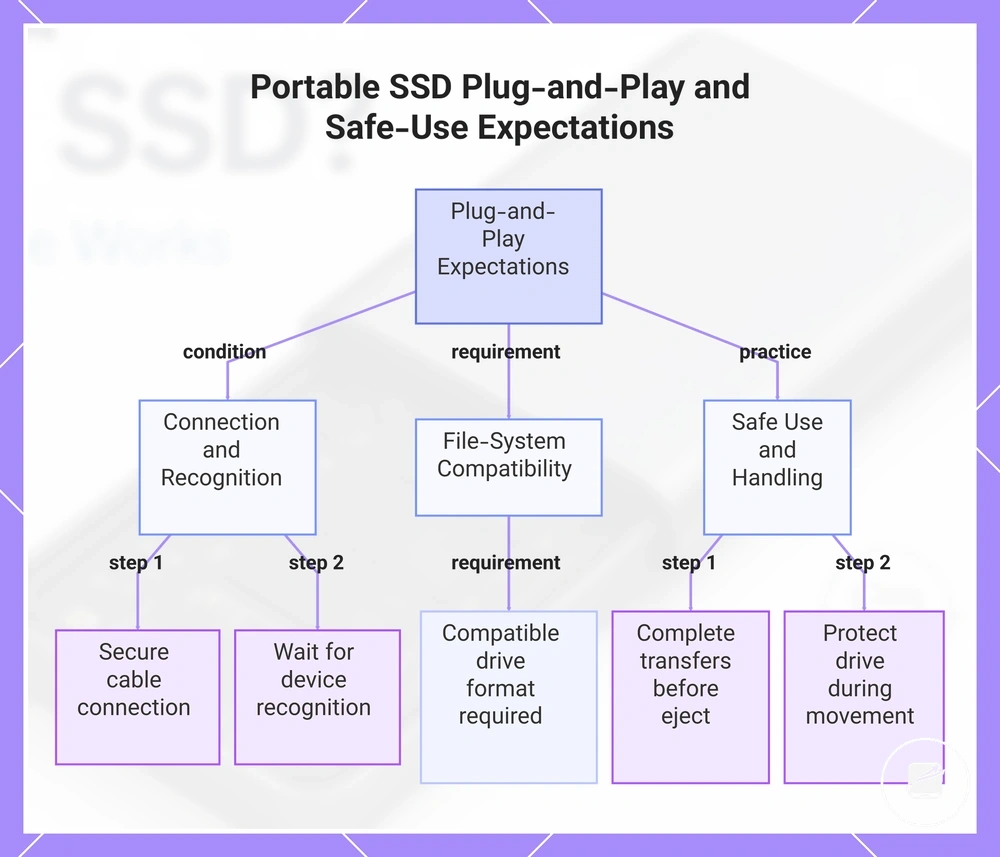
Basic Plug-and-Play and Safe-Use Expectations
Portable SSDs are commonly designed for plug-and-play use, but successful first use requires device recognition, correct cable fit, and a compatible drive format. Basic use is often straightforward once the host device recognizes the drive, although the experience is influenced by the operating system, available port, and file-system compatibility. Plug-and-play expectations should therefore include recognition, cable fit, and formatting conditions rather than guaranteed detection.
Protecting the portable SSD during movement also helps reduce the risk of accidental physical damage.
Safe use means waiting for device recognition before you transfer files, maintaining a stable connection during file transfers, and ejecting the drive safely before disconnecting it. Protecting the portable SSD during movement also helps reduce the risk of accidental physical damage. Setup can be simple for many users, but the first-use experience varies with the operating system, port, and drive format instead of following one identical process.
Setup can be simple for many users, but the first-use experience varies with the operating system, port, and drive format instead of following one identical process.
For basic first-use expectations, keep these points in mind:
- Connection: Connect the cable securely so the host device can establish device recognition through a compatible port.
- Recognition: Wait until the drive is recognized before attempting to transfer files.
- File-system compatibility: A compatible drive format is required for normal file access on the operating system being used.
- Safe use: Complete file transfers before you eject safely to help avoid interrupting active data operations.
- Handling: Protect the drive during movement because careful handling supports reliable everyday use.
This chart shows the key conditions and practices for successful plug-and-play use of a portable SSD, including connection, file-system compatibility, and safe handling.