
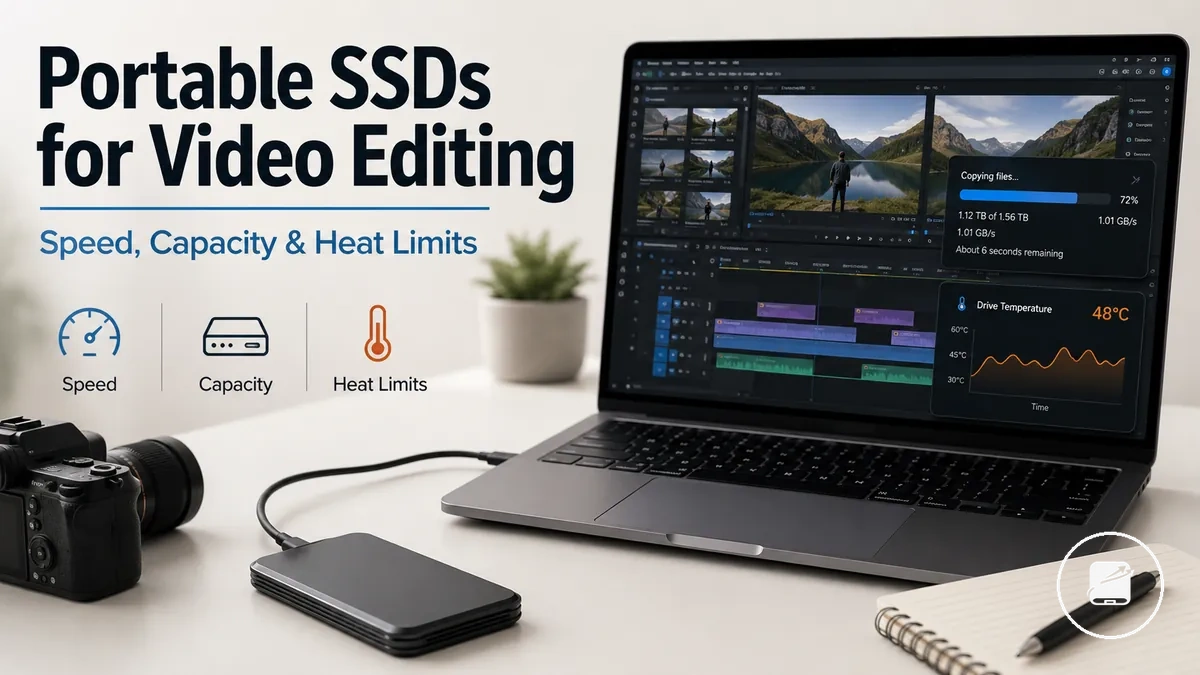
Portable SSDs for Video Editing Workflow Fit
Portable SSDs for video editing provide removable editing storage for active footage, project files, previews, and exports. Their workflow fit is determined by whether the drive can support the editing workload and footage type for the expected session, making those conditions the basis of the buying decision.
Portable SSDs for video editing provide removable editing storage for active footage, project files, previews, and exports.
This decision-support guide is for editors working with high-resolution footage, multi-camera timelines, mobile workstations, or projects that move between editing systems. A portable SSD is a suitable working media drive when its sustained performance, usable capacity, interface, and thermal design match the codec, timeline complexity, host device, cable, enclosure, and session length.
Port limits cap connection throughput, so an external SSD cannot transfer data faster than the supported host port and cable path.
Speed affects how quickly editing software reads media and writes previews or exports, while capacity determines how much active footage and project data can remain on the drive. Port limits cap connection throughput, so an external SSD cannot transfer data faster than the supported host port and cable path. Heat behavior can also reduce sustained performance during long transfers or editing sessions if the drive reaches its thermal limit. For example, a drive that handles short file copies well may deliver lower sustained performance during a long export, so workflow criteria are more useful than headline claims.
Heat behavior can also reduce sustained performance during long transfers or editing sessions if the drive reaches its thermal limit.
Evaluate a portable SSD for video editing by matching sustained performance to the footage type, capacity to the active project size, and the connection interface to the host device and cable. Then assess whether its heat behavior remains suitable for the expected editing workload, which provides the practical frame for understanding how portable editing storage supports the wider workflow.
Table of Contents
How Portable SSDs Support Video Editing Workflows
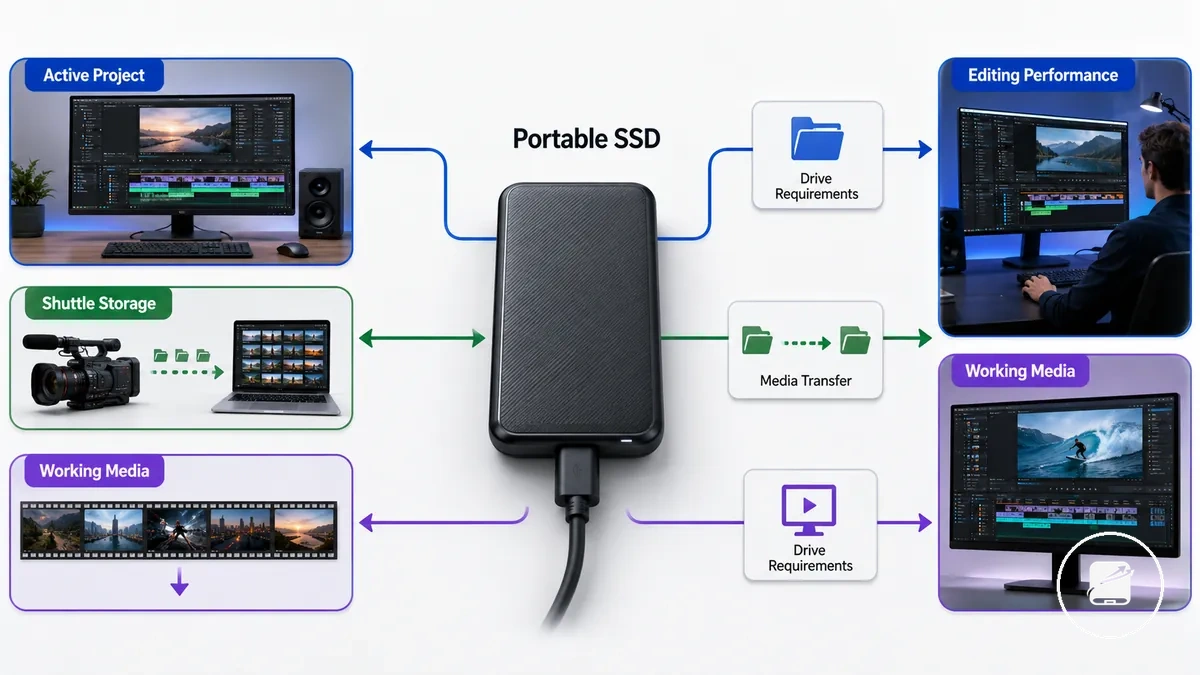
Portable SSDs support video editing workflows by serving different storage roles throughout an editing project rather than performing a single function. The required editing performance changes with the workflow role because continuous timeline access places greater demands on storage than media transfer alone. This role-based approach explains why the same portable SSD can suit different editing tasks under different conditions.
| Workflow role | What the drive must handle |
|---|---|
| Active project storage | Continuous reading and writing of project files and media during editing, with sustained performance suitable for the footage type and timeline workload. |
| Shuttle storage | Reliable media transfer between cameras, editors, or workstations, where successful file movement is the primary requirement. |
| Working media storage | Repeated access to source footage during editing, with drive requirements determined by codec demands, timeline complexity, host connection, and session length. |
Portable SSDs are external storage devices that can act as active project storage, shuttle storage, or working media storage depending on the editing workflow. Active project storage keeps files available for ongoing edits, shuttle storage focuses on moving media between locations or systems, and working media storage supplies footage directly to the editing application. These workflow roles clarify why editing requirements differ even when the same drive is used.
These workflow roles clarify why editing requirements differ even when the same drive is used.
For example, a portable SSD used only to transfer footage between two workstations mainly needs dependable media transfer, while the same drive used for active timeline editing must maintain sustained access to project media throughout the session. As the workflow role changes from transfer to continuous editing, the drive requirements become more demanding, and the editing outcome remains conditional on the codec, host device, cable, workload, and session conditions.
Editing Directly from the Drive Versus Storing Media
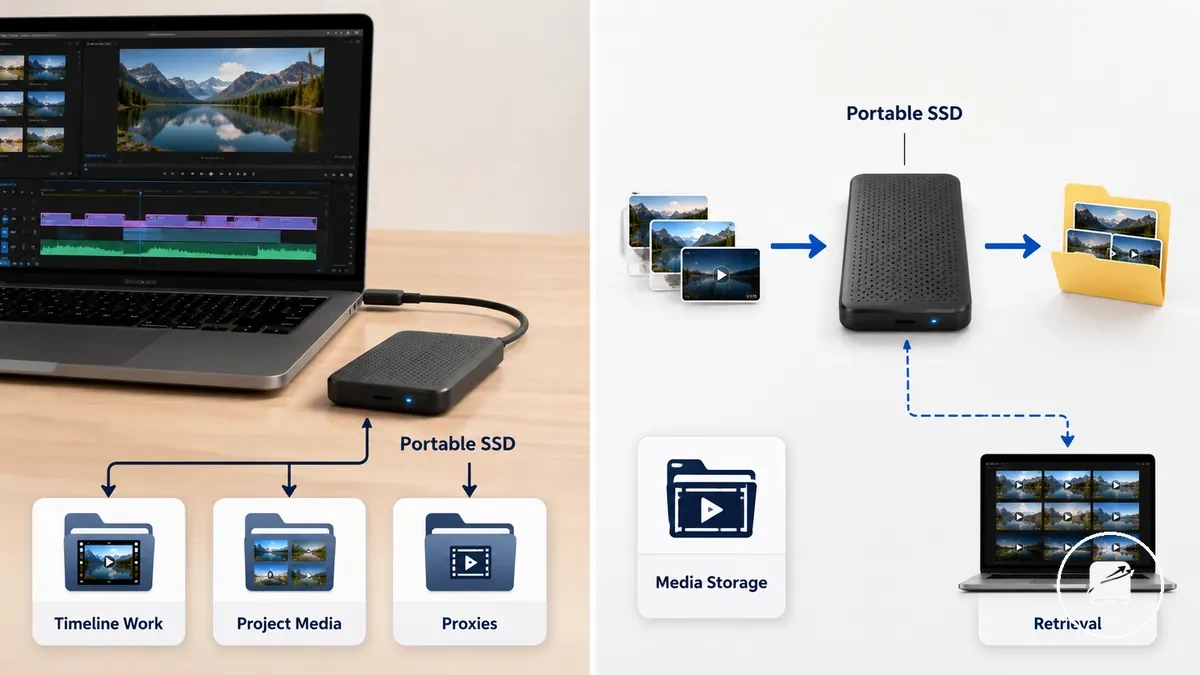
Editing directly from a portable SSD means the drive supplies project media for active timeline work, while storing media means it mainly keeps source footage available for transfer or later retrieval. Timeline work requires continuous read access for playback, whereas passive storage focuses on preserving files until they are needed. The comparison below clarifies how these two uses change workflow demands.
| Direct editing from the drive | Storing media on the drive |
|---|---|
| Continuous timeline access to project media for playback | Source footage is retained for transfer or later retrieval |
| Proxies and cache location support active timeline responsiveness | Proxies and cache location are not central because the drive is used as media storage |
| Performance sensitivity increases during sustained timeline work | Performance mainly affects copy and retrieval operations |
| Best suited for active editing sessions | Best suited for passive storage between editing sessions |
For example, an editor may keep project media, proxies, and the cache location on the same portable SSD while cutting footage, so the drive must maintain continuous timeline access throughout the editing session. After the project is finished, the same drive can store source footage for delivery to another workstation, where file availability is more important than playback responsiveness. This difference explains why editing directly places greater demands on the drive than storing media, although the editing experience remains conditional on the host device, connection, workload, file type, and editing software.
When External Storage Becomes the Editing Bottleneck
External storage becomes an editing bottleneck when it cannot deliver project data fast enough to maintain timeline responsiveness during active editing. Symptoms such as interrupted playback, delayed timeline response, or repeated pauses indicate that the storage path rather than the editing application is likely limiting the workflow. The checklist below organizes these symptoms by their most common bottleneck conditions.
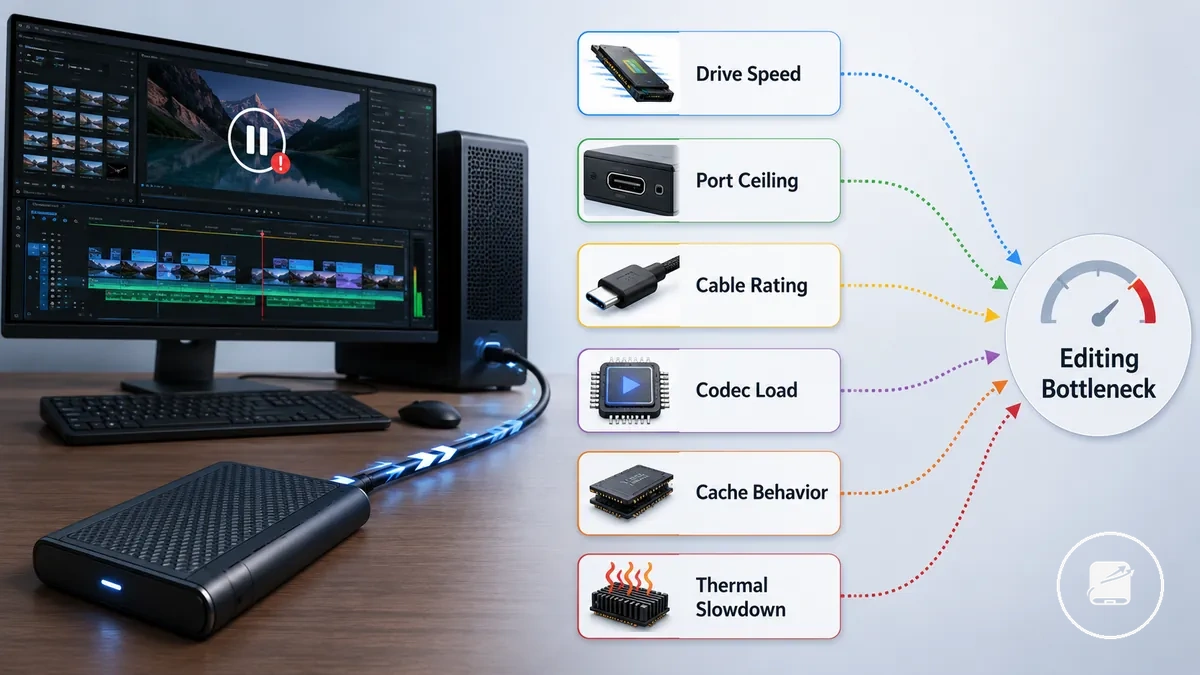
An editing bottleneck is usually linked to one of several condition groups rather than a single cause. Drive speed, the port ceiling, cable rating, codec load, cache behavior, and thermal slowdown each influence responsiveness because they affect how consistently external storage supplies project media during sustained timeline work. For example, smooth playback with proxy files but stuttering with high-bitrate source footage suggests that codec load is creating the bottleneck rather than ordinary file access. These conditions identify likely workflow limits instead of confirming that the storage device is faulty.
An editing bottleneck is usually linked to one of several condition groups rather than a single cause.
The checklist below helps distinguish editing bottlenecks from broader transfer-related slowdowns before moving to more general diagnosis.
- Drive speed: If timeline playback frequently pauses during active editing, check whether the drive can sustain the required editing workload.
- Port ceiling or cable rating: If responsiveness falls even though the drive is capable, verify that the connection supports the intended transfer speed.
- Codec load: If compressed or high-resolution footage stutters while lighter media plays smoothly, check whether the codec is placing greater demand on external storage.
- Cache behavior: If timeline response becomes inconsistent during longer sessions, review whether cache activity on the same drive is reducing responsiveness.
- Thermal slowdown: If performance drops only after sustained workload, check whether heat is causing the portable SSD to reduce performance temporarily.
If these symptoms appear primarily during timeline editing instead of ordinary file copying, they indicate an editing bottleneck rather than a general transfer issue. For broader file-copy diagnosis, see slow transfer troubleshooting.
Speed Requirements for Smooth Video Editing
Speed requirements for smooth video editing are determined by sustained usable speed, workload, and connection conditions rather than by peak advertised transfer rates alone. A portable SSD is fast enough when its read speed, sustained write speed, and interface work together to maintain playback stability, ingest speed, and export handling throughout the editing session. The criteria below help evaluate workload fit instead of chasing maximum specifications.
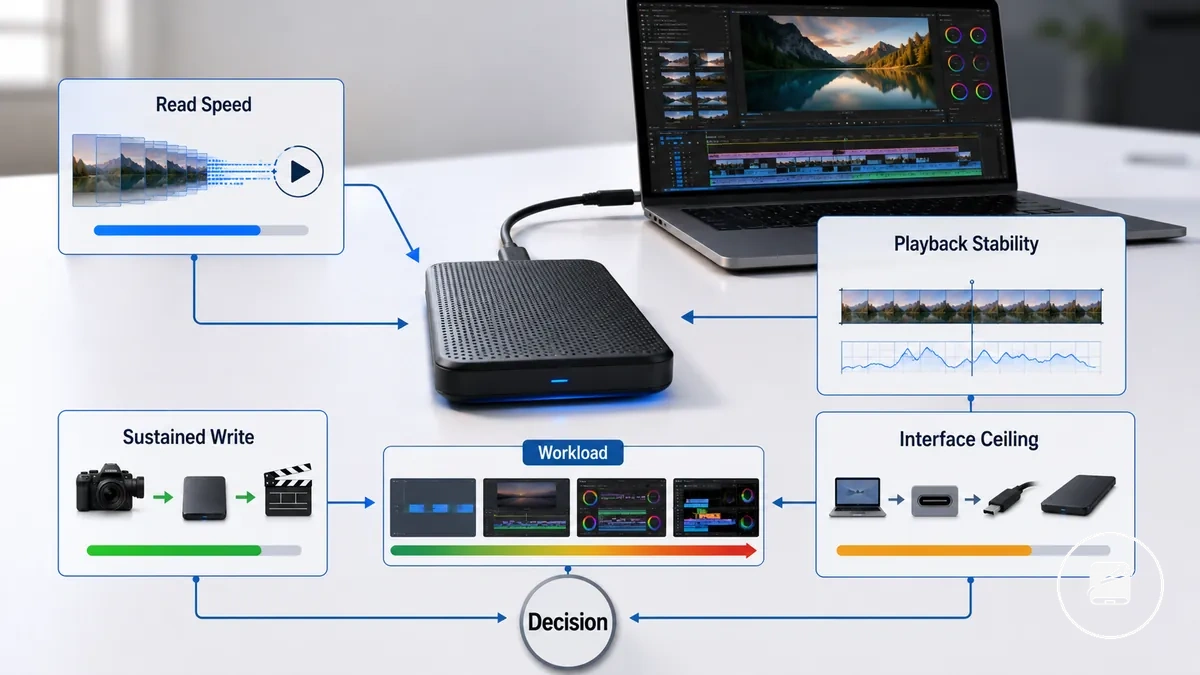
Read speed determines how consistently a portable SSD supplies media for timeline playback, while sustained write speed indicates how well it handles continuous ingest, cache activity, and export operations over the workload duration. Advertised peak transfer rates describe short ideal-condition results, whereas sustained performance is the relevant category for longer editing sessions. The interface ceiling created by the host device, port, and cable can also limit usable transfer performance below the drive's advertised capability. The table compares the main speed factor and decision cue for each workload class.
| Editing workload | Speed factor to check | Why it matters | Safe decision cue |
|---|---|---|---|
| Light editing | Read speed | Consistent media delivery supports playback stability on a simple timeline. | The drive is a suitable candidate when the intended media plays responsively through a representative editing session. |
| 4K single-stream work | Read speed and sustained write speed | Read performance supports timeline playback, while sustained write performance affects ingest speed, cache activity, and export handling. | Prioritise sustained usable speed under the intended codec and session length rather than peak advertised speed. |
| Multi-stream/heavier projects | Read speed, sustained write speed, and interface ceiling | Concurrent media streams increase demand across the drive, cable, port, and host device. | Choose only when the complete storage path can sustain the planned timeline workload. |
| Long transfers | Sustained write speed and workload duration | Extended ingest or export tasks test whether transfer performance remains consistent over time. | Use sustained transfer behaviour during a representative long task as the decision signal. |
For example, a portable SSD that supports responsive light editing may be less suitable for a long multi-stream project when concurrent media access or the interface ceiling limits sustained performance. For criteria beyond headline specifications, real-world SSD speed provides a more useful comparison of sustained behaviour and connection limits. Decision confidence is highest when the drive is assessed with the intended codec, host device, cable, workload duration, and editing pattern rather than speed alone.
Read Speed for Playback, Scrubbing, and Multi-Stream Timelines
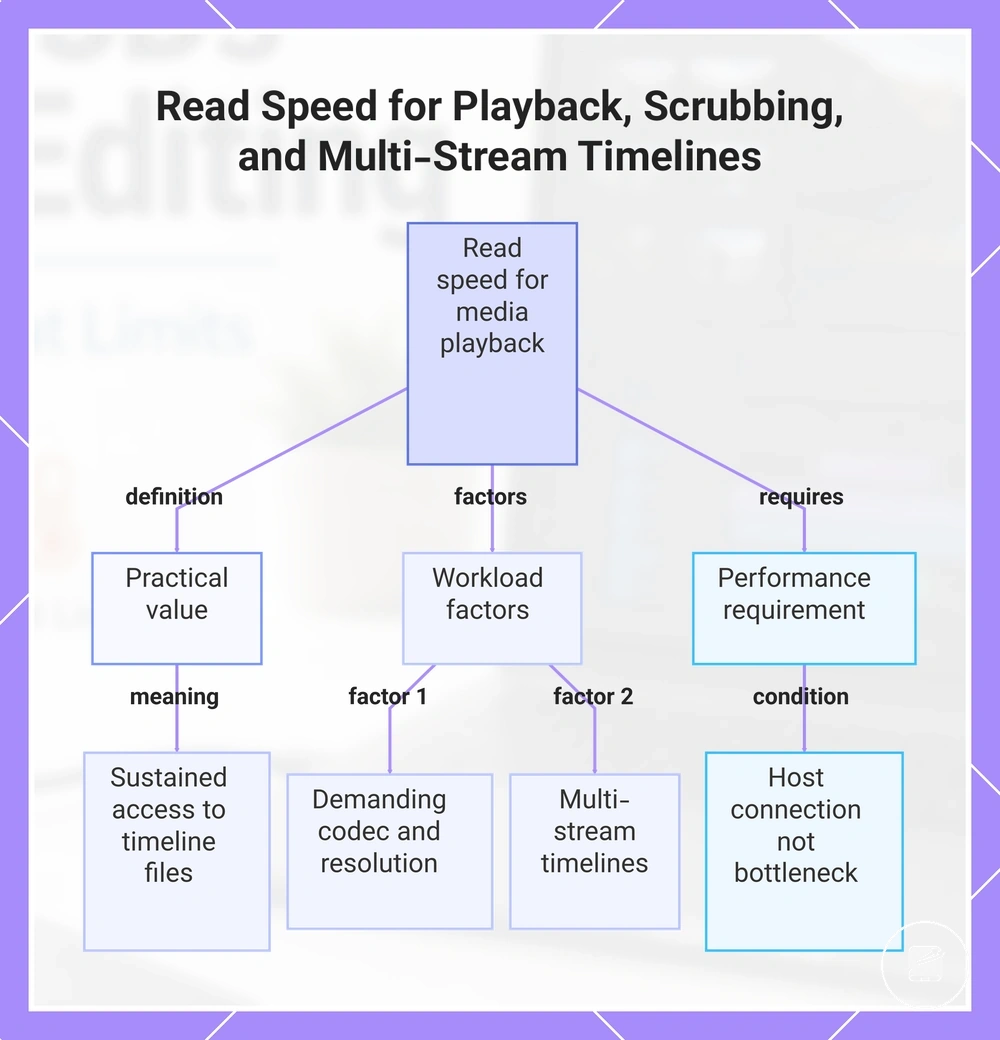
Read speed controls how quickly a portable SSD supplies media for playback and scrubbing, so its practical value is sustained access to the files required by the active timeline. The workload becomes heavier as the timeline codec demands more data, the stream count increases, or the project resolution rises. Under those conditions, insufficient read performance reduces responsiveness because the drive cannot feed the requested media as consistently.
The workload becomes heavier as the timeline codec demands more data, the stream count increases, or the project resolution rises.
A lighter timeline with one media stream and a less demanding codec places a lower read-side load on the drive than multi-stream timelines that access several higher-resolution files at once. For example, adding simultaneous video angles increases the amount of media the SSD must retrieve during playback and rapid scrubbing. The expected responsiveness is achievable only when the host connection, including the port and cable path, can carry the drive's available read performance without becoming the limiting condition.
For example, adding simultaneous video angles increases the amount of media the SSD must retrieve during playback and rapid scrubbing.
This chart explains the practical value of read speed, the workload factors that increase demand, and the host connection requirement for achieving responsiveness.
Sustained Write Speed for Ingesting Footage and Exports
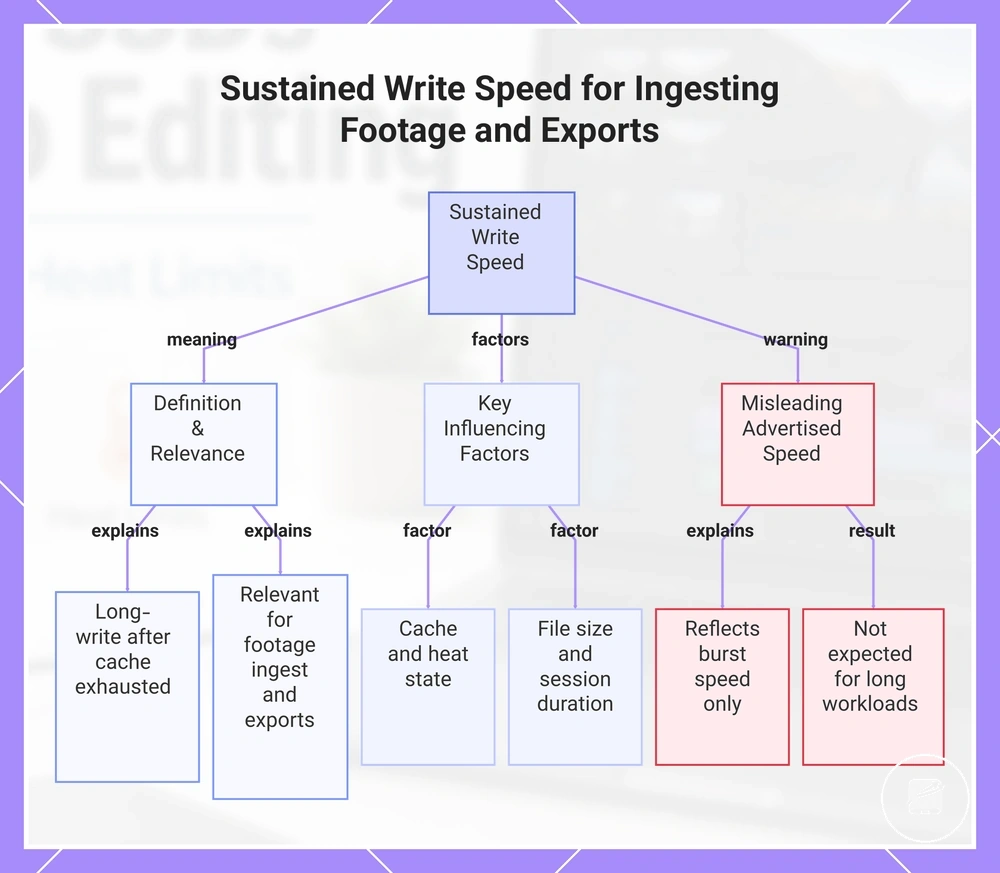
Sustained write speed determines how consistently a portable SSD handles ingesting footage, cache writing, and export movement during extended editing sessions. Unlike burst speed, which reflects short periods of peak writing, sustained write speed represents long-write performance after the available cache is exhausted. This makes sustained write behavior the more relevant attribute for long footage ingest and lengthy exports.
This makes sustained write behavior the more relevant attribute for long footage ingest and lengthy exports.
Advertised write speed reflects burst speed rather than sustained transfers, so it should not be treated as the expected performance for long editing workloads. For example, copying a few short clips can finish within the cache, while ingesting large files or exporting a longer project is more likely to reveal the drive's sustained write speed. The consistency of long-write performance remains conditional on controller behavior, available cache, heat state, file size, and session duration.
- Large file size extends sustained transfers beyond short burst activity.
- Longer session duration increases the importance of stable controller behavior.
- Available cache determines how long burst speed can be maintained before sustained write performance becomes the limiting factor.
- Higher heat state can reduce sustained transfer consistency during extended workloads.
- Repeated ingesting footage, cache writing, and exports place greater demand on sustained write speed than isolated short transfers.
This chart explains what sustained write speed is, why it matters for long editing sessions, the factors that affect it, and why advertised speeds can be misleading.
Capacity Planning for 4K Projects and Working Media
Capacity planning for 4K projects starts by estimating the combined storage required for footage volume, working media, and free-space headroom rather than selecting one fixed drive size. Required capacity increases as the codec produces larger media files, project length grows, and more working files accumulate. The planning logic is to size the drive for the source media, active editing files, and remaining operational space together.
The planning logic is to size the drive for the source media, active editing files, and remaining operational space together.
Working media includes the original footage plus cache files, proxies, preview media, and export versions created during editing. Footage volume establishes the baseline storage requirement, while codec and project length determine whether that baseline remains relatively low or rises substantially. Cache files and proxies add temporary or persistent capacity pressure, and export versions increase the total further when multiple revisions are retained. Free-space headroom is the reserved unused portion of the SSD that remains available for new media and temporary project files.
Free-space headroom is the reserved unused portion of the SSD that remains available for new media and temporary project files.
For example, a short project using an efficient codec and few export versions creates lower capacity pressure than a longer 4K project that retains proxies, cache files, and repeated exports. Broader video storage capacity guidance can support the final drive-size decision, but the editing-specific requirement should still be based on the actual footage and working-file scenario rather than a universal rule.
| Project condition | Capacity pressure | What to include | Planning caution |
|---|---|---|---|
| Short projects | Lower when footage volume and project length remain limited | Source footage, active working media, cache files, and required export versions | Reserve free-space headroom for temporary files and later revisions. |
| Longer 4K projects | Higher as footage volume and project length increase | All source media, project files, cache files, proxies, and expected exports | A less efficient codec or longer recording duration increases media capacity pressure. |
| Proxy and cache-heavy work | Higher because working media exists alongside the original footage | Source footage, proxies, cache files, preview media, and export versions | Do not estimate capacity from source footage alone. |
| Repeated project reuse | Moderate to higher as revisions and retained files accumulate | Current media, reused assets, revised cache files, proxies, and multiple exports | Recalculate available headroom before each new editing cycle. |
Footage, Cache Files, Proxies, and Free Space Headroom
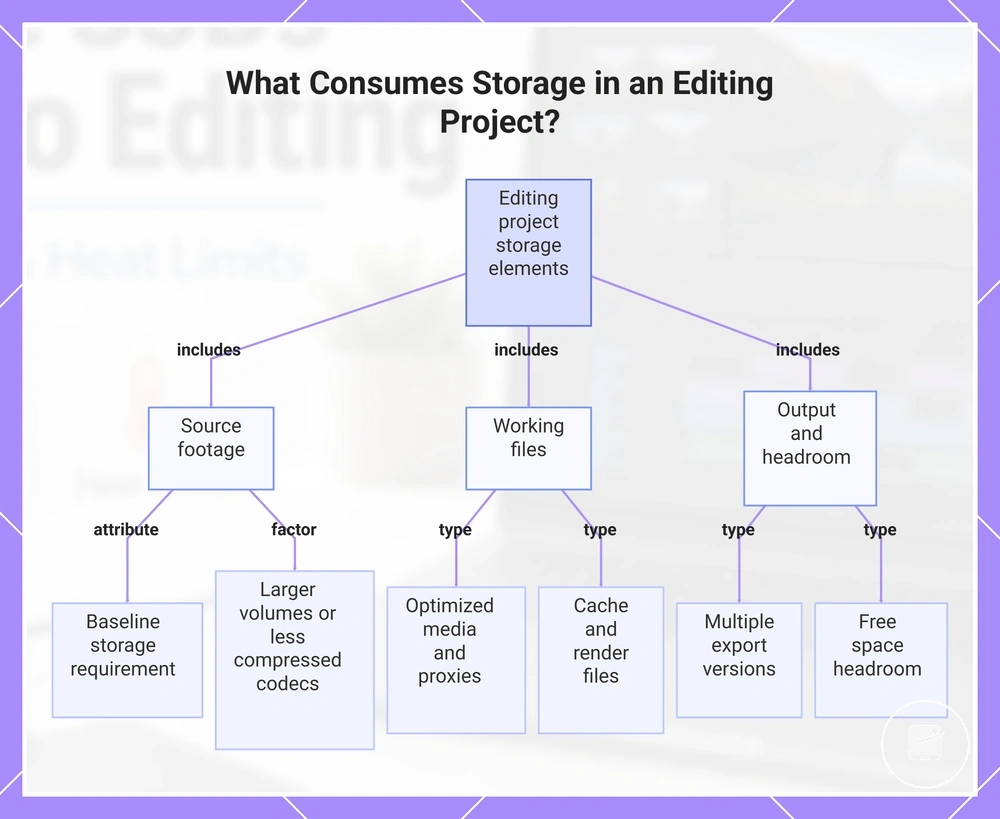
Footage, cache files, proxies, optimized media, render files, exports, and free space headroom are the local storage elements that consume space during an editing project. As introduced in the parent capacity-planning section, each working-media component has its own storage impact, so total capacity pressure comes from the complete project rather than from source footage alone.
- Source footage: Original media establishes the baseline storage requirement, and larger footage volumes or less compressed codecs increase the initial capacity demand.
- Optimized media and proxies: These working files are created to improve editing responsiveness and occupy additional storage alongside the original footage, increasing project size.
- Cache files: Editing software generates cache files for playback, previews, and processed effects, adding temporary or persistent storage impact throughout the editing session.
- Render files: Render files support smoother timeline playback and consume additional capacity as edited sequences and effects are processed.
- Exports: Each exported version creates a separate output file, so retaining multiple revisions increases total project storage.
- Free space headroom: Reserved unused space allows new working files and temporary project data to be created without immediately exhausting available storage, helping maintain project stability.
Planning capacity from source footage alone underestimates storage needs because optimized media, proxies, cache files, render files, and exports continue to grow during editing. For example, even when no new footage is imported, additional project files accumulate as edits, previews, and new export versions are created. Maintaining free space headroom helps accommodate this ongoing storage growth without relying on fixed capacity calculations.
Maintaining free space headroom helps accommodate this ongoing storage growth without relying on fixed capacity calculations.
This chart identifies the storage components in an editing project and why planning from source footage alone underestimates total capacity needs.
Choosing Between 1TB, 2TB, and 4TB Project Drives
Choosing between 1TB, 2TB, and 4TB project drives should follow editing workload rather than a single preferred capacity tier. Project size, reuse pattern, cache needs, travel frequency, and price sensitivity determine whether a smaller drive remains practical or a larger drive reduces workflow friction. The right tier is therefore the capacity choice that fits current project pressure while leaving usable free space for active work.
| Capacity tier | Best-fit editing use | Trade-off | When to step up |
|---|---|---|---|
| 1TB | Smaller projects, limited cache needs, infrequent reuse, and travel where lower cost and lighter storage demands matter | Greater price sensitivity is avoided, but limited free space can create more workflow friction as active projects grow | Step up when repeated project reuse, larger media sets, or expanding cache needs begin reducing working space |
| 2TB | Regular editing workloads with moderate project size, recurring reuse, and enough capacity for active files and cache growth | Higher cost than 1TB, balanced against more free space and fewer capacity interruptions | Step up when multiple active projects, frequent reuse, or sustained cache needs make free-space management a recurring task |
| 4TB | Larger projects, frequent reuse, substantial cache needs, and travel workflows that benefit from keeping more active media on one drive | Highest price sensitivity among the three tiers, but the greatest capacity for reducing file movement and storage-related workflow friction | Choose this tier when consolidating larger active workloads is more valuable than minimising the initial drive cost |
For example, an editor handling short, self-contained projects with limited reuse may find 1TB adequate, while recurring projects with growing caches place more pressure on a 1TB drive and make 2TB more practical. A 4TB drive becomes a stronger fit when larger projects remain active together or frequent travel makes repeated file movement inconvenient. The best value remains conditional: a higher capacity tier reduces storage pressure only when the workload is large enough to use the extra space.
Port, Cable, and Interface Limits for Editing Speed
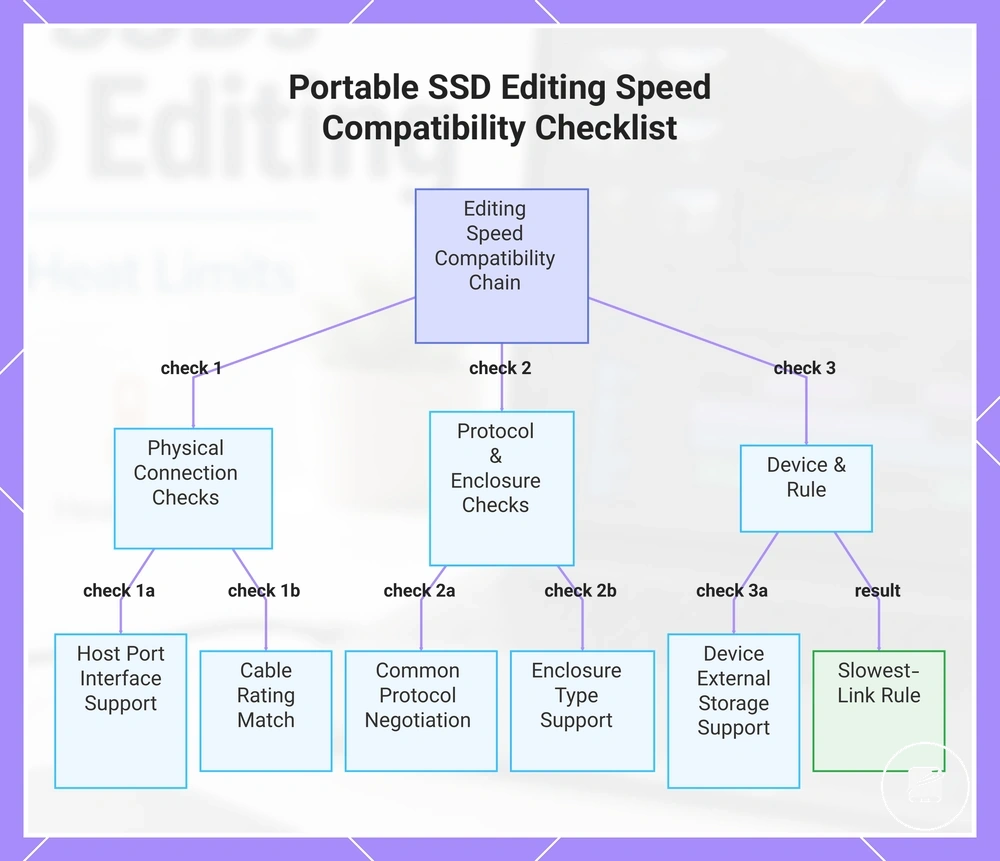
A portable SSD reaches its expected editing speed only when the entire connection chain is compatible. The host port, cable, interface, protocol, enclosure type, and device support work together, and the slowest compatible link always sets the maximum transfer performance available during editing. This compatibility chain—not the SSD alone—determines practical editing speed.
This compatibility chain—not the SSD alone—determines practical editing speed.
Use the checklist below to verify that every component supports the intended connection path before judging storage performance. Each item confirms a separate compatibility condition that can limit editing speed even when the portable SSD itself is capable of higher throughput.
- Host port: Confirm the host port supports the required data interface instead of relying on the connector shape alone.
- Cable rating: Verify the cable rating matches the intended data protocol rather than supporting charging or a lower-speed data mode only.
- Protocol: Ensure the portable SSD, host port, and cable negotiate a common protocol; otherwise, the connection falls back to the highest mutually supported mode.
- Enclosure type: Check that the enclosure type supports the required external interface because its controller can become the performance condition that limits throughput.
- Device support: Confirm the computer, tablet, or phone supports external storage through the selected interface and protocol.
- Slowest-link rule: Treat the lowest-capability compatible component in the connection chain as the maximum editing speed the system can deliver.
The port provides the physical connection, the cable carries the supported data mode, the protocol defines communication between devices, and the enclosure type bridges the internal SSD to the external interface. Device support determines whether that complete combination is recognised and used correctly. Common mismatches include pairing a high-performance portable SSD with a lower-rated cable or connecting it through a slower host port, causing the faster drive to operate at the lower interface limit. For example, replacing only the SSD does not improve editing speed if the existing cable remains the slowest compatible link. Review port compatibility when comparing connection requirements so every component in the chain supports the intended performance level.
Device support determines whether that complete combination is recognised and used correctly.
This chart shows the key compatibility checks and the slowest-link rule that determine the maximum editing speed of a portable SSD.
USB-C, USB4, Thunderbolt, and NVMe Performance Conditions
USB-C identifies a connector type, while USB4 and Thunderbolt identify interface protocols, and NVMe identifies drive technology rather than the external connector. Because these labels describe different parts of the storage chain, USB-C does not automatically provide USB4 or Thunderbolt-level performance. Editing speed is determined by compatible performance conditions across the complete connection path.
Editing speed is determined by compatible performance conditions across the complete connection path.
The comparison below shows what each label describes and which additional compatibility conditions must still be satisfied before higher editing performance is available.
| Label | What it describes | What still must match |
|---|---|---|
| USB-C | Connector type | Protocol support, host controller, cable, and enclosure design |
| USB4 | Interface protocol | Compatible host controller, cable, enclosure design, and device support |
| Thunderbolt | High-performance interface protocol | Thunderbolt-compatible host controller, cable, enclosure design, and device support |
| NVMe | Drive technology | Enclosure design plus an external interface and host controller capable of exposing the drive's performance |
USB-C, USB4, Thunderbolt, and NVMe work together because each label describes a different compatibility layer instead of the same feature. A portable SSD with an NVMe drive can still operate below its potential when the enclosure design, host controller, or protocol support provides a lower-performance connection. For example, a USB-C enclosure without USB4 or Thunderbolt protocol support does not deliver USB4 or Thunderbolt-class editing performance simply because it uses the same connector shape. Evaluate all four labels together when estimating editing speed, because the achievable result remains conditional on the complete compatible configuration.
Cable and Device Limits That Reduce Real Transfer Speed
Cable and device limits affect compatibility when every part of the connection supports the required data path for editing workloads. A lower-rated cable, an older port generation, or a host device limitation can reduce real transfer speed even when the portable SSD itself is capable of higher performance. Verify the following local conditions before treating slower performance as a drive problem.
- Cable rating: Check that the cable rating supports the intended data connection; a lower-rated cable can become the connection bottleneck and reduce transfer speed.
- Port generation: Confirm the host port generation matches the SSD and enclosure capabilities; an older port generation limits the maximum available bandwidth.
- Hub use: Verify whether the drive is connected through a hub; if the hub supports a lower-speed interface than the drive, it can restrict real transfer speed.
- Power delivery: Ensure the enclosure receives adequate power delivery for stable operation; insufficient power can contribute to reduced or inconsistent performance.
- Device thermal limits and operating system behavior: Check whether sustained workloads trigger device thermal limits or whether operating system background activity is using storage bandwidth, as either condition can temporarily reduce observed transfer speed.
A high-speed portable SSD can perform below its expected level when a lower-rated cable or host link becomes the limiting connection. For example, connecting a USB4-capable SSD through a cable that supports only a lower data mode prevents the faster connection from being established even though the drive itself supports higher performance. Real transfer speed should therefore be assessed against the complete cable and host-device configuration rather than the SSD specification alone.
Heat Behavior During Sustained Video Workloads
Heat behavior becomes more important during sustained video workloads because continuous editing activity increases controller load over time, which can affect performance consistency if the SSD reaches its thermal control point. Rather than focusing only on peak benchmark results, evaluate whether the drive maintains stable throughput throughout the expected editing session.
| Heat condition | Workload trigger | Possible effect | Safe decision cue |
|---|---|---|---|
| Drive enclosure | Continuous file transfers or timeline operations | A compact enclosure can retain more heat during prolonged activity | Prioritize sustained performance evidence instead of short benchmark results alone |
| Airflow | Operation in confined or poorly ventilated spaces | Reduced airflow slows heat dissipation and can increase thermal stress | Consider whether the normal editing environment allows adequate airflow around the drive |
| Transfer duration | Long video imports, exports, or proxy generation | Longer controller load increases the opportunity for heat accumulation | Review sustained-workload behavior that reflects the expected editing session |
| Ambient temperature | Editing in a warm indoor or outdoor environment | Higher ambient temperature reduces available thermal headroom | Thermal stability becomes more important when the working environment is consistently warm |
| Throttling response | Controller reaches its thermal management condition | Throughput can be reduced temporarily to manage heat and preserve reliable operation | Assess performance after extended activity instead of relying only on initial transfer speed |
The drive enclosure influences how efficiently heat leaves the SSD, while controller load and transfer duration determine how much heat is generated during sustained editing. Ambient temperature and airflow define the operating conditions that either increase or reduce thermal pressure. Using EAV logic, each heat condition maps to a specific workload trigger and a corresponding effect on performance consistency through the throttling response when thermal control becomes necessary.
For broader thermal guidance beyond this editing-specific context, see portable SSD heat .
Heat resistance matters more than short benchmark speed when editing involves extended footage transfers, proxy creation, or prolonged work directly from the portable SSD. For broader thermal guidance beyond this editing-specific context, see portable SSD heat. A drive with slightly lower peak speed can be the better choice if it maintains more consistent performance throughout sustained video workloads under the intended operating conditions.
Thermal Throttling During Long Transfers and Editing Sessions
Thermal throttling is a local performance drop that occurs when a portable SSD reduces activity after sustained load raises its operating temperature. During long transfers or extended editing sessions, the most useful symptoms are reduced write speed, repeated slowdown, and a performance pattern that changes as enclosure temperature rises.
- Sustained load: If transfer performance remains stable during a short write but declines during a longer operation, the duration-linked performance drop is consistent with possible thermal throttling.
- Enclosure temperature: A warmer enclosure during continuous activity indicates heat accumulation, but warmth alone does not show that the SSD is throttling, unsafe, or defective.
- Reduced write speed: A write-speed decline that begins after prolonged activity can indicate heat-related throttling when the same workload started at a higher rate.
- Repeated slowdown: If comparable editing sessions slow at a similar stage under similar workload conditions, the repeated pattern supports a sustained-load interpretation rather than an isolated fluctuation.
- Recovery after cooling: If performance improves after the drive cools and the same type of workload is resumed, the recovery pattern strengthens the thermal-throttling diagnosis.
Repeated slowdown followed by recovery after cooling is a stronger diagnostic signal than enclosure temperature alone because it connects a heat condition to an observable performance change. For example, a long footage transfer that slows after extended writing and returns to its earlier rate after a cooling interval fits this pattern without proving a fault. Normal warmth remains within the non-throttling boundary when the drive stays responsive and does not show a repeatable heat-related decline in write speed.
Enclosure Material, Airflow, and Placement Factors
During video editing, enclosure material and placement influence how efficiently a portable SSD releases heat while sustained activity continues. An aluminium casing transfers heat to its outer surface more readily than a rubberized shell, but practical heat behavior still depends on airflow and placement rather than casing material alone. As discussed in the broader heat context, these everyday handling choices help shape normal operating conditions.
- Aluminium casing: An aluminium casing spreads heat across the enclosure surface, allowing heat to leave the drive more readily during sustained use.
- Rubberized shell: A rubberized shell provides a less direct path for heat to reach surrounding air, so the enclosure can remain warmer during extended workloads.
- Airflow obstruction: Covering the drive or placing it tightly against other objects restricts airflow and reduces the enclosure's ability to dissipate heat.
- Stacking: Stacking the SSD beneath or between other devices limits exposed surfaces and adds nearby heat sources, creating less favourable ventilation.
- Sunlight: Direct sunlight raises the enclosure's starting temperature, leaving less thermal headroom during long editing sessions.
- Work surface: A firm, open work surface leaves more of the enclosure exposed to surrounding air than soft materials that partially surround the drive.
Place the SSD where airflow is unobstructed, avoid stacking it with other warm devices, and keep it away from direct sunlight whenever practical. For example, leaving the drive on an open desk provides a more airflow-friendly placement than resting it beneath a laptop or on a cushion that restricts ventilation. These placement choices can improve heat behavior, although the resulting temperature and performance effects remain dependent on the drive design, workload, and surrounding environment.
How to Choose a Portable SSD for Video Editing
Choose a portable SSD for video editing by matching the drive to the editing workload and the limits of the host device. The required combination of speed, capacity, compatibility, heat behaviour, durability, and price changes with footage type, project size, session length, and budget. Use those criteria together rather than treating one specification as the deciding factor.
Use those criteria together rather than treating one specification as the deciding factor.
Speed should be evaluated by sustained performance, while capacity should cover the active project with headroom for footage, cache files, proxies, and exports. Compatibility requires the SSD, host port, and cable to support the same connection standard and performance level. Heat and durability matter more when the drive will handle long sustained workloads or frequent travel, while price should remain proportional to the capabilities the workflow will use. The following decision checklist converts those factors into practical selection criteria.
- Speed: Select sustained performance that matches the footage type and editing workload rather than relying only on peak transfer figures.
- Capacity: Choose enough storage for the current project size and maintain free-space headroom for cache files, proxies, exports, and project growth.
- Host device: Confirm that the computer, tablet, or other editing device supports the connection standard required by the SSD.
- Port and cable: Match the drive, port, and cable to the same interface capability because the slowest component limits the usable transfer rate.
- Heat: For long editing sessions, prioritise stable sustained performance and placement conditions that allow heat to dissipate.
- Durability: Select an enclosure suited to the intended use, with greater physical protection becoming more relevant for frequent transport than for fixed desk use.
- Budget: Pay for additional speed, capacity, or durability only when that upgrade addresses a defined workflow requirement.
- Product-example readiness: Compare individual drives only after the workload, compatibility, capacity, heat tolerance, durability, and price limits are clear.
For light editing and short projects, moderate sustained speed and enough capacity for one active project can provide the most balanced trade-off. Regular 4K editing places greater emphasis on sustained performance, larger project headroom, and confirmed port and cable compatibility. Heavier work involving high-bitrate footage, multi-camera timelines, or long sessions shifts the decision toward higher sustained speed, more capacity, stronger heat management, and a higher budget. These scenarios define suitability by workload rather than by rankings or isolated specifications.
These scenarios define suitability by workload rather than by rankings or isolated specifications.
The final choice should satisfy the workload first, remain compatible with the host device, and fit the available budget without paying for unused capability. A portable SSD is suitable when its sustained performance, capacity, connection conditions, heat behaviour, and durability align with the intended editing use.
The final choice should satisfy the workload first, remain compatible with the host device, and fit the available budget without paying for unused capability.
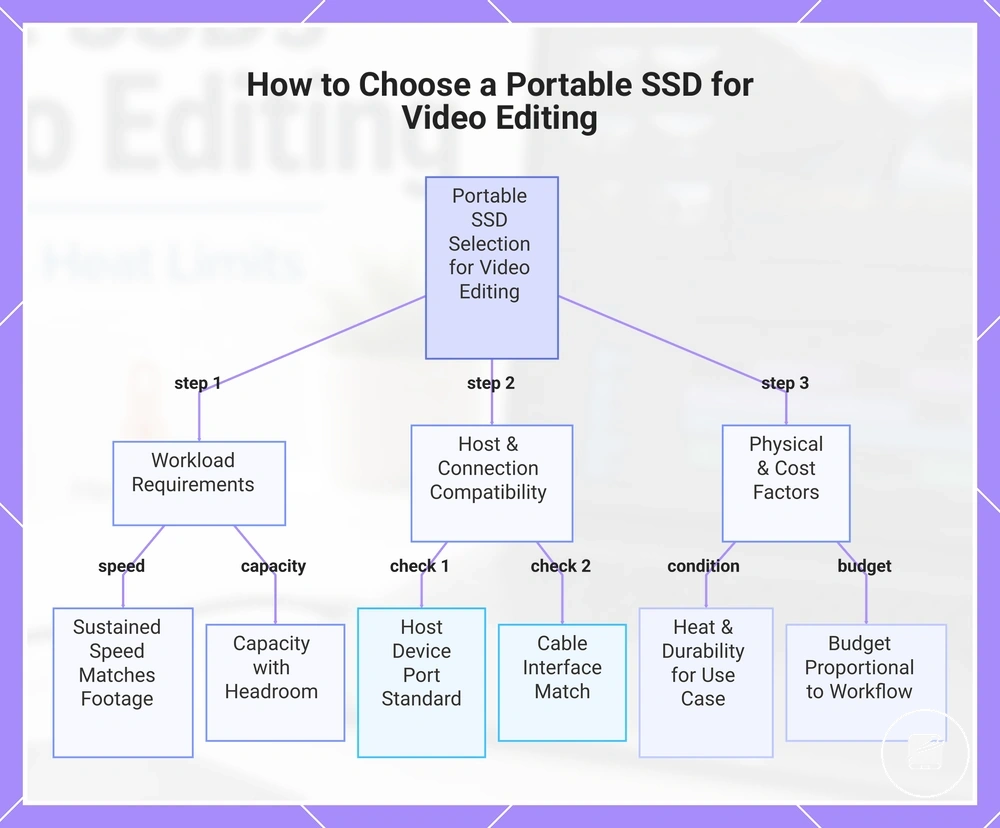
This chart shows the three-step decision process for selecting a portable SSD for video editing, prioritizing workload requirements, host compatibility, and physical and cost factors.
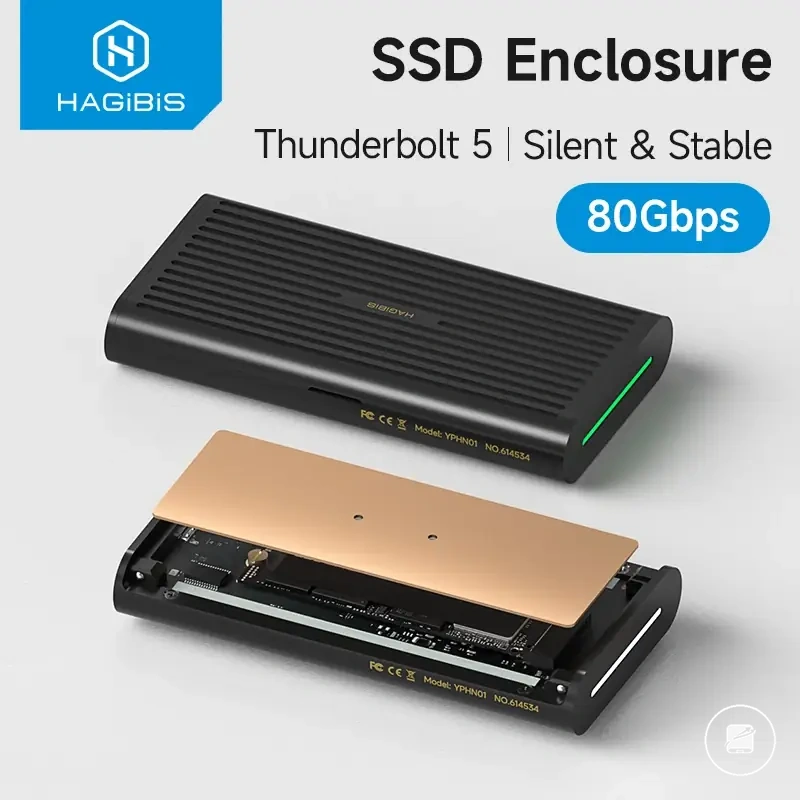
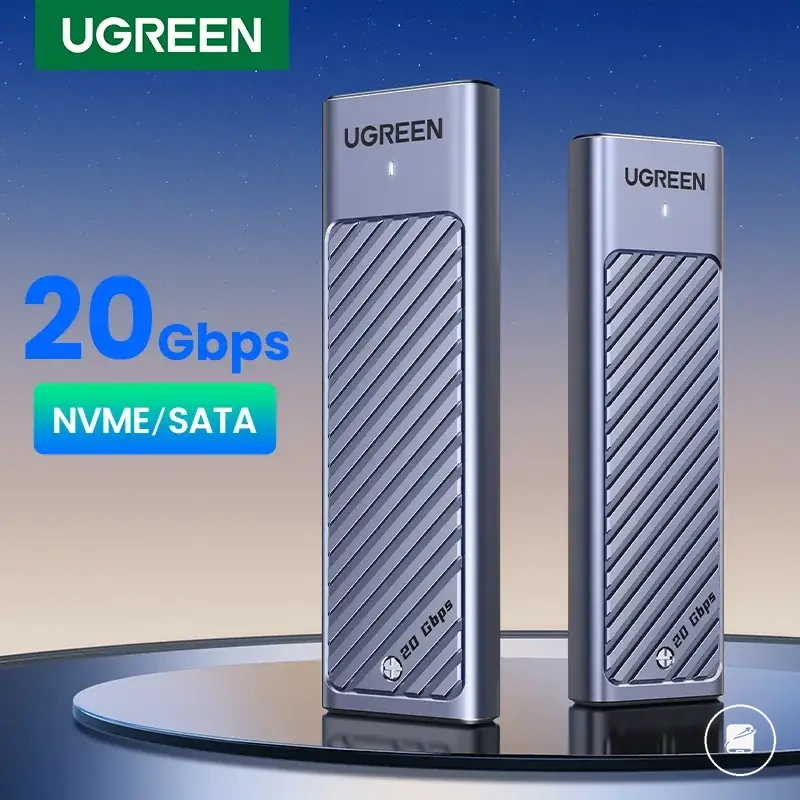
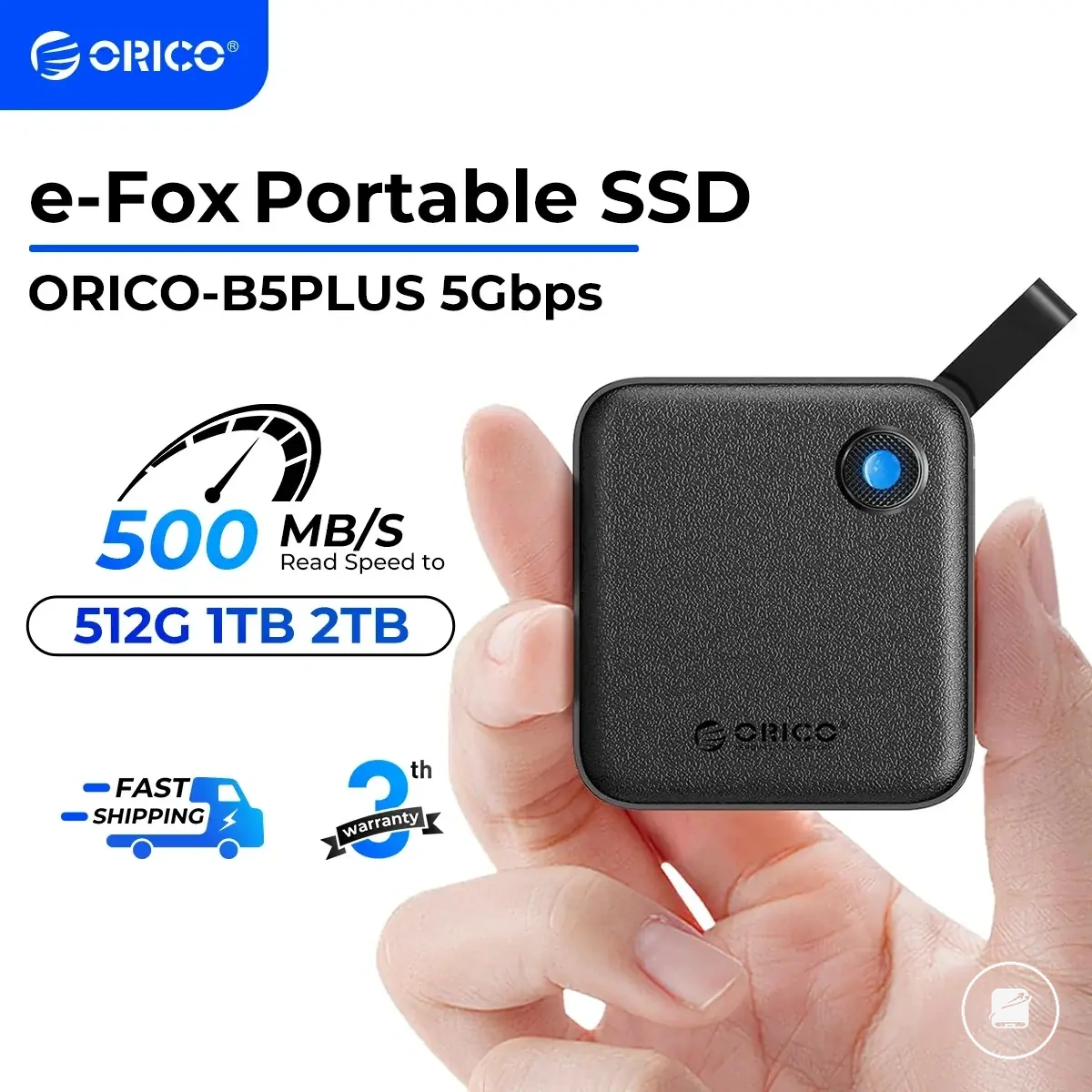
The products below are useful examples for comparing available options.
The products below are useful examples for comparing available options. Before buying, check that the compatibility criteria, key features, and product details match your needs.


Matching Drive Performance to Footage, Software, and Device Limits
Drive performance should match the complete editing environment rather than a single headline speed figure. Footage characteristics, software behaviour, and device limits determine whether a portable SSD can support the intended workload without an avoidable bottleneck. Use the matrix to connect each editing condition with its limiting factor and selection cue.
| Editing condition | Limiting factor | What to check | Selection cue |
|---|---|---|---|
| Footage | Camera codec, resolution, and media data rate | Identify whether the footage uses a lighter compressed codec or a higher-data-rate format at the selected resolution. | Choose higher sustained drive performance as codec demand, resolution, or the number of simultaneous media streams increases. |
| Software and cache | Timeline complexity and cache behavior | Check whether the software writes cache, preview, proxy, or render files to the project drive during active editing. | Prioritise stronger sustained write performance and more available capacity when complex timelines generate frequent cache activity. |
| Host device | Device limits | Confirm the connection standard and maximum interface capability supported by the editing computer or tablet. | Select a drive whose interface matches the host device instead of paying for performance the device cannot access. |
| Cable and port | The slower connection component | Verify that the host port and cable support the same interface level required by the SSD. | Use a matched host port and cable because either component can reduce usable drive performance below the SSD's capability. |
| Capacity | Available capacity during the project | Account for source footage, project files, cache data, proxies, previews, and exports. | Choose enough capacity for the active workload while retaining free-space headroom throughout the edit. |
A lighter setup using compressed footage, a simple timeline, limited cache activity, and a host port with moderate throughput can be matched to a lower sustained-performance tier. A heavier setup using higher-resolution footage, a demanding camera codec, multiple streams, frequent cache writes, and a faster host port places greater value on sustained speed and larger available capacity. For example, a faster SSD adds limited practical value when the cable or host port remains the primary device limit, whereas a matched connection allows more of the drive's capability to support the workload. Select the drive only when the footage, software, host port, cable, and available capacity align with the intended editing environment.
Balancing Speed, Capacity, Heat Control, Durability, and Price
Value comes from balancing speed, capacity, heat control, durability, and price against the actual video-editing workload. A higher price is justified only when the added capability reduces a defined workload risk or removes recurring editing friction. Use the trade-offs below to judge whether each upgrade supports the intended work.
Use the trade-offs below to judge whether each upgrade supports the intended work.
Speed has greater value when the drive can maintain sustained performance during long transfers and active editing rather than only reaching a high peak rate. A larger capacity tier can reduce editing friction by keeping footage, cache files, proxies, and exports on the same project drive, but unused space adds cost without improving the workflow. Heat control and durability become more valuable for long sessions and frequent travel, while warranty signals indicate the stated support period and coverage conditions rather than future reliability.
- Speed: Pay more for higher speed only when the host device, port, cable, and workload can use the additional performance.
- Capacity: Move to a larger capacity tier when the active project and working files would otherwise require frequent transfers or storage reshuffling.
- Sustained performance: Prioritise stable transfer behaviour when long edits, large media copies, or repeated cache writes create workload risk.
- Heat control: Favour stronger thermal management when sustained sessions could reduce performance and increase editing friction.
- Durability: Give enclosure strength and environmental protection more weight when the drive travels regularly than when it remains on a desk.
- Warranty signals: Compare the stated warranty period and coverage terms as support indicators, but do not treat them as guaranteed durability.
- Price and workload fit: Choose the lowest price tier that satisfies the required speed, capacity, thermal behaviour, durability, and support conditions.
For a light editing workload with short projects and limited cache activity, paying more for the highest performance tier may not reduce practical friction. For heavier work involving large footage sets, sustained transfers, frequent cache writes, or travel, additional capacity, stronger heat control, and greater durability may lower the risk of interrupted work or repeated file management. The premium is reasonable only when it addresses one of those specific constraints.
The premium is reasonable only when it addresses one of those specific constraints.
The safest value decision is to match price to the capabilities the workload will use rather than selecting by cost or headline speed alone. Choose the trade-off that meets the required sustained performance, capacity, heat control, durability, and warranty signals within the available budget.
Before buying, check that the compatibility criteria, key features, and product details match your needs.
The products below are useful examples for comparing available options. Before buying, check that the compatibility criteria, key features, and product details match your needs.