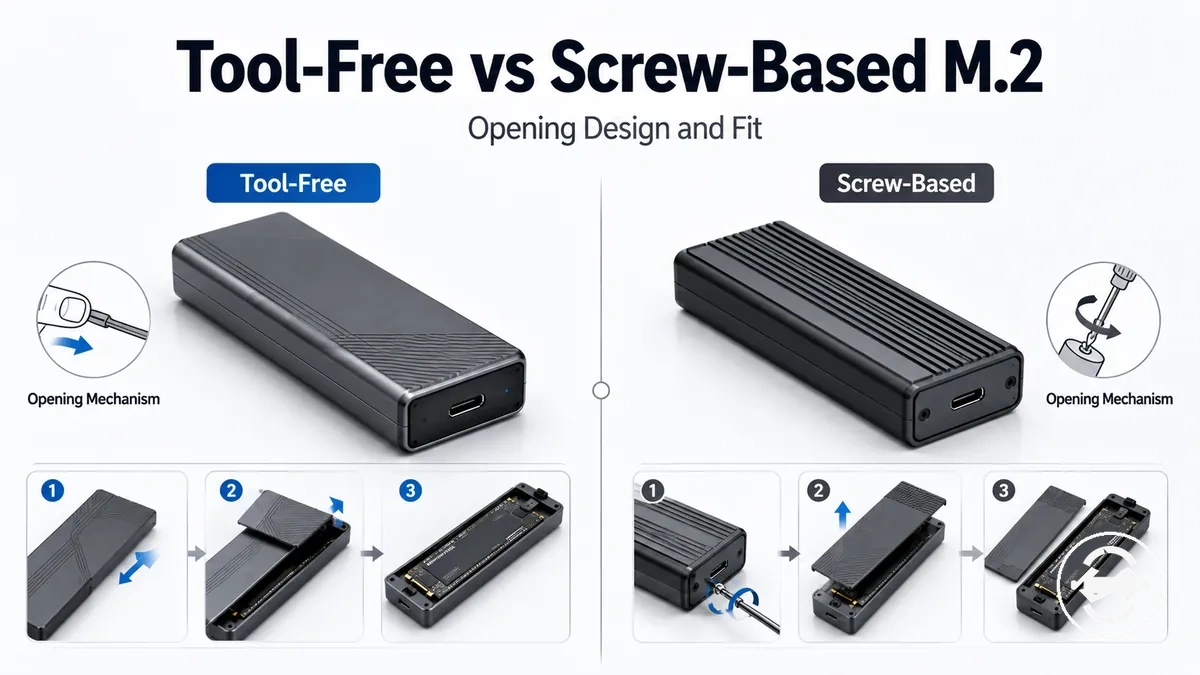
Tool-Free vs Screw-Based M.2 SSD Enclosure Designs
Tool-free and screw-based M.2 SSD enclosure designs depend on how often you need drive access and how much deliberate closure you prefer. A tool-free M.2 SSD enclosure usually favors quick access, while a screw-based M.2 SSD enclosure usually favors a more controlled SSD retention method. Core tradeoff: tool-free convenience helps when access is frequent, while screw-based retention may suit users who install one drive and leave the enclosure closed.
This comparison focuses on the enclosure design type, not on ranking products or promising a fixed result. The opening mechanism may use a latch, slide-open cover, snap-close cover, cover screw, or retention screw depending on the model. The practical selection comes from how the enclosure opens, how the SSD is held, and how the user handles the drive during everyday use.
Access frequency, SSD retention, handling context, and compatibility check all shape the decision. A quick install enclosure can reduce friction when drives are swapped often, but mechanism quality can vary by build. A screw enclosure can feel more deliberate during closure, but the screwdriver, small screws, internal fit, NVMe or SATA support, SSD length, and tray design still need checking.
Design type is only one buying factor. It does not automatically solve speed limits, heat behavior, detection symptoms, or drive fit, so selection should start with the physical mechanism and retention distinction before moving into compatibility and use-case details.
How tool-free and screw-based enclosure designs differ
Tool-free design and screw-based design differ primarily in how an M.2 SSD enclosure opens and how the SSD is retained inside the enclosure. The design type changes the cover access method and retention hardware rather than the purpose of the enclosure itself.
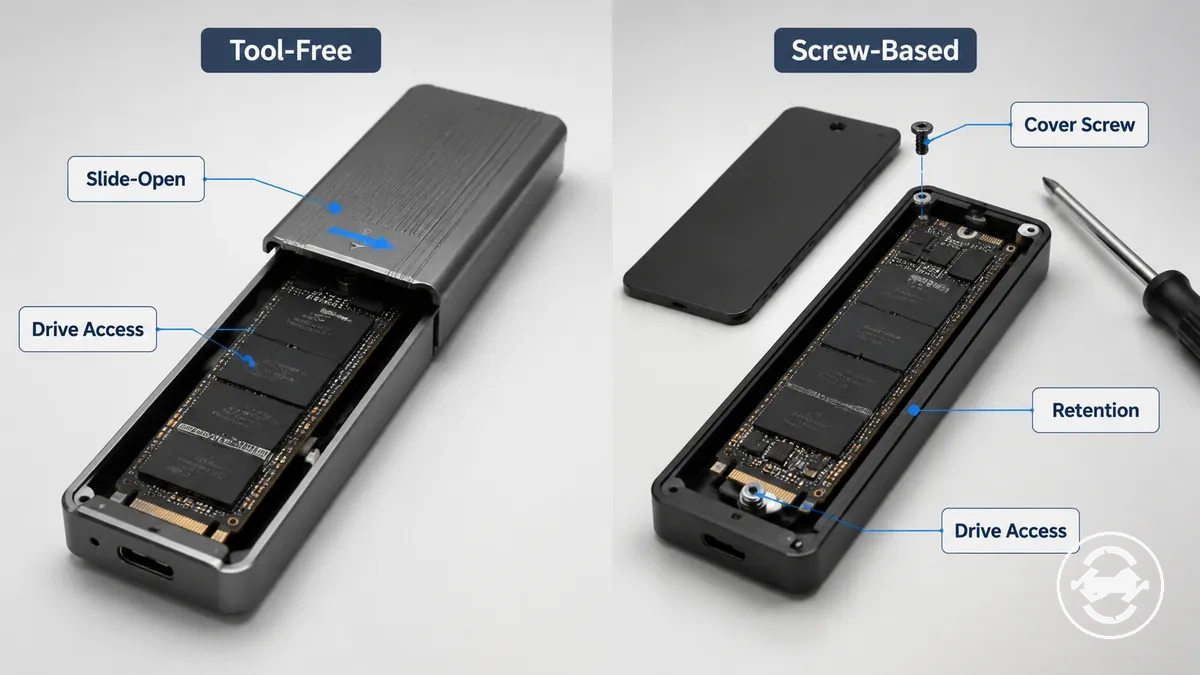
A tool-free design commonly uses a latch, slide-open, or snap-close mechanism for cover access, while a screw-based design typically relies on screws or a cover screw that requires a screwdriver. The enclosure body may look similar externally, but the opening mechanism and retention hardware create a different handling experience during drive access. These physical differences do not by themselves determine compatibility, speed, or thermal behaviour. For broader enclosure features beyond design type, see the M.2 SSD enclosure hub.
The main physical differences are easiest to compare side by side.
| Design type | How it opens | How the SSD is retained | Practical effect |
|---|---|---|---|
| Tool-free design | Latch, slide-open, or snap-close mechanism | Model-specific retention hardware without a cover screw | Can simplify repeated drive access when supported by the enclosure design |
| Screw-based design | Cover screw removed with a screwdriver | Screws or other retention hardware secure the enclosure during closure | May provide a more deliberate opening and closing process with additional hardware to handle |
Tool-free latch, slide-open, and snap-close access
Tool-free access is the local opening mechanism that lets you reach the SSD without removing a cover screw. It changes how the cover opens and closes rather than how the SSD operates, making repeated drive swap tasks more convenient on compatible enclosure designs.
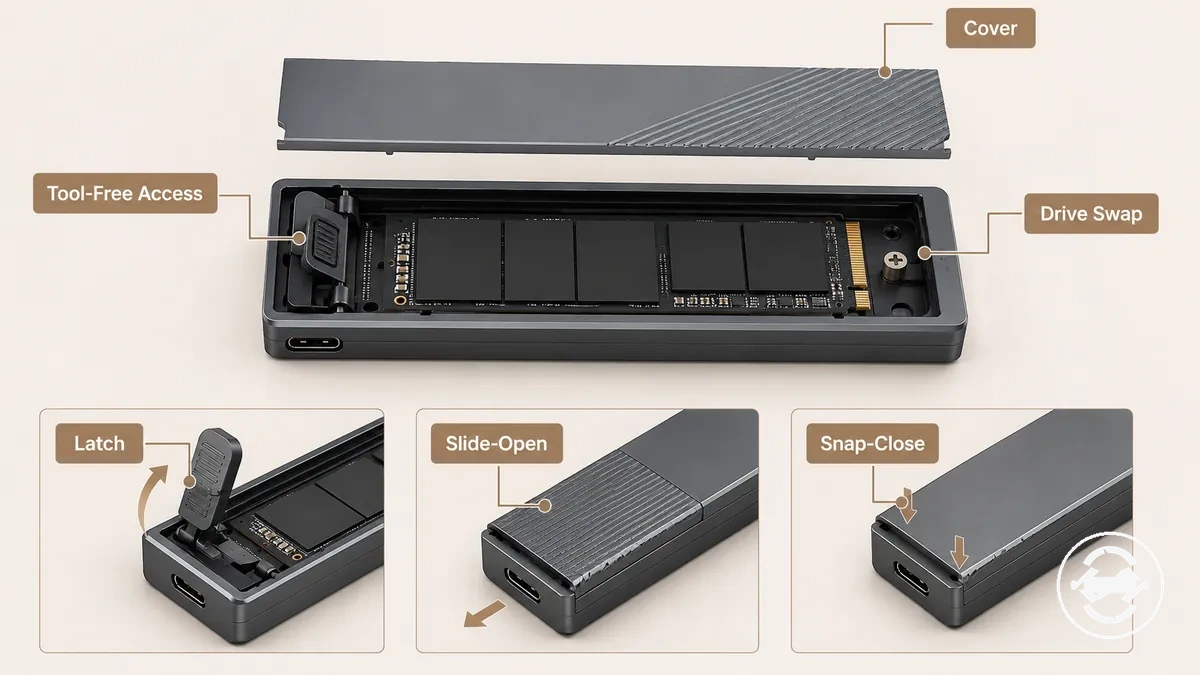
Common tool-free access mechanisms include:
- Latch: A latch releases or secures the cover with a manual action, allowing quick drive access without separate tools.
- Slide-open: A slide-open cover moves along the enclosure body before lifting away, reducing the need for screws during routine drive swaps.
- Snap-close: A snap-close cover presses back into place after the SSD is positioned, although the closing feel and retention can vary with mechanism quality.
No-screw opening changes only the cover access method and does not change NVMe or SATA protocol support or SSD length compatibility. Mechanism quality can vary by model, so the opening experience may differ between enclosures.
Screw-based cover and drive retention hardware
Screw-based cover hardware uses a cover screw and retention hardware to keep the enclosure closed while supporting SSD retention inside the enclosure. The mechanism requires a screwdriver for cover access, while the retention screw or retention peg works with the internal fit to hold the SSD in its intended position.
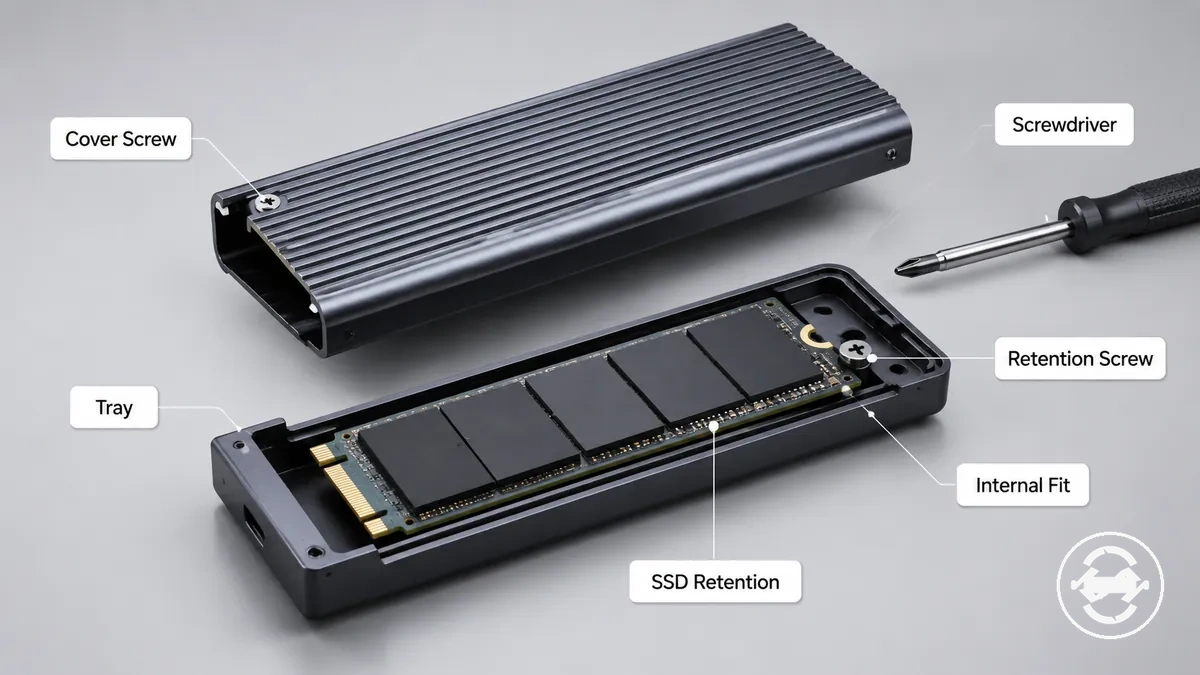
The main hardware components include:
- Cover screw: Holds the enclosure cover in place and is removed with a screwdriver when access to the drive is needed.
- Tray and retention screw: The tray supports the SSD, while the retention screw or peg helps keep the drive in position during closure.
- Internal fit: The enclosure's internal fit works with the retention hardware, and the resulting stability can vary with enclosure design and hardware quality.
Using a screwdriver and handling small hardware can make setup more deliberate than a no-screw opening. A screw-based cover does not automatically provide stronger retention, because overall stability also relies on the internal fit and the quality of the retention hardware.
Installation effort and drive access tradeoffs
Installation effort usually depends on the enclosure's access method, fastener count, and drive retention design. Tool-free enclosures often reduce drive access effort for repeated drive swap tasks, while screw-based designs usually involve a screwdriver and a more tool-dependent setup.
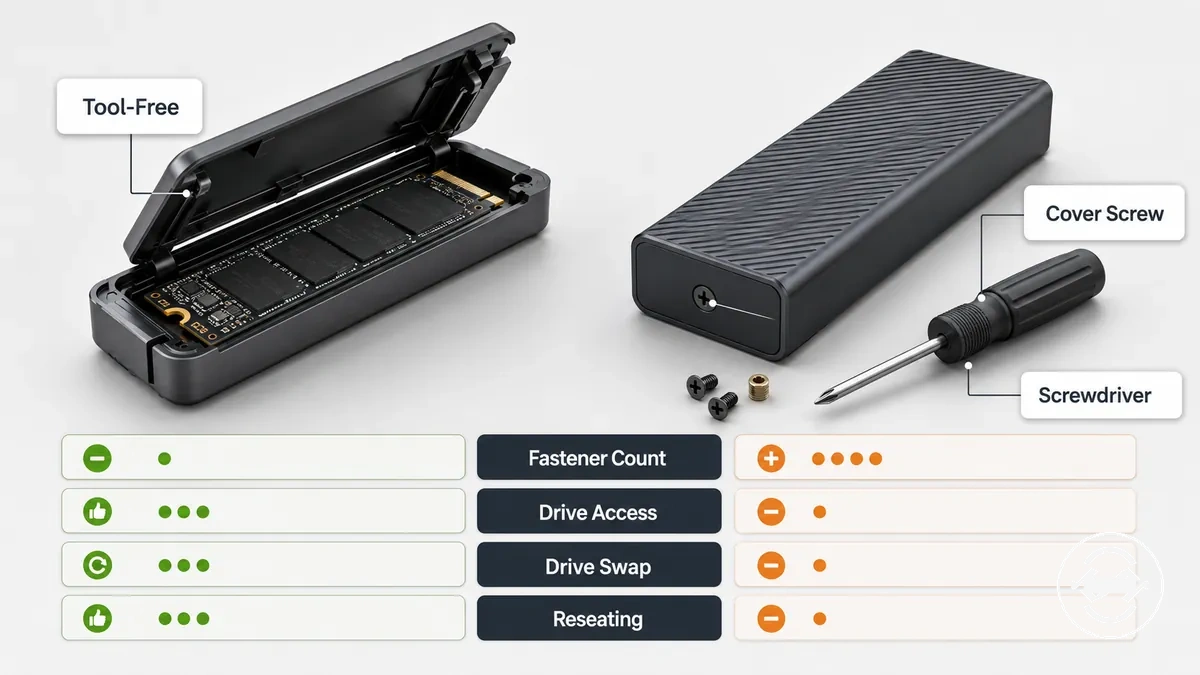
Installation effort can also vary with enclosure construction, retention hardware, and how often the SSD is accessed. A lower fastener count may reduce access time, while screw-based designs can require handling small hardware and increase the chance of misplaced screws during repeated opening. Reseating the SSD may also take more time when the cover must be removed and secured again, although the overall experience depends on the enclosure model and internal design.
| Task | Tool-free design | Screw-based design | Decision signal |
|---|---|---|---|
| Opening | Usually no screwdriver required | Usually requires a screwdriver and cover screw removal | Frequent drive access may favor tool-free designs |
| Initial install | Quick access with model-specific retention | Tool-dependent setup with retention hardware | Choose based on preferred access method |
| Drive swap | Often reduces access time for repeated swaps | May require handling small screws during each swap | Regular drive swaps may favor tool-free access |
| Reseating | Usually simpler when the cover opens quickly | May take longer because the cover is screw-secured | Careful connector contact remains important in either design |
| Closing the enclosure | Latch or snap mechanism depending on the model | Cover screw secured after closure | Closure feel varies with enclosure construction |
Users who swap drives frequently may prioritize quicker drive access and reduced setup effort. Users who expect to install one SSD and leave it in place may find the additional screwdriver step less significant because the enclosure is opened less often.
This section compares installation effort rather than providing full setup instructions. For complete guidance, see the installation process.
Quick SSD swaps without a screwdriver
Frequent drive swaps are a common situation where a tool-free M.2 SSD enclosure can reduce setup effort. When access frequency is high, opening the enclosure without a screwdriver may make temporary SSD changes more convenient while reducing the tool requirement, although the experience can vary by enclosure design and drive handling.
Quick access is often useful in situations such as:
- Testing different SSDs without repeatedly removing cover screws.
- Temporary file transfers that require more than one drive change.
- Frequent drive swaps where lower tool-dependent use can simplify enclosure setup.
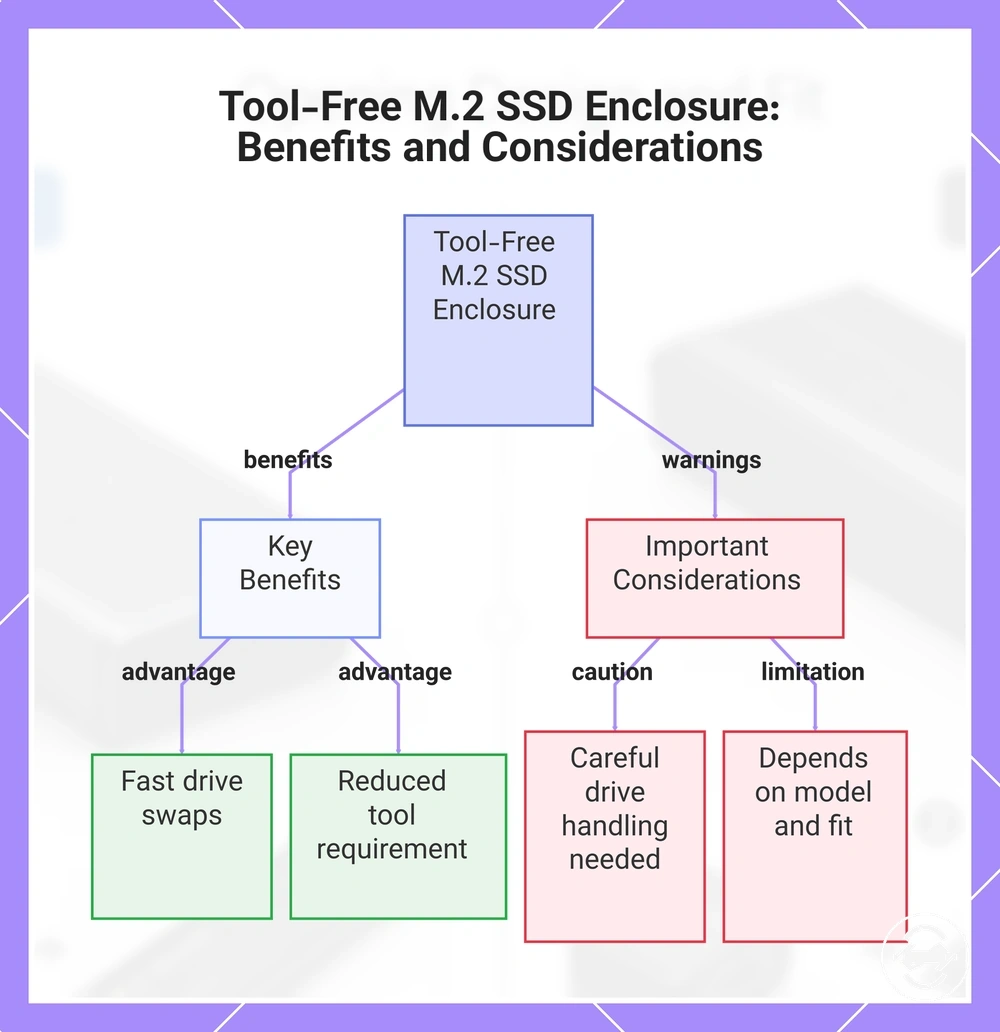
Quick access does not remove the need for careful drive handling. Correct SSD seating remains important whenever the drive is removed or reinserted, and the convenience of a tool-free design still depends on the enclosure model, drive fit, and proper alignment during reseating.
This chart shows the main benefits and important considerations of using a tool-free M.2 SSD enclosure for frequent drive swaps.
Screwdriver setup for longer-term installs
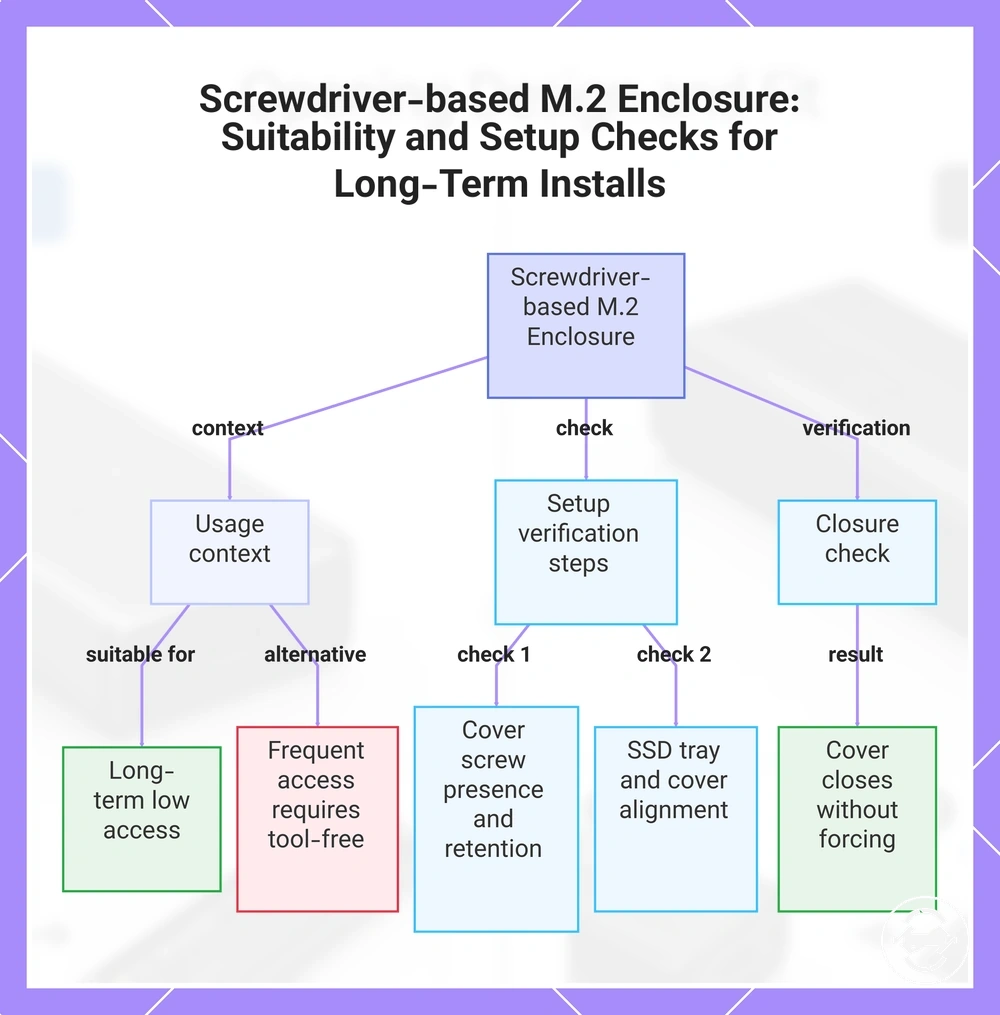
Leaving an SSD installed for an extended period is a common situation where a screwdriver-based M.2 SSD enclosure may be a practical choice. When access frequency is low, the additional tool requirement is often less significant because the enclosure is not opened regularly, although setup effort can vary by enclosure design and drive handling.
For longer-term enclosure setup, it is useful to verify:
- The cover screws are present and retained before closing the enclosure.
- The SSD tray and SSD seating are correctly aligned before securing the cover.
- The cover closes fully without forcing the retention hardware into place.
If frequent field access is expected or small screws are likely to be misplaced, a tool-free design may better match that use case. Otherwise, a screwdriver-based enclosure can suit installations where drive access is infrequent and careful closure is preferred.
This chart shows when a screwdriver-based M.2 SSD enclosure is suitable for long-term installations and what checks to perform during setup.
Fit, retention, and reliability differences
Fit, retention, and reliability depend on how the SSD is seated, how the cover closes, and how the M.2 SSD enclosure is handled over time. Neither a tool-free nor a screw-based design is inherently more reliable, because the outcome can vary with enclosure construction, internal fit, cover closure, and daily handling.
The practical comparison is easier to assess by looking at the main design criteria.
| Criteria | Tool-free design | Screw-based design |
|---|---|---|
| SSD seating | Retention depends on the enclosure's internal fit and latch stability. | Retention depends on screw hardware, internal fit, and correct SSD seating. |
| Cover closure | Closure stability may vary with the latch mechanism and cover movement. | Closure stability may vary with screw retention and enclosure construction. |
| Daily portable use | Reliable handling can depend on secure closure and exposure to vibration during transport. | Reliable handling can depend on secure screw retention, cover closure, and careful handling. |
| Repeated drive swapping | Frequent opening may place more emphasis on consistent latch operation and cover closure. | Frequent opening may increase setup effort because screws are removed and reinstalled. |
| Typical use scenario | May suit users who expect regular drive access. | May suit users who leave the SSD installed for longer periods. |
For desk use, either design can provide stable retention when SSD seating and cover closure are correct. During travel or frequent handling, enclosure construction, vibration exposure, and careful daily handling can have a greater influence on reliability than the opening mechanism alone, so the choice should match the intended use case.
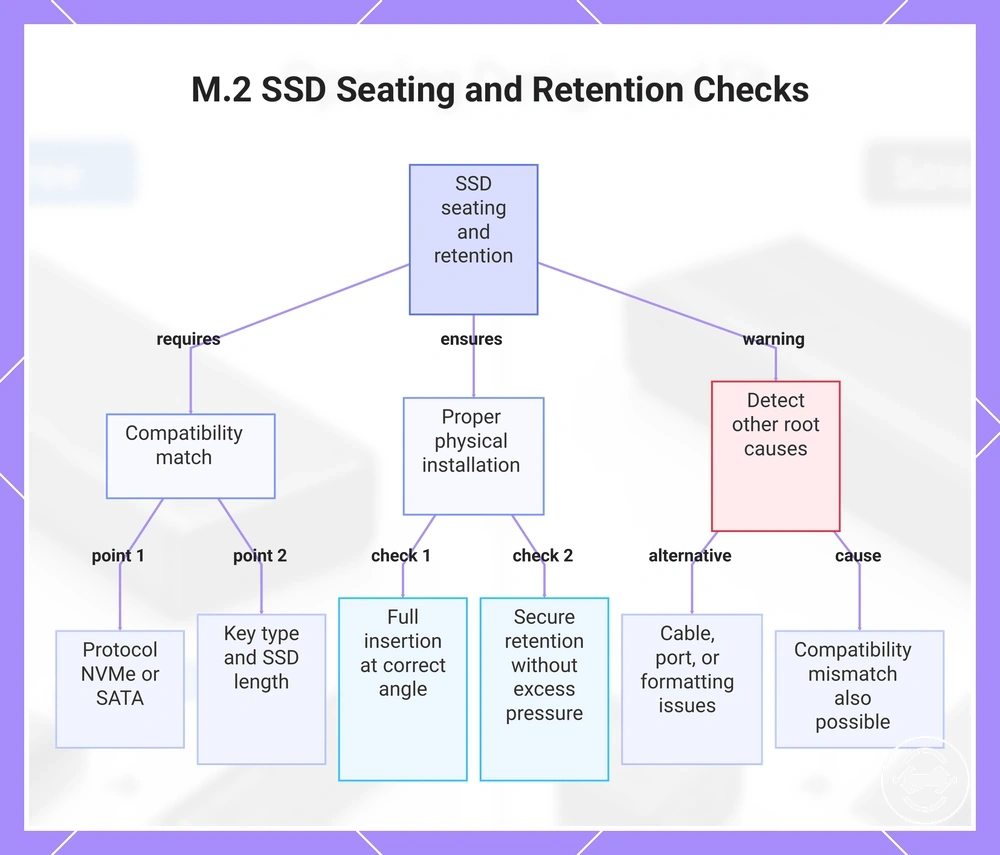
SSD seating and retention consistency
SSD seating and retention consistency rely on matching the M.2 SSD to the enclosure specification and ensuring the drive is fully seated. Compatibility requires the correct NVMe or SATA protocol support, key type, SSD length, and internal fit because an incorrect match or incomplete seating may contribute to unstable recognition or intermittent contact.
Before closing the enclosure, check these conditions:
- The SSD connector is fully inserted into the enclosure slot at the correct seating angle.
- The NVMe or SATA protocol, key type, and SSD length match the enclosure specification.
- The retention point holds the drive securely without excessive internal pressure.
- The lid closes without placing unnecessary pressure on the SSD or reducing internal clearance.
Poor seating can contribute to detection symptoms, but recognition problems may also result from compatibility, the cable, the USB port, or formatting rather than SSD retention alone. If poor seating is suspected, see drive seating and detection fixes for further guidance.
This chart lists the main conditions to verify for reliable M.2 SSD seating and retention inside an enclosure.
Cover closure, vibration, and daily handling
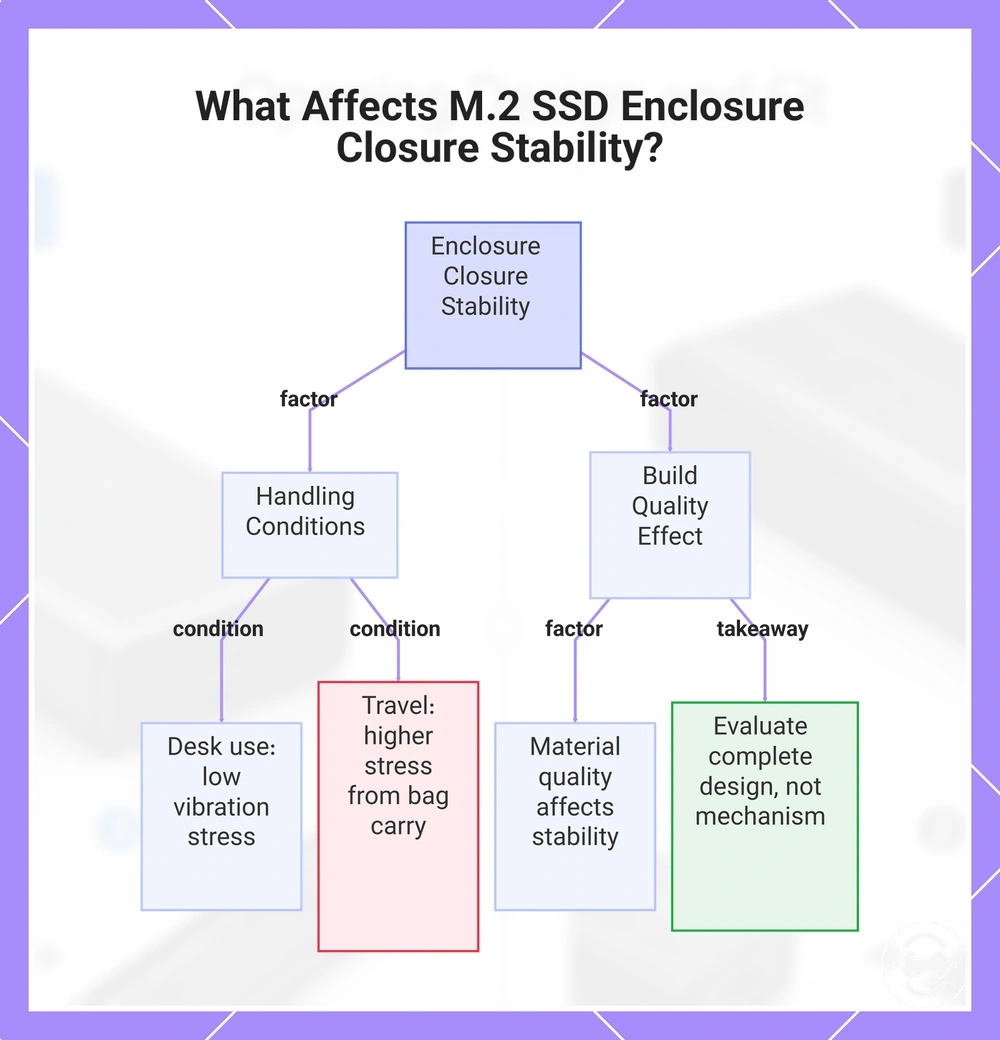
During travel, repeated opening, or frequent portable handling, cover closure can influence how reliable an M.2 SSD enclosure feels in everyday use. Latch closure and screw closure may respond differently to vibration and daily handling, but closure stability can vary with enclosure design, handling frequency, and overall condition rather than the opening mechanism alone.
For desk use, limited movement may reduce the effect of vibration compared with regular bag carry or repeated transport. Body flex and perceived looseness may become more noticeable during frequent daily handling, particularly when the enclosure is opened often, although these outcomes are not expected for every model. Material and build quality can affect closure stability as much as the latch or screw mechanism, so evaluating the complete enclosure design is usually more useful than judging reliability by the opening method alone.
This chart shows the key factors influencing M.2 SSD enclosure closure stability, highlighting that build quality and overall design matter more than the opening mechanism.
Compatibility checks that design type does not replace
Tool-free or screw-based enclosure design does not replace essential compatibility checks. Before choosing an opening mechanism, confirm that the M.2 SSD enclosure matches the SSD's NVMe or SATA protocol, key type, SSD length, internal fit, and enclosure specification. Design choice affects drive access, not protocol support, port speed, or operating system recognition.
Check these conditions before comparing enclosure designs:
| Compatibility check | What to verify | Why it matters |
|---|---|---|
| SSD protocol | NVMe or SATA support matches the enclosure specification | Protocol support must match the installed M.2 SSD |
| Key type | The SSD key type fits the enclosure slot | Incorrect keying may prevent proper installation |
| SSD length | The enclosure supports the drive length | Correct retention and internal fit rely on supported dimensions |
| Thermal clearance | Thermal pad, lid pressure, and internal clearance are appropriate | The enclosure should close without unnecessary pressure on the SSD |
| Host connection | The enclosure connects correctly to the intended device and port | Recognition and port speed also depend on the host connection and enclosure support |
Evaluate tool-free or screw-based design only after the drive physically and electrically fits the enclosure. The opening mechanism should be a secondary decision once compatibility and fit checks have been confirmed.
NVMe, SATA, key type, and SSD length support
NVMe, SATA, key type, and SSD length support must match the enclosure specification before the opening design becomes relevant. Compatibility is determined by protocol support, physical keying, supported SSD length, and internal fit, while a tool-free or screw-based mechanism only changes how the enclosure is opened.
Check these compatibility conditions before selecting a design:
- Drive type: Confirm the M.2 SSD uses the NVMe or SATA protocol supported by the enclosure specification.
- Key type: Verify that the enclosure slot matches the SSD key type, such as M-key or B+M key.
- SSD length: Ensure the enclosure supports the installed SSD length so the drive can be retained correctly.
- Internal fit: Check that the SSD seats fully and that thermal pad clearance and lid pressure allow the enclosure to close properly.
A tool-free mechanism may simplify drive access, but it cannot make an incompatible NVMe or SATA drive fit or operate when the enclosure specification, key type, SSD length, or internal fit requirements are not met.
Thermal pad clearance and internal fit
Thermal pad clearance and internal fit must match the enclosure specification regardless of whether the enclosure uses a tool-free or screw-based design. Compatibility depends on the physical fit between the M.2 SSD, the thermal pad, and the enclosure lid after NVMe or SATA support, key type, and SSD length have already been confirmed.
Check these fit conditions before closing the enclosure:
- Thermal pad thickness: The thermal pad should allow the enclosure lid to close without creating unnecessary pressure.
- Lid pressure: The enclosure lid should close evenly without forcing the SSD out of its seated position.
- SSD components: Raised controller and other SSD components should have sufficient internal clearance.
- Internal fit: The installed SSD should match the enclosure specification so clearance, seating, and supported SSD length remain consistent.
Double-sided M.2 SSDs or thicker thermal pads may reduce available clearance, so enclosure closure can vary by model. The opening mechanism does not change these compatibility requirements, which remain dependent on the enclosure specification and physical fit.
Which design fits which use case
The right design depends on the use case, including access frequency, portability, handling, and tolerance for small hardware. A tool-free design may suit users who need quick access and frequent drive swaps, while a screw-based design may suit users who prefer deliberate closure for long-term storage.
Selection depends on how often the enclosure is opened and where it is used. Frequent drive swaps can make quick access and lower tool requirements more important, while long-term storage may place more value on stable closure and retention confidence. Portability, available tools, and expected handling conditions can also influence the decision. The enclosure specification and internal fit remain important regardless of the opening mechanism.
| Use case | Tool-free design | Screw-based design | Decision signal |
|---|---|---|---|
| Frequent drive swaps | May suit users who need quick access with repeated opening. | May add setup effort when screws are removed and replaced often. | Higher access frequency may favour tool-free convenience. |
| One-time setup | Quick access may be less important after installation. | May suit users focused on long-term storage and stable closure. | Lower opening frequency can reduce the impact of tool requirements. |
| Travel use | May suit situations where tool availability is limited. | May suit users who prefer screw-based closure during transport. | Consider portability, handling, and retention confidence. |
| Desk storage | May be useful when occasional access is expected. | May fit users who leave the drive installed for longer periods. | Choose based on access needs rather than location alone. |
| Tool tolerance | Reduces the need for a screwdriver during access. | Requires handling small hardware during opening. | Match the design to personal setup preferences. |
Users who need frequent access, temporary drive changes, or quick access in different locations may find a tool-free design more aligned with their use case. Users who prioritise long-term storage and less frequent opening may prefer a screw-based design when stable closure is more important than rapid access.
Selection should be based on the expected use case rather than a universal preference. The better fit is the design that matches access habits, portability needs, handling conditions, and comfort with the required tool approach.
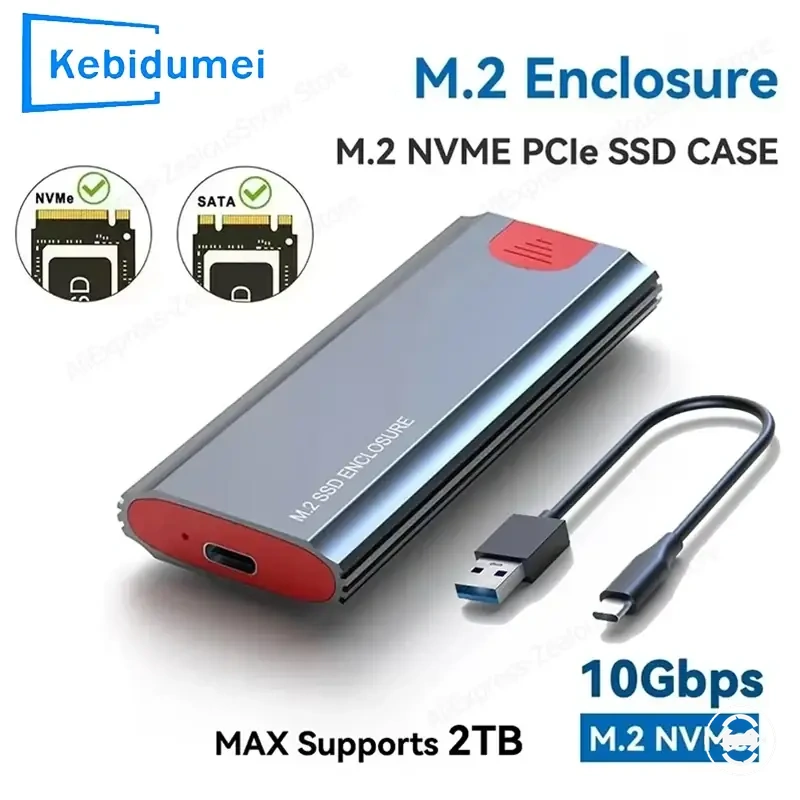
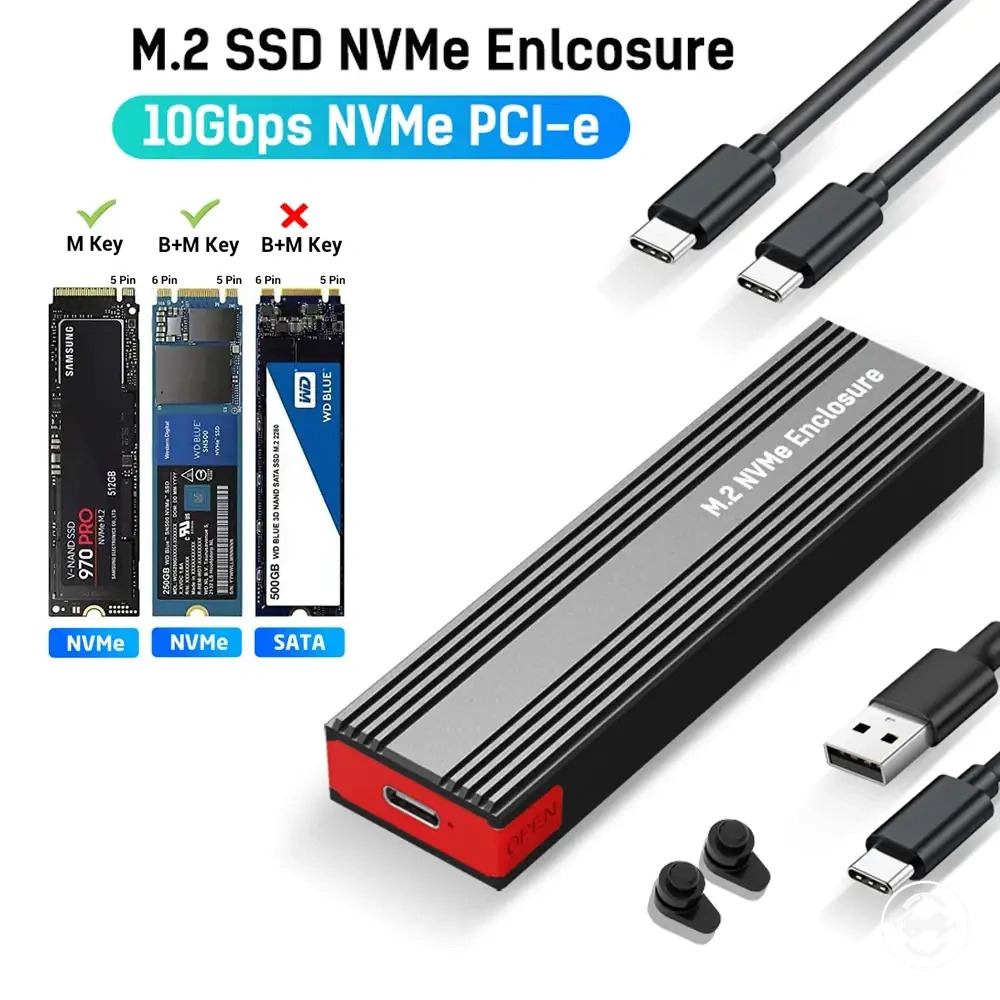
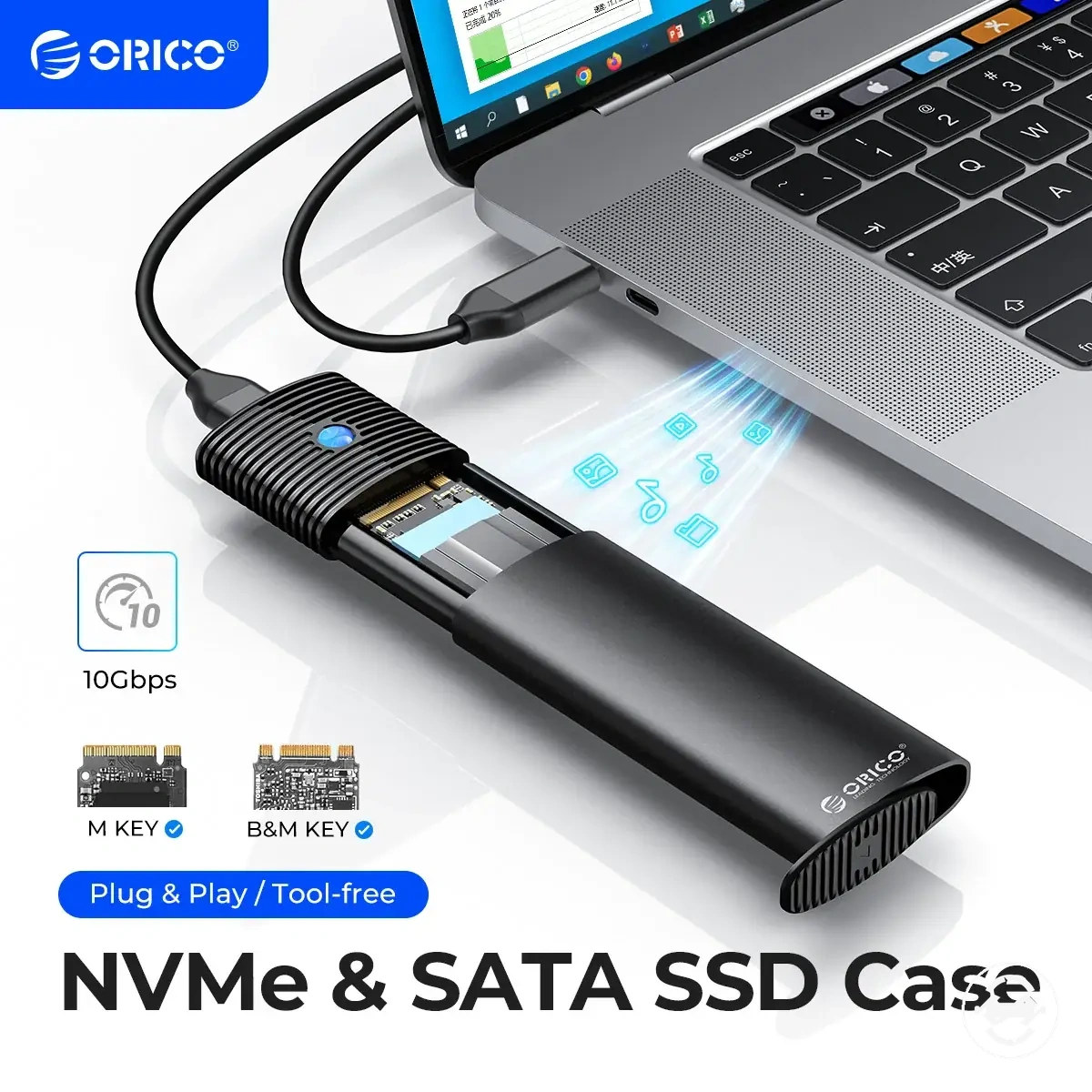
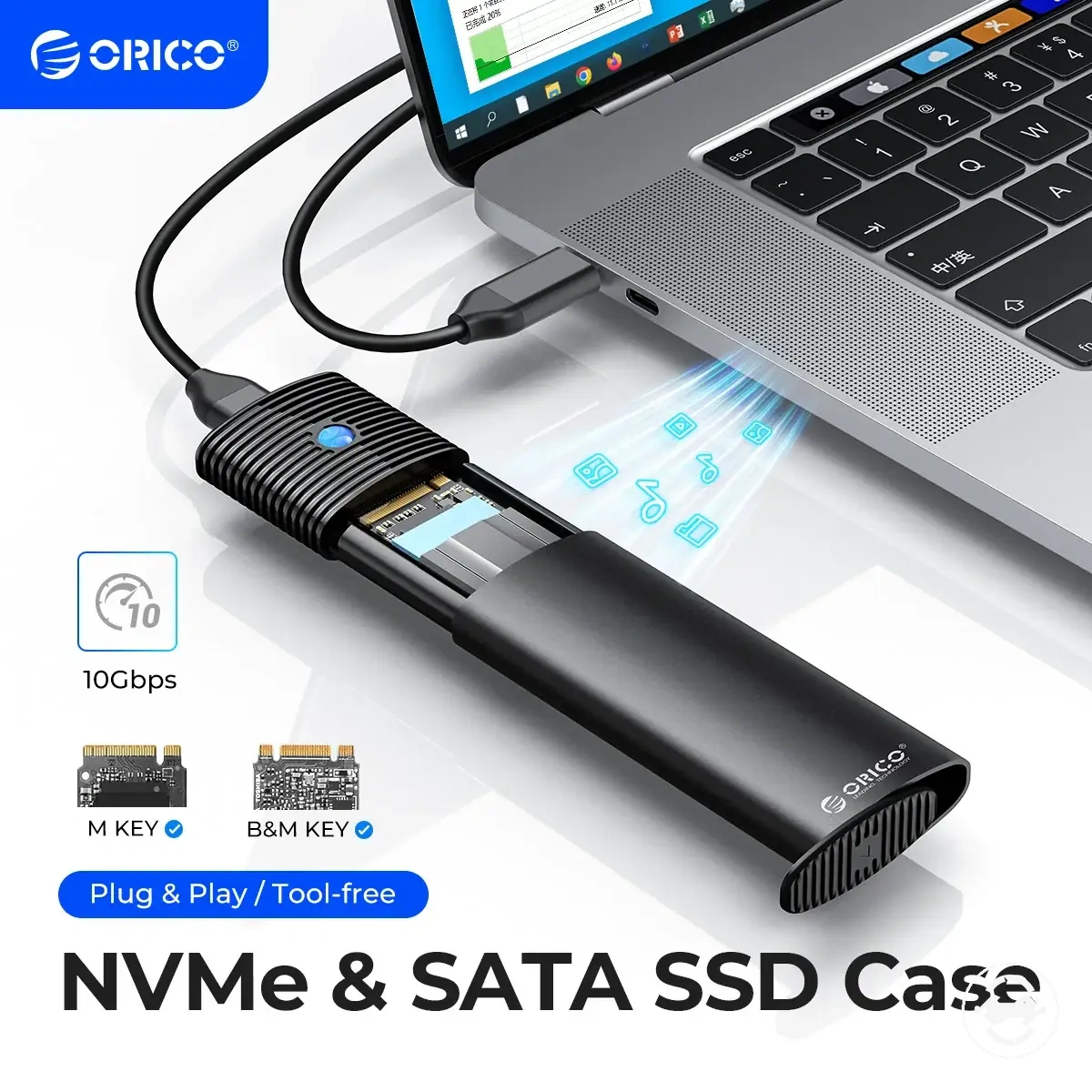
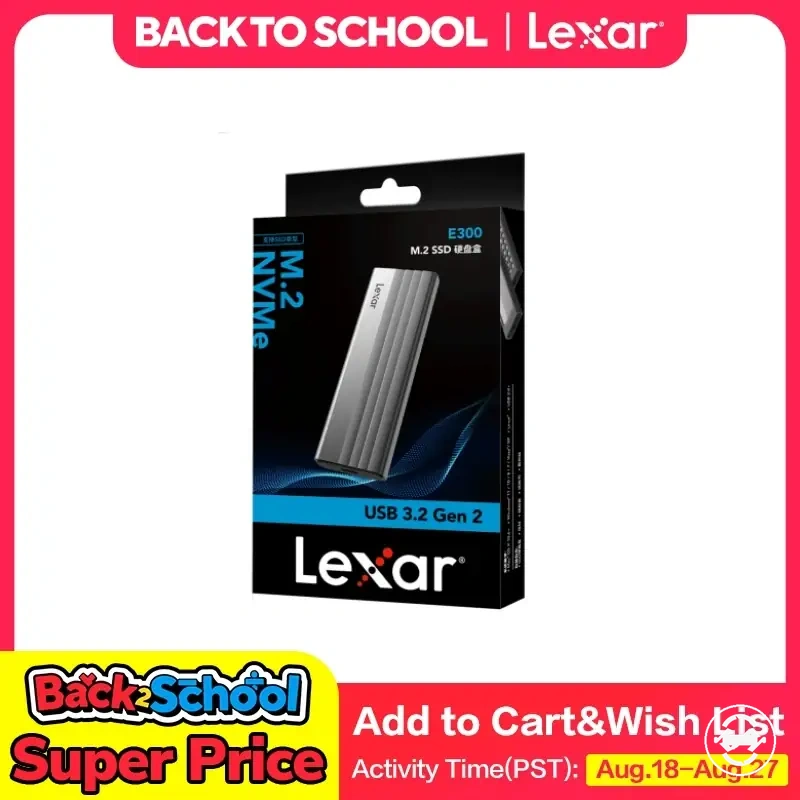
Here are product examples that may make comparison easier. Before buying, always review the compatibility criteria, essential features, and product details.
Tool-free designs for frequent drive swaps and quick access
A tool-free design is often the stronger selection when the use case involves frequent drive swaps and quick access rather than long-term storage. This fit scenario is most relevant when the enclosure is opened regularly, although portability, enclosure quality, and retention confidence can still influence the overall experience.
The following situations may make a tool-free design a suitable choice:
- Frequent drive swaps where quick access reduces repeated handling of small screws.
- Temporary SSD testing that requires the enclosure to be opened multiple times.
- Short-term file transfers where drives are exchanged regularly.
- Low-tool environments where access without a screwdriver is more convenient.
- Convenience-focused workflows where fast enclosure access is a higher priority than long-term storage.
Latch quality, correct closure, and proper SSD seating remain important regardless of the opening method. A tool-free design may simplify repeated access, but retention confidence can still vary with enclosure model, build quality, and consistent closure after each drive change.
Screw-based designs for stable long-term portable storage
A screw-based design is often the stronger selection when the use case prioritises stable long-term storage with less frequent access. This fit scenario generally suits users who keep one SSD installed for extended periods, where portability and retention confidence may matter more than quick access or frequent drive swaps.
The following situations may make a screw-based design a suitable choice:
- Long-term portable storage where the enclosure is opened only occasionally.
- One-drive use with infrequent SSD changes after the initial installation.
- Use cases that prioritise careful retention and stable closure over quick access.
- Workflows where a screwdriver is readily available for installation or maintenance.
- Users who accept slower access as part of their enclosure selection.
Screw-based closure does not guarantee reliability or compatibility. Poor-quality hardware, incorrect SSD seating, or over-tightening may still create problems, so the outcome can vary with the enclosure model, build quality, and installation method.
Buying decision checks before choosing either design
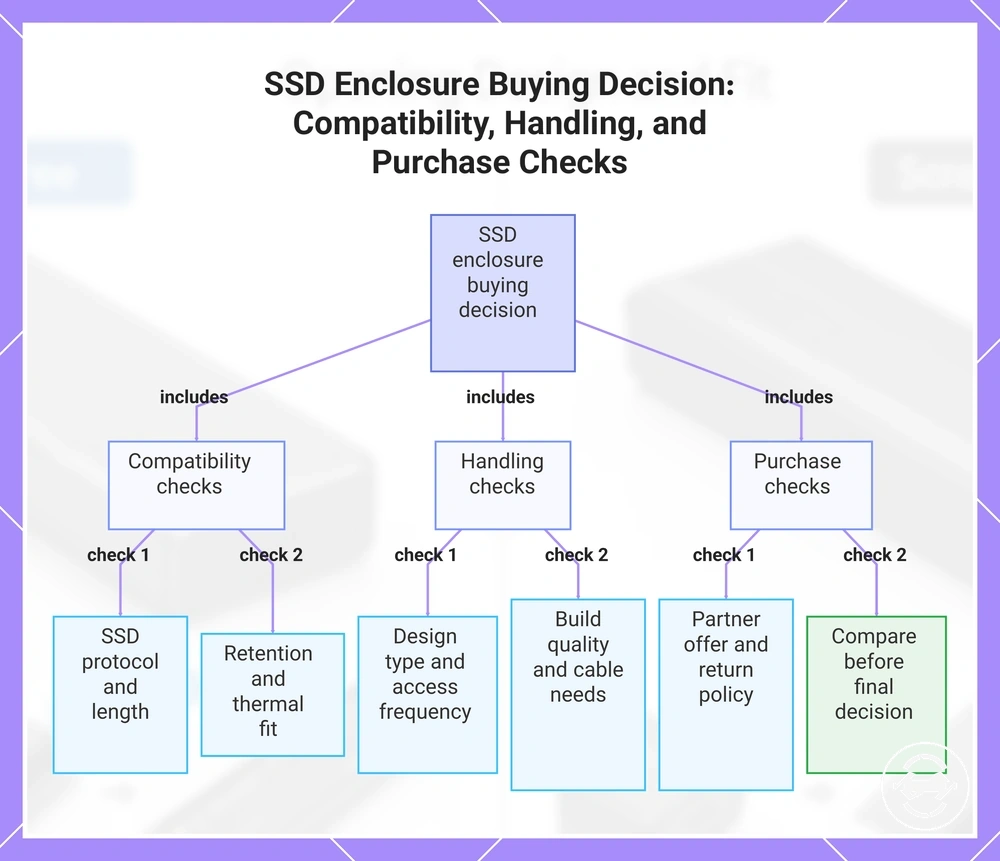
The final buying decision should combine design preference with compatibility, handling, and buying checks rather than relying on the opening mechanism alone. Confirm that the enclosure matches your SSD and intended use before choosing between a tool-free or screw-based design type.
- Design type: Match the opening method to your expected access frequency and handling routine.
- SSD protocol: Verify that the enclosure supports the required NVMe or SATA protocol.
- SSD length: Check that the enclosure supports the installed SSD length for correct fit.
- Retention method: Confirm that the SSD can be secured correctly without unnecessary movement.
- Cable and port needs: Ensure the enclosure connection matches the device and port you plan to use.
- Thermal clearance: Verify that the SSD, thermal pad, and enclosure lid fit together correctly.
- Build quality: Review construction quality if the enclosure will be handled or transported regularly.
- Partner offer: Compare a return-friendly partner offer alongside compatibility and price checks before deciding.
Purchase-proxy checks help evaluate whether an enclosure is suitable without relying on merchant-style claims. Review compatibility details, handling characteristics, and any return-friendly options available through the partner offer before making a final decision.
For a broader set of evaluation criteria, refer to the buying checklist before making your final selection.
The most suitable design type is the one that aligns with your SSD protocol, SSD length, retention method, handling needs, and expected access frequency. Completing these buying checks before comparing a partner offer can support a more informed decision while keeping compatibility and practical use as the primary criteria.
This chart groups the key checks for choosing an SSD enclosure into three main categories: compatibility, handling, and purchase.
Here are product examples that may make comparison easier. Before buying, always review the compatibility criteria, essential features, and product details.