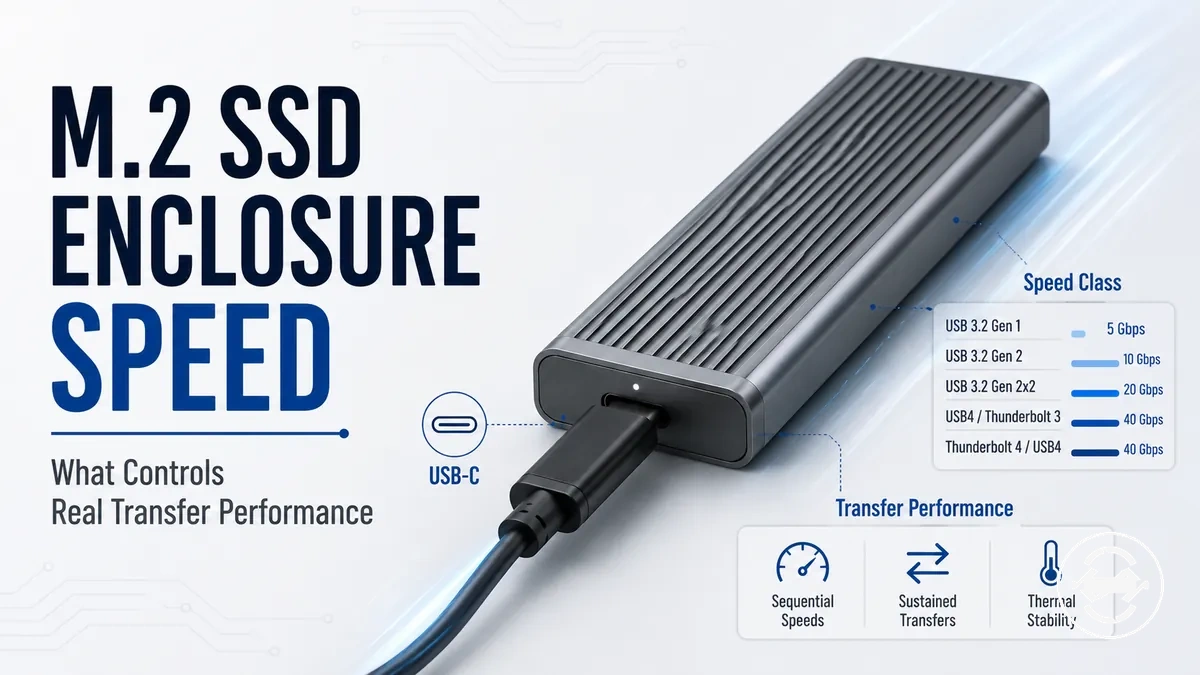
M.2 SSD enclosure speed and real transfer limits
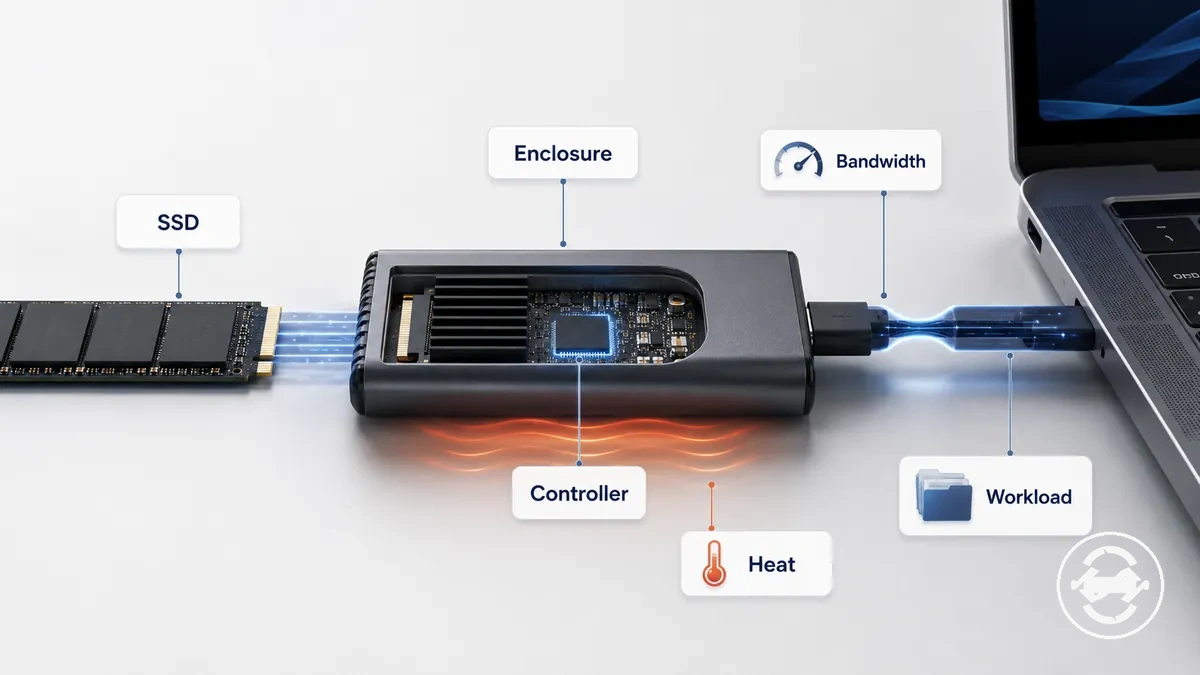
M.2 SSD enclosure speed depends on the complete connection path rather than the advertised bandwidth label alone. The enclosure interface, SSD type, host port, cable, controller, protocol overhead, workload, and thermal behavior can all influence usable throughput. Real transfer performance varies because each part of the system can create a different speed ceiling.
An M.2 SSD enclosure can have different throughput limits depending on how the internal drive communicates through the enclosure controller and how the enclosure connects to the host device. Bandwidth describes the potential capacity of the connection, while throughput describes the usable transfer rate after factors such as protocol overhead are considered. Sustained transfer performance may also vary when workload patterns and thermal behavior change during longer operations.
What real M.2 SSD enclosure speed depends on
Real M.2 SSD enclosure speed depends on the slowest relevant link in the complete transfer path. The M.2 SSD enclosure, SSD, cable, port, and protocol each contribute conditions that can limit transfer performance. A higher advertised speed ceiling may not represent the throughput achieved in a specific setup.
The M.2 SSD enclosure hub provides the wider context for enclosure choices, while this section focuses on the conditions that shape real speed. The enclosure controller, connection protocol, host port, cable, workload, and temperature can each influence the final transfer rate.
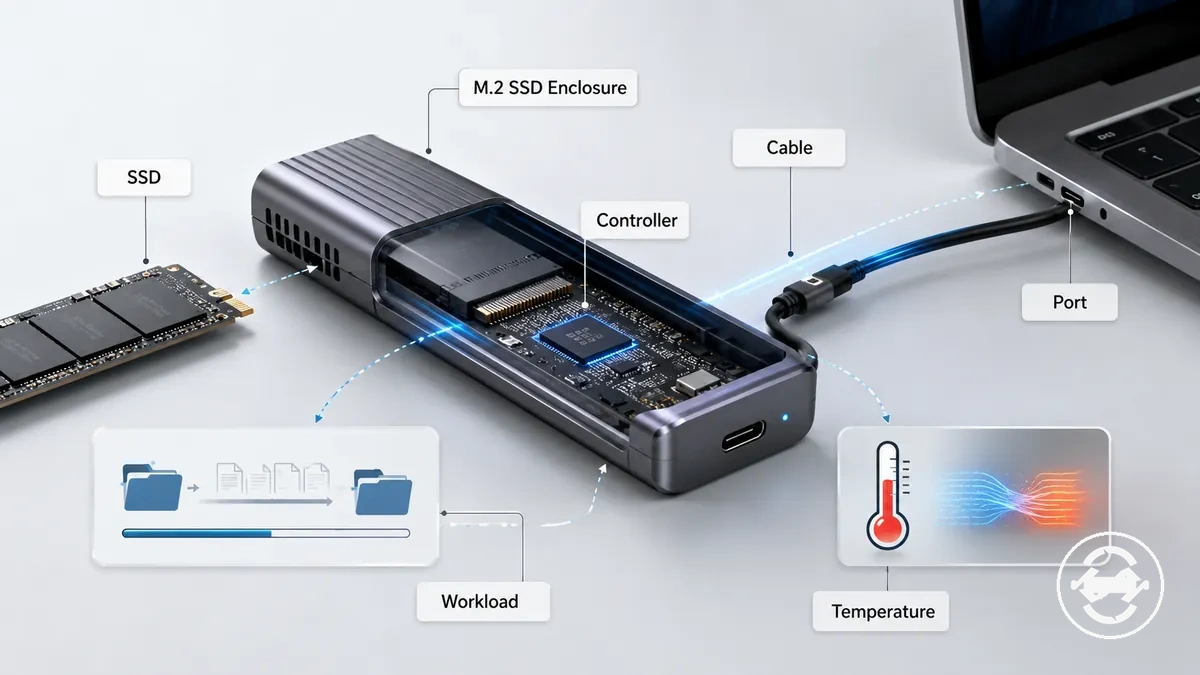
The slowest link in the chain can create the practical speed limit for an M.2 SSD enclosure. This section explains speed conditions and transfer performance factors rather than diagnosing every possible slow-transfer issue.
Advertised bandwidth versus usable transfer speed
Advertised bandwidth describes the potential capacity of an M.2 SSD enclosure connection, while usable transfer speed reflects the throughput available during actual file transfers. The difference between bandwidth and throughput comes from conditions such as controller behavior, protocol overhead, workload, and the limits of the connected components. A bandwidth label can show a speed ceiling, but it does not define every sustained transfer result.
An M.2 SSD enclosure uses a controller and connection protocol to move data between the SSD and the host device. During file transfers, the enclosure, cable, port, and workload can influence the resulting throughput. A quoted bandwidth value should be viewed as an upper boundary of the connection path rather than a fixed sustained transfer outcome.
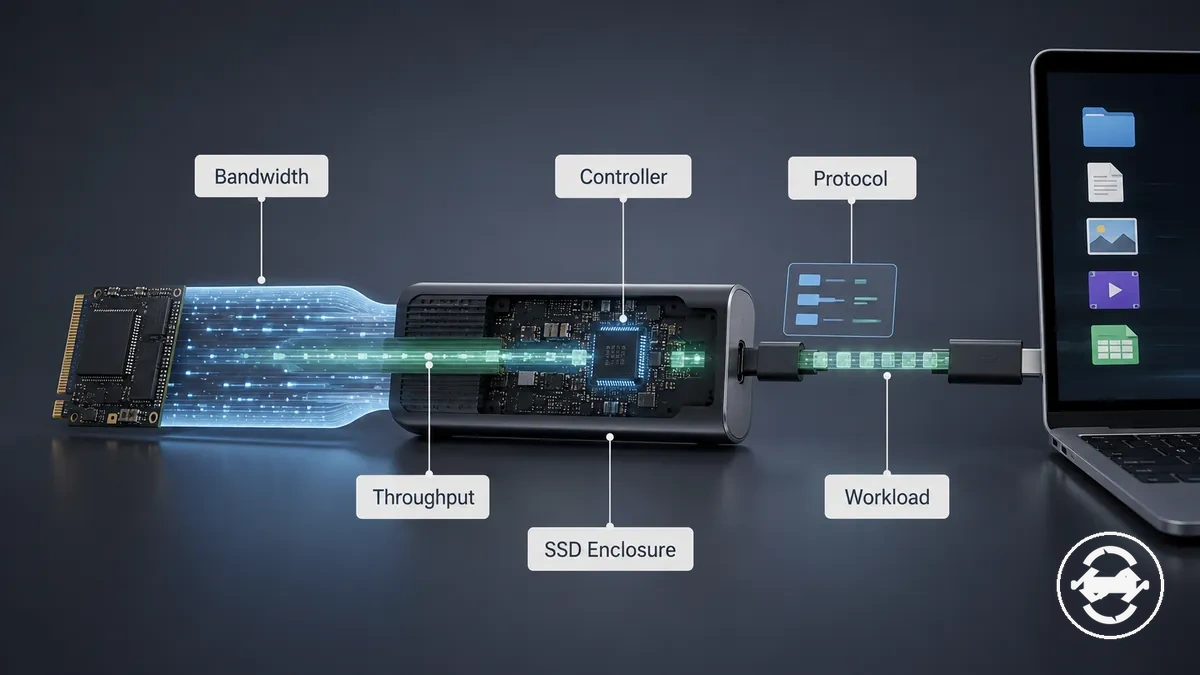
The relationship between bandwidth and throughput becomes clearer when the full transfer path is considered, including how overhead and workload conditions shape sustained performance.
Why a fast SSD can slow down inside an enclosure
A fast SSD can have lower transfer performance inside an M.2 SSD enclosure when the enclosure connection path creates a limiting condition. The SSD capability is only one part of the performance chain. The enclosure controller, interface bandwidth, host connection, workload, and thermal behavior can influence the resulting throughput.
An internal SSD may have higher potential performance than an external SSD enclosure can deliver because the enclosure adds its own controller and protocol overhead. During sustained transfer, the speed limit can come from the enclosure, cable, port, workload pattern, or temperature conditions rather than the SSD alone. This means SSD capability and enclosure capability need to be considered together when evaluating transfer performance.
Interface speed classes and practical throughput
Interface speed classes help compare the potential ceiling of an M.2 SSD enclosure connection, but practical throughput depends on the complete setup. Speed classes such as 10Gbps, 20Gbps, and 40Gbps describe connection capability rather than a guaranteed transfer result. The useful value of a higher speed class depends on host support, cable support, transfer workload, and other limits in the connection path.
An M.2 SSD enclosure speed class should be evaluated as part of the complete transfer chain. USB generation naming, USB4 or Thunderbolt conditions, enclosure controller behavior, and protocol overhead can influence whether higher bandwidth provides meaningful value or becomes limited by another part of the setup.

The comparison below shows how different speed classes represent different potential ceilings without presenting them as fixed sustained transfer outcomes.
| Speed class | Decision attribute | Practical consideration |
|---|---|---|
| 10Gbps | Connection ceiling | May be suitable when host support, cable support, and workload conditions align with the available bandwidth. |
| 20Gbps | Higher bandwidth | Can provide more headroom when the rest of the transfer path supports the higher class. |
| 40Gbps | Higher speed ceiling | Requires compatible connection conditions for the additional bandwidth to provide practical value. |
10Gbps, 20Gbps, and 40Gbps limits
10Gbps, 20Gbps, and 40Gbps speed classes create different bandwidth ceilings for an M.2 SSD enclosure, but practical throughput depends on whether the host support, cable support, and transfer workload match the connection class. A higher speed class can provide more transfer headroom, but it may have limited value when another part of the setup creates the speed limit. The main boundary is that the speed class describes capability, not a fixed sustained transfer result.
The difference between 10Gbps, 20Gbps, and 40Gbps comes from the available bandwidth and the conditions required to use it effectively. Light transfers may not benefit from a higher ceiling in the same way as large file movement or sustained transfer workloads, while controller behavior and other connection factors can influence the final throughput.
| Speed class | Support condition | Practical consideration |
|---|---|---|
| 10Gbps | Matching host support and cable support | Provides a lower speed ceiling that may suit many transfer workloads. |
| 20Gbps | Compatible connection path | Can provide additional bandwidth when the setup can use the higher class. |
| 40Gbps | Higher-capability connection conditions | May provide more headroom when host support, cable support, and workload requirements align. |
USB, USB4, and Thunderbolt speed conditions
USB, USB4, and Thunderbolt speed conditions depend on whether the M.2 SSD enclosure, cable, and host port support a compatible connection mode. The enclosure protocol, cable capability, and host port must work together for a negotiated speed to be available. A connector shape alone does not confirm the supported transfer capability.
The connection chain should be checked as a group because the host port, cable, protocol generation, and enclosure support condition can influence the final transfer rate. A compatible setup may reach a higher speed ceiling, while a mismatch can result in fallback speed or a lower negotiated speed. These conditions help evaluate enclosure performance without replacing the dedicated discussion of ports and cables.
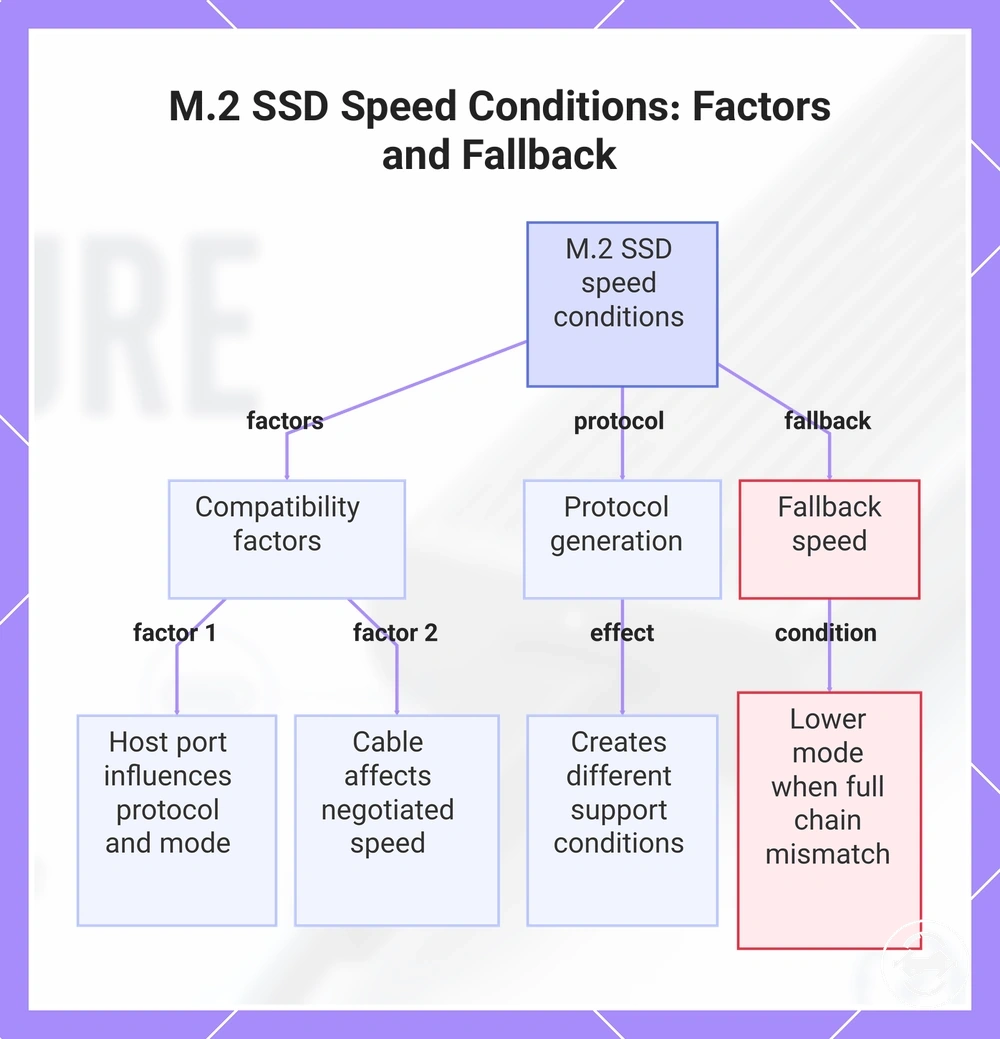
- Host port: The computer-side port can influence the available protocol and connection mode.
- Cable: Cable support can affect the negotiated speed between the enclosure and host device.
- Protocol: USB, USB4, and Thunderbolt modes create different support conditions for transfer performance.
- Fallback speed: A connection may operate at a lower mode when the full compatibility chain is not matched.
This chart illustrates the key factors affecting USB, USB4, and Thunderbolt transfer speeds for an M.2 SSD enclosure, including host port, cable, protocol, and the resulting fallback speed.
Controller, protocol, and overhead factors
The M.2 SSD enclosure controller and protocol overhead can reduce usable throughput below the raw bandwidth label. The controller acts as the connection bridge between the SSD and host device, while protocol handling and transfer conditions influence the resulting throughput. The practical speed limit depends on how the enclosure components manage the data path.
An M.2 SSD enclosure can show different sustained transfer results even when two enclosures have a similar interface class because controller behavior, protocol handling, and workload conditions may vary. Transfer overhead, queue behavior, and firmware differences can influence performance, while thermal behavior may also affect longer transfer activity.
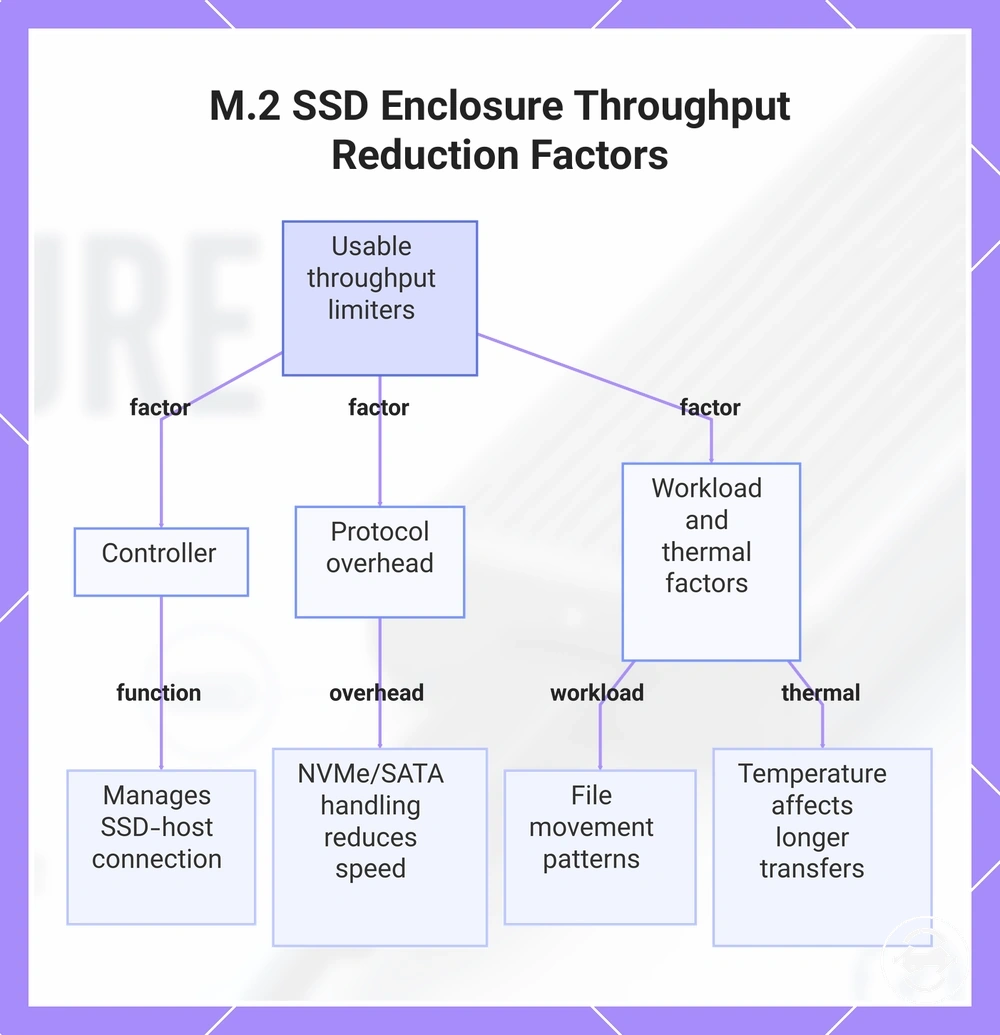
- Controller: The bridge controller manages communication between the SSD and host connection.
- Protocol overhead: NVMe or SATA protocol handling can influence usable throughput compared with the raw connection capability.
- Transfer workload: File movement patterns can affect sustained transfer behavior.
- Thermal behavior: Temperature conditions may influence longer operations depending on the enclosure and workload.
This chart shows the main factors—controller, protocol overhead, workload patterns, and thermal conditions—that reduce usable throughput below the raw bandwidth label in M.2 SSD enclosures.
Drive and host conditions that cap performance
M.2 SSD enclosure performance depends on the compatibility between the SSD, enclosure, and host connection path. The SSD protocol, drive capability, host port, cable support, and negotiated speed can determine the practical throughput available. A high speed ceiling from the enclosure does not remove limits created by the connected components.
The drive and host conditions should be evaluated together because NVMe, SATA, and connection support can create different performance boundaries. A connection may use a lower negotiated speed or fallback speed when the required support condition is not matched, while operating-system behavior and workload conditions can also influence observed transfer performance.
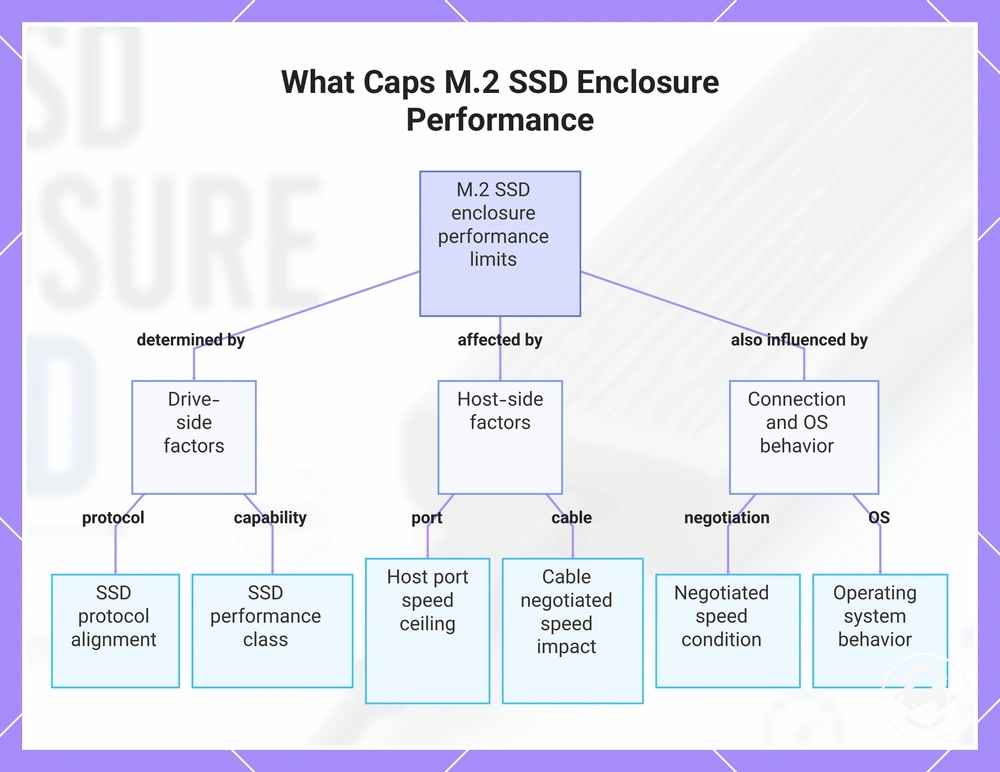
The following verification points help separate a speed limitation from a physical fit or detection issue:
- Drive protocol: NVMe or SATA support should align with the M.2 SSD enclosure design and connection requirements.
- SSD capability: The drive performance class can influence the throughput available within the enclosure setup.
- Host port: The computer-side port can determine the available protocol mode and speed ceiling.
- Cable support: The cable can influence the negotiated speed between the enclosure and host device.
- Negotiated speed: The active connection mode may vary depending on the matched support conditions.
- Operating system: System behavior can influence how storage performance is observed during use.
This chart shows the drive, host, and connection factors that determine the practical throughput of an M.2 SSD enclosure.
NVMe and SATA speed boundaries
NVMe and SATA speed boundaries in an M.2 SSD enclosure depend on the drive protocol, enclosure support, and the connection conditions between components. An NVMe drive and a SATA drive can have different performance ceilings because the protocol determines the available transfer path. The main condition is that the enclosure must support the drive type and connection mode being used.
The protocol type creates a speed boundary before factors such as host port, cable support, and negotiated speed are considered. For example, a SATA M.2 drive cannot use an NVMe-only speed ceiling because the drive protocol remains the limiting condition. The NVMe versus SATA speed differences provide further comparison context, while this section focuses on the speed boundary created inside an enclosure.
| Drive protocol | Enclosure support condition | Speed implication |
|---|---|---|
| NVMe | Requires NVMe-compatible enclosure support | Can use the available NVMe-related speed ceiling when the connection path supports it. |
| SATA | Requires SATA-compatible enclosure support | Remains limited by the SATA protocol boundary even when other components support a higher speed ceiling. |
Computer port and cable bottlenecks
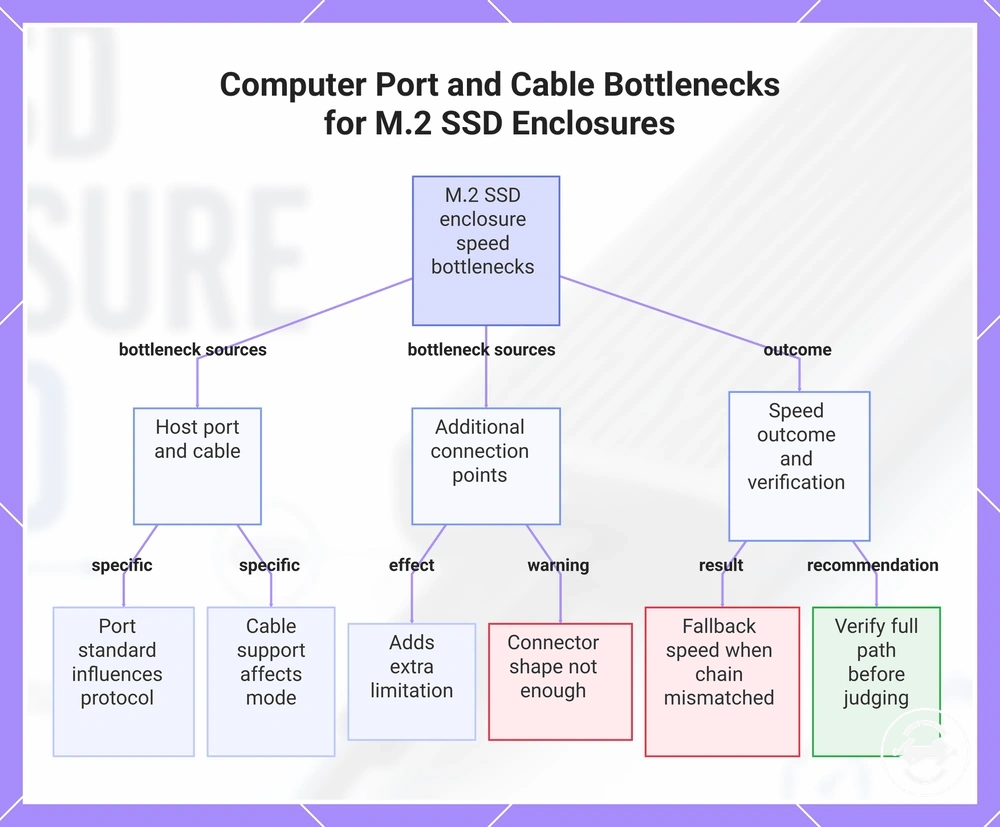
Computer port and cable bottlenecks can reduce the negotiated speed of an M.2 SSD enclosure when the connection path does not meet the required support condition. The host port, cable, adapter, and connected devices need to support a compatible protocol mode for the intended transfer capability. A USB-C connector shape alone does not confirm the available speed or protocol support.
The connection path should be verified before judging the enclosure because the host port, cable, and additional connection hardware can influence the final throughput. The ports and cable limits provide broader connection context, while this section focuses on how these conditions can create a speed boundary.
- Host port: The port standard can influence the available protocol and negotiated speed.
- Cable: Cable support can affect the connection mode available between the enclosure and host device.
- Adapter, hub, or dock: Additional connection points can introduce another limitation in the transfer path.
- Connector shape: A matching connector does not confirm the full support condition for speed performance.
- Fallback speed: A connection may operate at a lower mode when the required support chain is not matched.
This chart shows the main sources of speed bottlenecks in M.2 SSD enclosures, including host port, cable, additional hardware, and the resulting fallback speed when the connection chain is incomplete.
Thermal behavior during sustained transfers
Thermal behavior during sustained transfers can influence M.2 SSD enclosure throughput when heat changes how the system maintains performance during longer workloads. An enclosure becoming warm does not automatically indicate a defect. The effect depends on factors such as enclosure design, SSD controller behavior, airflow, and the duration of the workload.
The M.2 SSD enclosure, controller, and thermal conditions work together during sustained transfer activity. Heat can interact with bandwidth, protocol overhead, and workload demands, meaning short transfers may behave differently from longer operations. Thermal behavior should be considered as a performance condition rather than treated as a failure signal by itself.
The following factors show how sustained load can influence transfer performance:
| Factor | Condition | Possible performance effect |
|---|---|---|
| Enclosure material | Heat management depends on enclosure design | Can influence how the enclosure handles warmth during extended use. |
| Thermal pad contact | Depends on contact between components and enclosure structure | Can affect heat transfer away from the SSD controller. |
| Workload duration | Longer sustained transfer creates more continuous demand | May influence throughput behavior during extended operations. |
| Airflow | Surrounding conditions affect heat dissipation | Can influence thermal conditions around the enclosure. |
| Throttling threshold | Depends on how the SSD controller responds to heat conditions | May affect sustained transfer when thermal limits are reached. |
Heat buildup under long read and write loads
Heat buildup under long read and write loads occurs when an M.2 SSD enclosure handles sustained transfer activity that keeps the SSD and controller working over an extended period. Longer transfer duration and higher write intensity can create more thermal demand than shorter workloads. The main condition is that heat behavior varies by enclosure design, SSD characteristics, thermal interface, and ambient conditions.
During a sustained transfer workload, the enclosure body, thermal contact, and airflow conditions can influence how heat is managed. For example, a long write workload may create different thermal behavior from a short read operation because the workload duration and controller activity differ. These factors can influence throughput changes without indicating that every warm enclosure has a performance issue.
Thermal throttling as a speed limit
Thermal throttling as a speed limit can appear during sustained transfers when heat conditions cause an M.2 SSD enclosure or SSD controller to reduce performance. A slow transfer or sudden drop in throughput can have multiple possible causes, including connection limits and workload conditions. The main boundary is that thermal throttling may be a protective response rather than evidence of an enclosure fault.
A sudden drop after extended activity may indicate a heat-related slowdown when the workload creates sustained thermal demand. Other factors, such as negotiated speed, cable fallback, cache behavior, and connection conditions, can also influence transfer results. A symptom should be evaluated with its surrounding conditions before identifying the likely cause.
- Symptom: A slow transfer or sudden drop may appear after sustained activity.
- Likely cause: Heat buildup during a demanding workload may contribute to throttling behavior.
- Safe check: Compare the symptom with workload duration, thermal behavior, negotiated speed, and connection conditions.
- Drive behavior: The SSD controller may adjust performance depending on operating conditions.
- Expected outcome: Performance may change when load or temperature conditions change.
For deeper thermal checks, the heat and throttling context covers the broader heat-related behavior boundary.
Workload patterns that change transfer speed
Workload patterns can change the observed transfer speed of an M.2 SSD enclosure because different file activities create different measurement conditions. A file transfer involving large files, small files, backup tasks, or cloning can produce different throughput results on the same enclosure. The main condition is that observed speed depends on the workload pattern being performed, not a single benchmark result.
The file transfer type, transfer duration, and cache behavior can influence how throughput appears during use. A sequential transfer may show different behavior from small files or mixed file activity, while a sustained write workload may experience changes as the operation continues. These differences help explain why backup, cloning, and everyday external storage tasks can produce varied transfer observations.
The following comparison shows how common workload patterns can change observed speed:
| Workload pattern | Transfer context | Speed interpretation |
|---|---|---|
| Sequential transfer | Large files moved in a continuous transfer pattern | Can show sustained throughput behavior under a consistent workload. |
| Small files | Many smaller file operations | May produce different observed speed because the transfer pattern changes. |
| Backup | Mixed file transfer activity over time | Speed results can vary depending on file types and workload pattern. |
| Cloning | Extended copy operation between storage devices | May involve longer activity where cache behavior and sustained workload conditions matter. |
| Sustained write | Long write-focused transfer activity | Speed behavior may change during the operation as conditions evolve. |
For broader examples of storage activities, the file transfer use cases context covers how different transfer scenarios affect usage decisions.
Large sequential files versus small mixed files
Large sequential files and small mixed files can create different file transfer results in an M.2 SSD enclosure because file size and file count change the workload pattern. A sequential transfer involving large files may show different observed speed from a transfer involving many small files. The main condition is that throughput depends on the transfer characteristics being measured.
The difference between these workload patterns comes from file size, queue pattern, metadata handling, operating-system behavior, and cache behavior. For example, moving one large file may create a different transfer condition from moving many small files during a backup or cloning task.
| Workload pattern | Transfer condition | Observed speed factor |
|---|---|---|
| Large sequential files | Continuous sequential transfer with larger files | May show more consistent throughput when the workload matches sequential transfer behavior. |
| Small mixed files | Many smaller file operations with varied access patterns | May produce different observed speed because file handling and metadata activity change the workload pattern. |
Drive cache and sustained write drops
Drive cache behavior can cause an M.2 SSD enclosure to show higher initial write throughput followed by lower sustained transfer performance during longer workloads. The effect depends on the SSD model, workload pattern, drive condition, and thermal behavior. The main boundary is that cache-related speed changes are different from a port, cable, or connection bottleneck.
During a sustained transfer, SLC cache behavior, sustained write capability, drive fill level, SSD controller activity, enclosure bandwidth, and thermal behavior can interact to influence usable throughput. For example, a large file transfer may begin with higher write speed and later show a lower sustained write rate after cache conditions change. The observed result depends on the combined workload and hardware conditions rather than a fixed cache size or exact speed drop.
Choosing the right enclosure speed class
Choosing the right enclosure speed class depends on matching the M.2 SSD enclosure with the user’s workload, host support, SSD capability, and connection conditions. A higher speed class can provide additional headroom, but it may not provide practical value if the rest of the system cannot use that capability. The main condition is that the suitable speed class depends on the complete setup rather than the headline speed ceiling alone.
The choice should compare the use case, SSD capability, host support, cable rating, thermal behavior, value, and upgrade headroom. A user moving large files may prioritize different criteria from someone using an enclosure for lighter storage tasks, while a planned future upgrade may change whether additional speed capacity is useful.
| Decision factor | What to compare | Selection consideration |
|---|---|---|
| Use case | Transfer workload, backup activity, cloning, or everyday storage | Choose a speed class that aligns with the intended workload. |
| SSD capability | Drive protocol and available performance capability | The enclosure speed class should match what the SSD can use. |
| Host support and cable rating | Connection support and cable capability | The practical speed ceiling depends on the complete connection path. |
| Thermal behavior | Sustained transfer conditions and heat management | Long workloads may depend on how the enclosure handles thermal conditions. |
| Value and upgrade headroom | Current requirements compared with future needs | Additional capacity may be useful when there is a clear reason to use it. |
A suitable speed class is usually a balance between enough performance for the current use case and useful upgrade headroom. A higher speed class may be worth considering when the host support, SSD capability, cable rating, and workload can make use of it, while a lower class may be sufficient when those conditions do not require additional capacity.
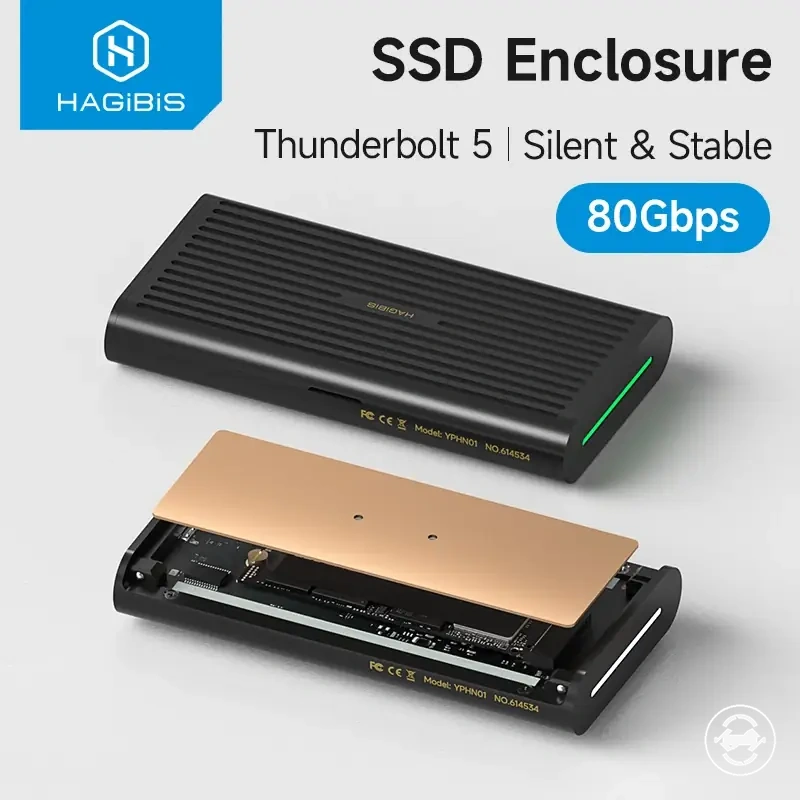
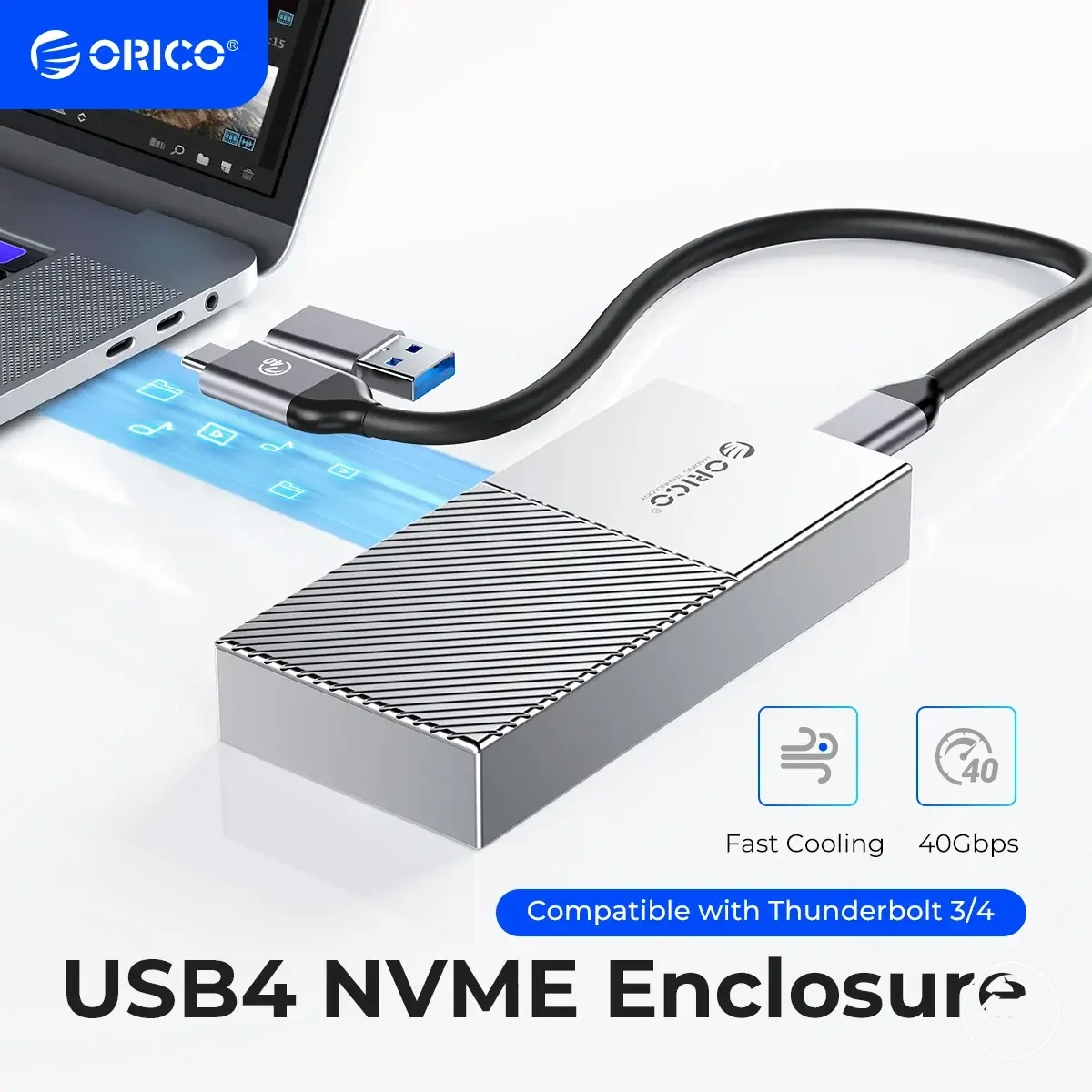
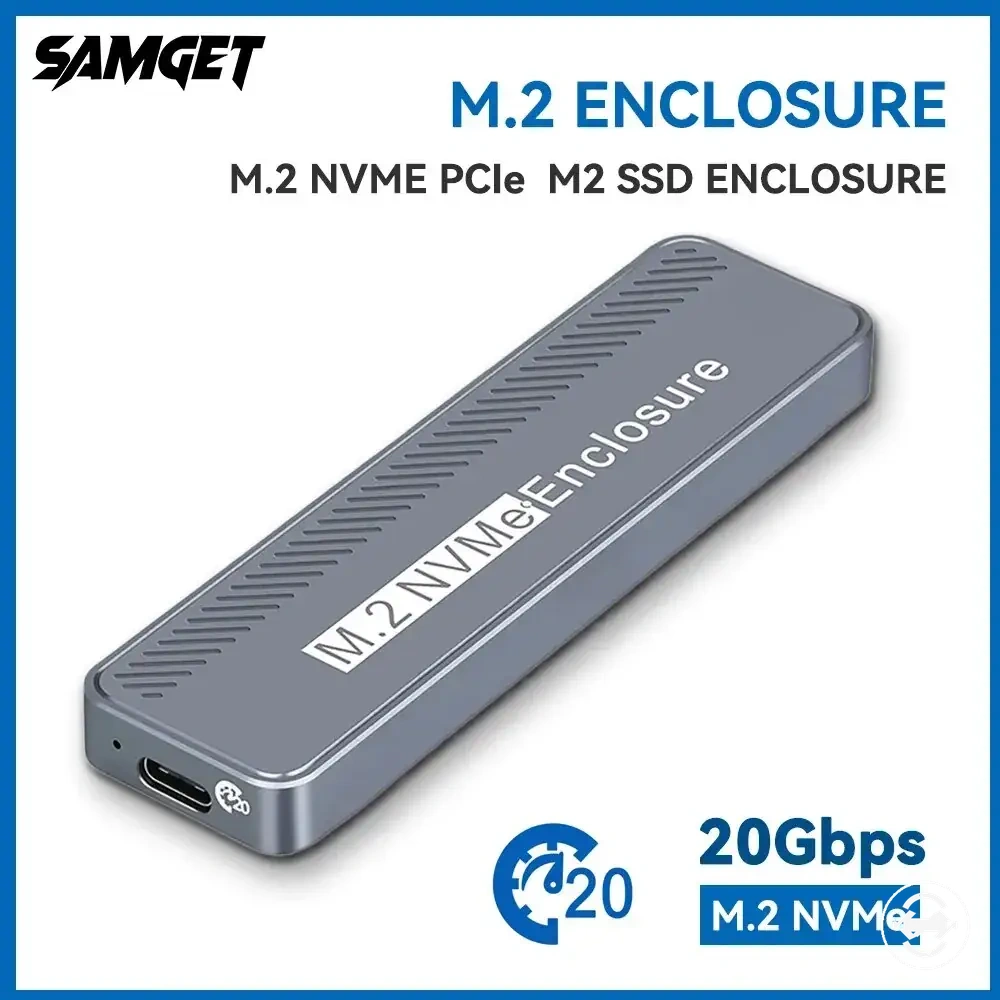
Here are product examples that may make comparison easier. Before buying, always review the compatibility criteria, essential features, and product details.


When a 10Gbps enclosure is enough
A 10Gbps M.2 SSD enclosure can be enough when the use case, host support, and SSD capability align with the available speed class. A higher speed class is not automatically more suitable when the workload or connection path cannot use the additional capacity. The main condition is that the enclosure choice should match practical needs rather than the highest available speed ceiling.
A 10Gbps speed class may suit everyday backup, moderate file transfer, SATA use, some NVMe workloads, older host ports, or situations where value is a priority. The decision should consider cable rating, thermal behavior, and upgrade headroom because these factors can influence whether additional enclosure capability provides useful value.
- Use case: Everyday backup and moderate transfer workloads may not require a higher speed class.
- Host support: Older host connections may limit the value of choosing a higher speed ceiling.
- SSD capability: SATA or lower-demand SSD setups may not need additional enclosure bandwidth.
- Value: A lower speed class can be a practical choice when it matches the intended workload.
- Upgrade headroom: A higher class may be worth considering when future hardware changes are part of the decision.
When 20Gbps or 40Gbps makes sense
A 20Gbps or 40Gbps M.2 SSD enclosure can make sense when the speed class matches the use case, host support, SSD capability, and cable rating across the entire connection path. A higher speed class is not automatically the better choice because the practical throughput depends on every component supporting that capability. The main condition is that additional bandwidth provides value only when the surrounding setup can use it.
The decision should consider workload demands, high-throughput NVMe drives, compatible host ports, rated cables, thermal behavior, value, and upgrade headroom. A higher speed class may suit frequent large file transfers or sustained workloads when the supporting hardware is compatible, while the additional capability may provide limited practical value if the host, cable, SSD, or everyday workload becomes the limiting factor.
- Use case: Frequent large file transfers or sustained workloads may justify a higher speed class.
- SSD capability: High-throughput NVMe drives are more likely to benefit when the enclosure capability matches the drive.
- Host support: The host connection should support the selected speed class to make practical use of the available bandwidth.
- Cable rating: A compatible cable can be necessary for the intended connection capability.
- Thermal behavior: Sustained transfers may depend on how the enclosure manages heat during extended use.
- Value and upgrade headroom: A higher speed class may be worthwhile when future hardware upgrades or demanding workloads justify the additional cost.
Slow transfer speed signals and page boundaries
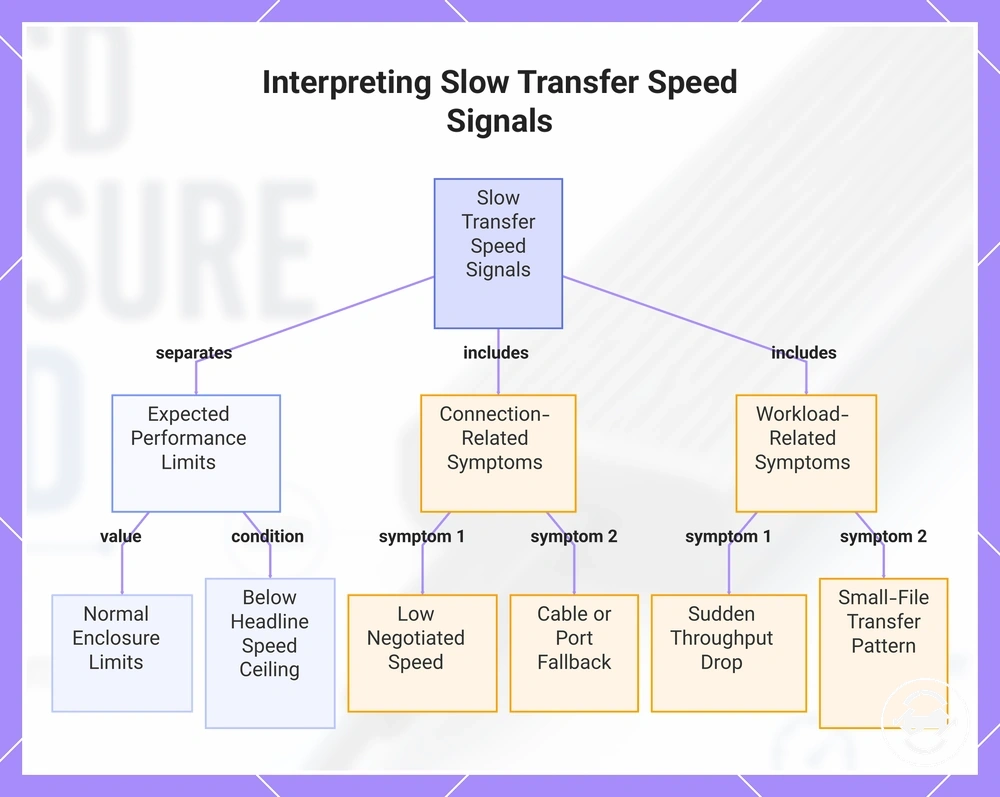
Slow transfer speed signals should be interpreted by separating expected speed limits from symptoms that may need troubleshooting. An M.2 SSD enclosure can perform within its normal limits even when transfer rates are lower than a headline speed ceiling. This section identifies diagnostic boundaries rather than replacing a complete troubleshooting flow.
A slow transfer symptom may have more than one likely cause, so each signal should be considered in context. A sudden drop in throughput, consistently low negotiated speed, heat-related slowdown, cable fallback, cache behavior, or small-file transfer pattern can each influence observed performance without confirming a single fault.
- Sudden drop: May appear during sustained workloads and can be associated with heat-related slowdown or cache behavior.
- Low negotiated speed: Can indicate that the host connection, cable, or port is operating below the expected connection mode.
- Small-file behavior: Many small files may produce lower observed throughput than large sequential transfers.
- Cable or port fallback: A lower connection mode may reduce the available transfer rate.
- Cache behavior: Write performance may change during longer transfers as workload conditions evolve.
When these symptoms persist after basic checks, use the dedicated slow transfer fixes guidance for a deeper troubleshooting process rather than treating this section as a complete diagnostic workflow.
This chart shows how to separate normal performance limits from common symptoms when analyzing slow transfer speed signals on an M.2 SSD enclosure.