M.2 SSD enclosure meaning and function
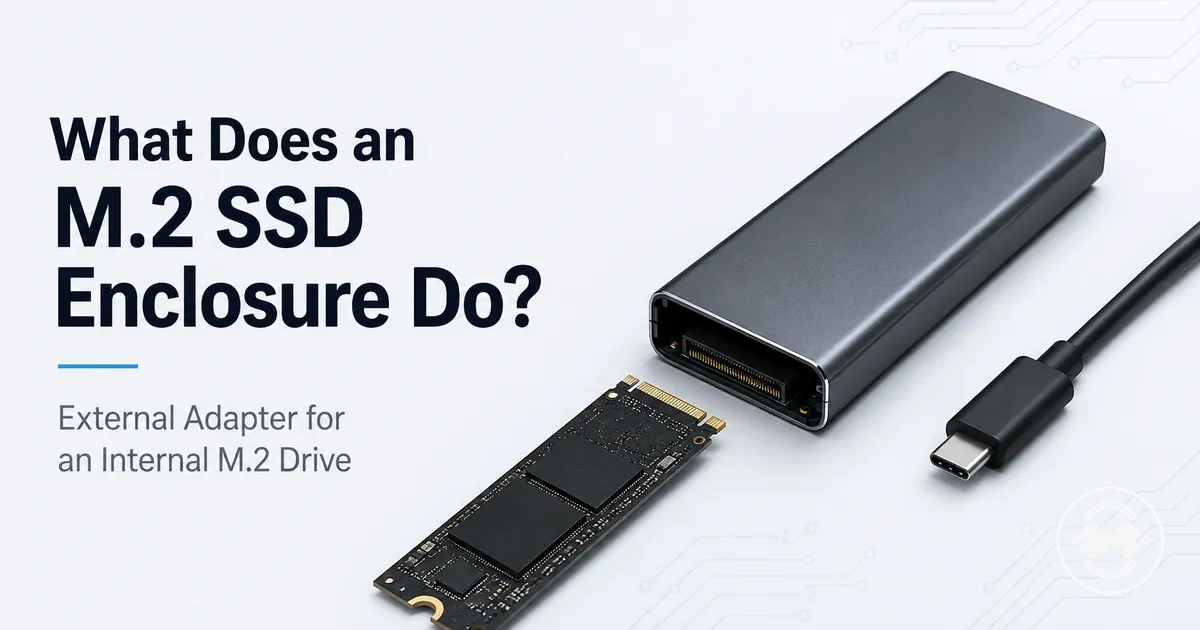
An M.2 SSD enclosure is a housing and adapter that lets an internal M.2 SSD connect as external storage. It holds the drive and provides a connection path to a host device. The enclosure changes the access method by allowing the internal drive to be used through an external connection.

An M.2 SSD enclosure combines a protective housing, an enclosure adapter, and an interface that connects the contained drive to another device. The internal drive remains the M.2 SSD, while the enclosure provides the structure and connection method needed for external use. The controller inside the enclosure manages communication between the drive and the external interface. This housing-plus-adapter design allows an internal drive to be presented as external storage.
The relationship between the M.2 SSD and the enclosure depends on the complete connection path. The internal drive connects to the enclosure through its connector, and the enclosure connects to a host device through a cable or port such as USB-C. The controller, interface, operating system, and setup state can influence drive recognition and transfer behavior. This means the outcome depends on the drive type, enclosure support, port, and cable being used together.
An M.2 SSD enclosure does not upgrade the SSD itself or change the drive into a different storage device. It changes how the internal drive is accessed by providing an external connection path. Compatibility, recognition, and transfer results depend on the specific M.2 SSD, enclosure controller, host device, operating system, and setup conditions.
Understanding the role of an enclosure provides the foundation for exploring how different drives, connections, and use cases relate to this device. For a broader overview of selection factors and related guidance, see the M.2 SSD enclosure hub.
What an M.2 SSD enclosure is
An M.2 SSD enclosure is a housing and adapter that allows an M.2 SSD to be used as an external drive outside a computer. The enclosure holds the bare M.2 SSD and provides the connection method needed for external storage. The enclosure is the housing component, while the M.2 SSD remains the internal drive being accessed externally.
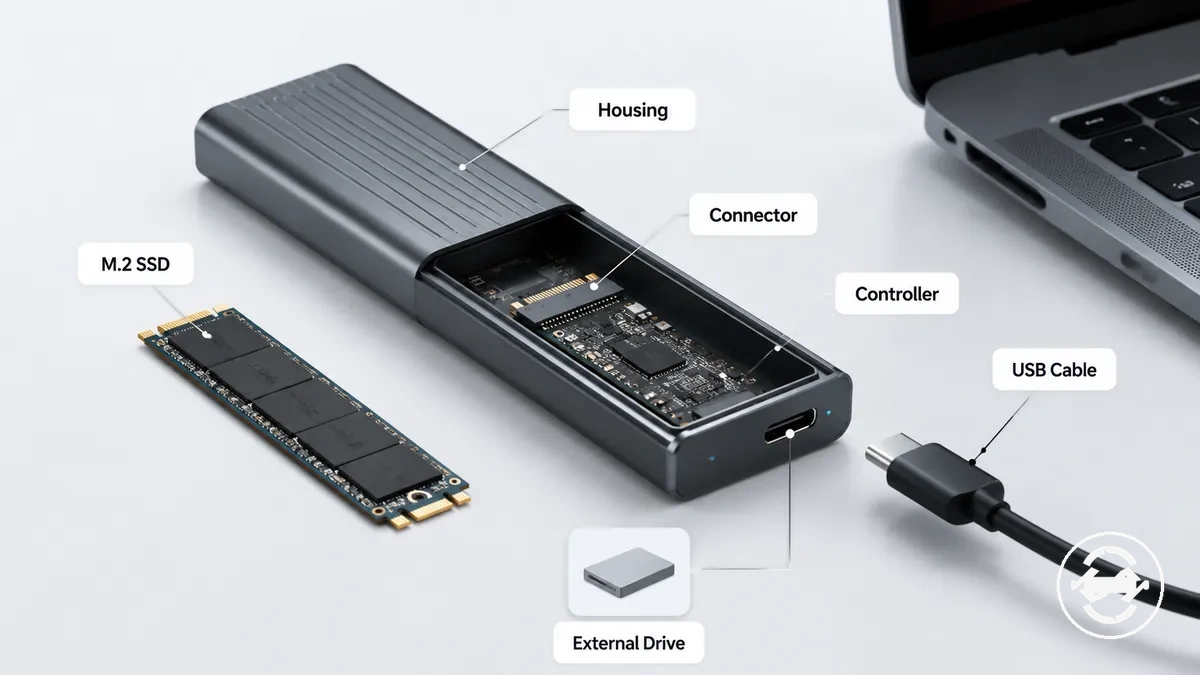
The housing keeps the M.2 SSD positioned inside the enclosure, while the adapter components create the link between the internal drive and the external interface. The connector joins the M.2 SSD to the enclosure, and the controller manages communication between the drive and the connected computer. A USB cable provides the external connection path that allows the drive to be accessed outside its original internal location.
An M.2 SSD enclosure is not the M.2 SSD itself. The enclosure provides the housing, adapter, and connection path, while the M.2 SSD remains the contained storage device. This separates an external enclosure from an internal M.2 slot, which is a built-in connection point inside a computer.
How an M.2 SSD enclosure works
An M.2 SSD enclosure works by connecting an internal M.2 SSD to a computer through an enclosure controller and external interface. The enclosure creates a communication path between the drive inside the enclosure and the host computer. This path allows the M.2 SSD to be accessed as external storage when the required drive, connection, and setup conditions are supported.
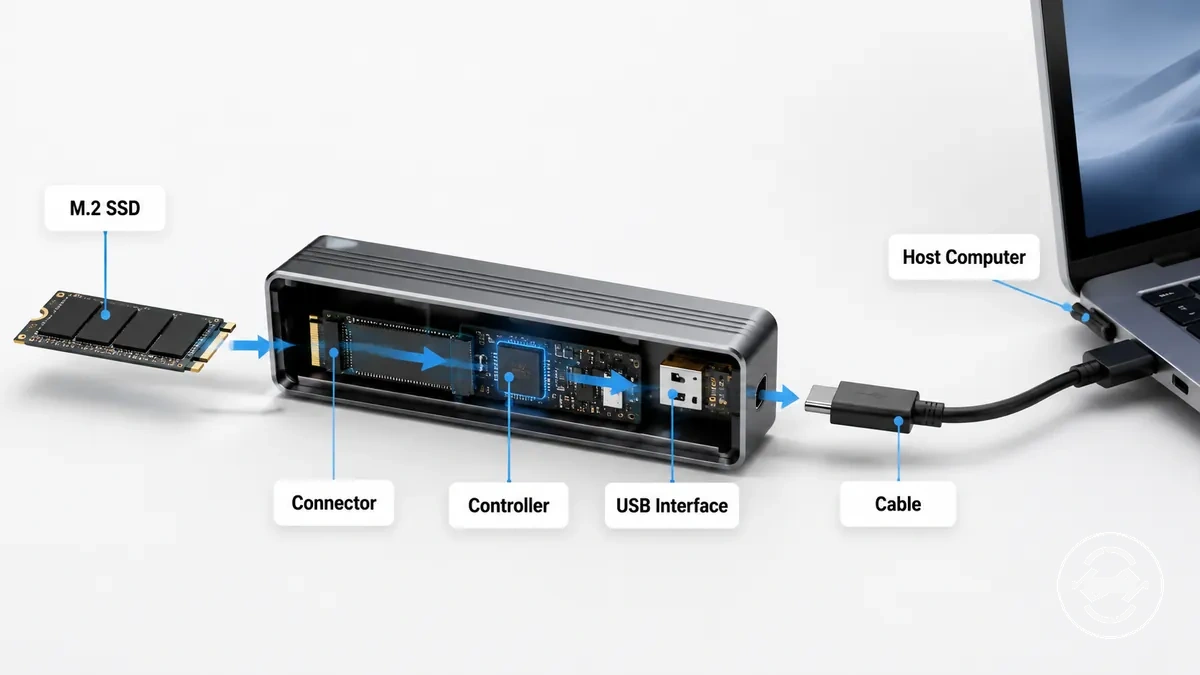
The internal connection begins when the M.2 SSD connects through the M.2 connector inside the enclosure. The enclosure controller manages communication between the supported drive and the external interface. Drive types such as NVMe or SATA may affect whether the enclosure can communicate with the installed M.2 SSD. The internal path depends on supported drive conditions, connector compatibility, and correct seating of the components.
The external connection uses the enclosure controller, USB interface, cable, and host computer to create the access path. The USB interface carries communication between the enclosure and the host device through the connected cable. Drive recognition and readable storage depend on conditions such as the operating system, file system, formatting state, and supported connection setup.
How an M.2 SSD enclosure works can be represented as a simple connection path from the internal drive to the computer. The diagram below organizes the relationship between the M.2 SSD, enclosure connector, controller, cable or port, and host computer.
- M.2 SSD → Enclosure connector → Controller → USB interface → Host computer
Internal M.2 drive connection
An M.2 drive connects inside an enclosure through an internal connector that must match the drive requirements. The connector links the M.2 drive to the enclosure controller and creates the internal connection path. The M.2 drive needs to match the enclosure connector conditions for the internal connection to function.
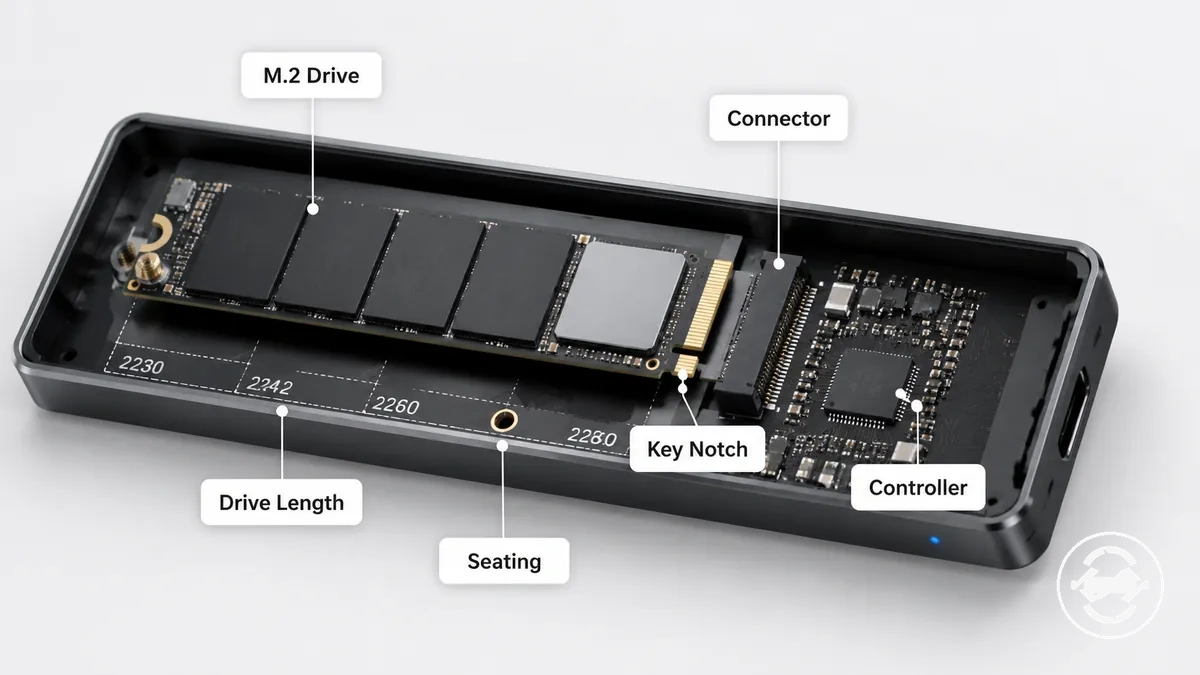
The internal M.2 drive connection depends on physical fit and electrical support. The key pattern, such as M-key or B+M-key, identifies the connector arrangement, while NVMe or SATA support depends on the enclosure controller and drive requirements. Drive length affects whether the M.2 drive can be positioned correctly inside the enclosure, with common lengths such as 2280 requiring suitable mounting support. Proper seating helps maintain the intended connection, but drive detection still depends on supported conditions.
External connection to the computer
The external connection allows an M.2 SSD enclosure to communicate with a computer through an external interface. The enclosure presents the SSD through a connection path that includes the enclosure interface, cable, and host port. This path enables access to the internal drive while depending on supported connection conditions.
The cable, host port, and operating system influence how the computer recognizes and reads the connected drive. A USB-C or USB-A connection provides the physical link between the enclosure and the computer, while the operating system and file system can affect recognition and readable storage. The connector shape identifies the connection type, but the shape alone does not determine transfer speed or compatibility.
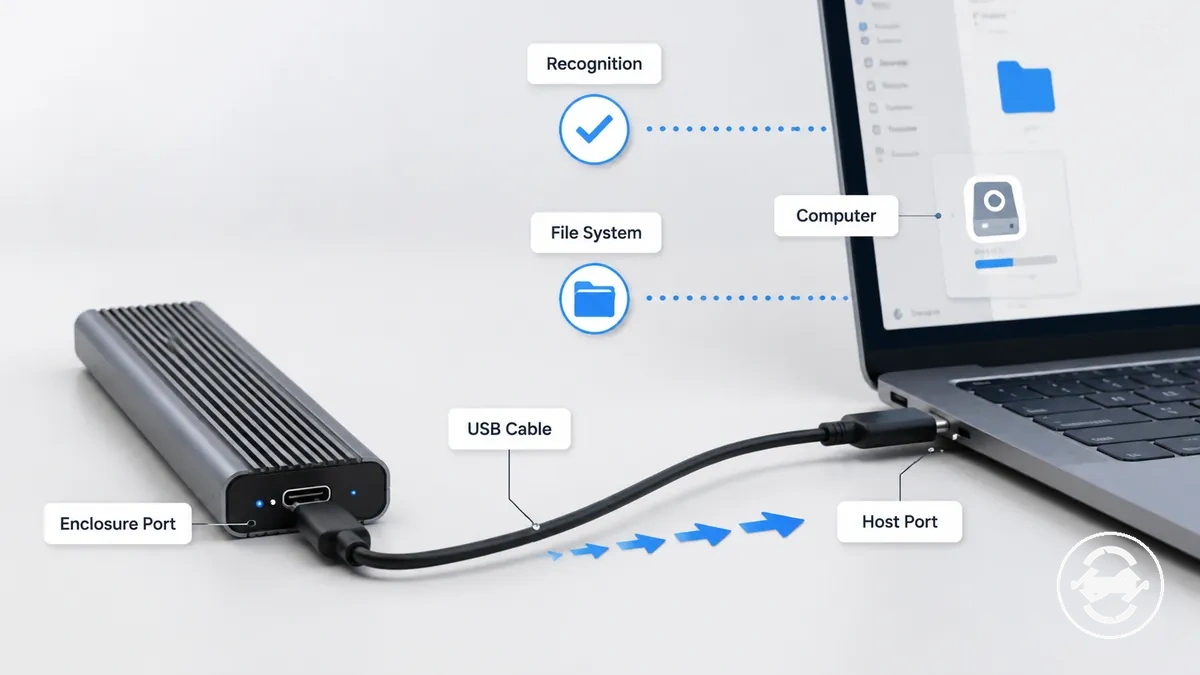
External connection to the computer separates the conditions that affect access and transfer behavior:
| Connection element | What to check | Why it matters |
|---|---|---|
| Cable | Supported cable connection | The cable provides the physical path between the enclosure and computer. |
| Host port | USB-C or USB-A port support | The host port affects how the computer communicates with the enclosure. |
| Operating system or file system | Readable drive setup | The computer may need compatible recognition and file access conditions. |
What an enclosure adds to an M.2 SSD
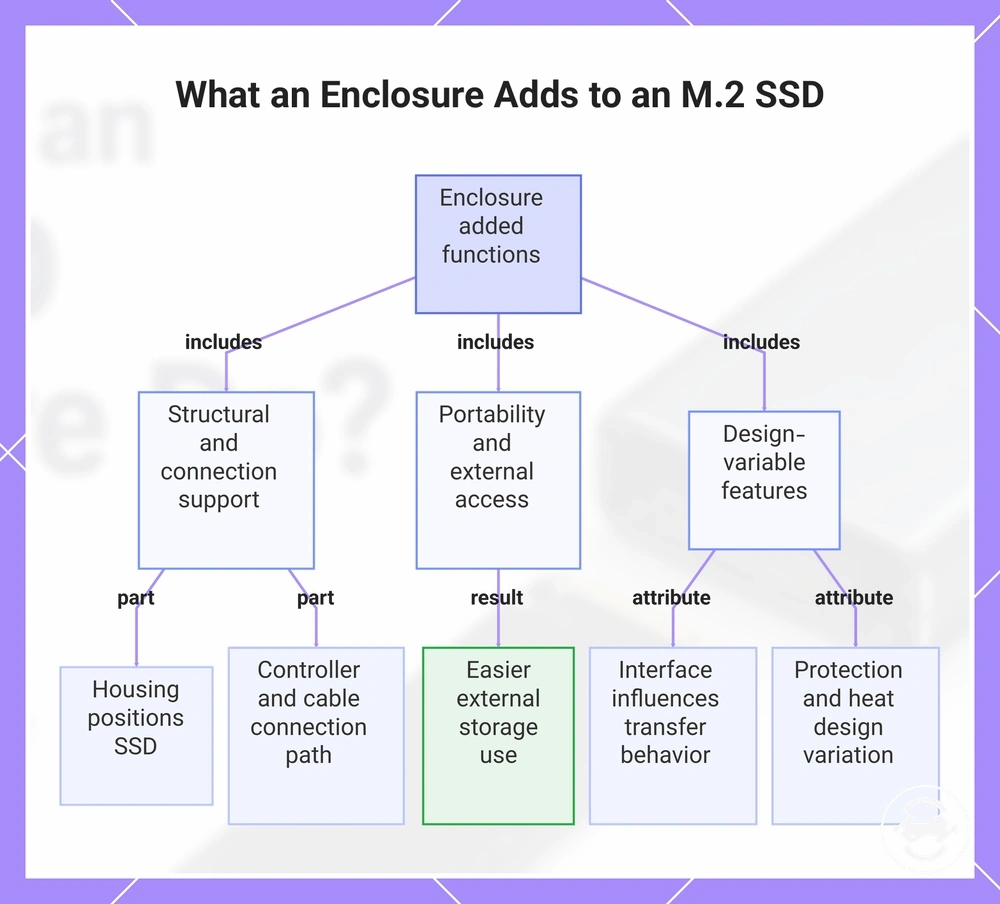
An enclosure adds external access, housing, and connection conversion to an M.2 SSD while keeping the SSD as the original storage device. The enclosure provides a structure and interface that allows a bare M.2 SSD to be used outside its original internal location. These added functions improve access and handling, but the exact result depends on the enclosure design and supported setup.
The housing positions the M.2 SSD inside the enclosure, while the controller and cable support help create the connection path between the drive and a host device. The enclosure can add portability by making an internal drive easier to use as external storage. The enclosure interface may influence recognition and transfer behavior, while handling protection and heat-related features can vary by design. The enclosure adds access and usability functions, but it does not guarantee the same outcome across every configuration.
This chart shows the main functions an enclosure adds to an M.2 SSD, including structural support, portability, and design-dependent characteristics.
External access and portability
An M.2 SSD enclosure can make an M.2 SSD usable as removable storage through a cable and host device connection. The enclosure allows the drive to be carried, connected, and accessed externally when the enclosure, USB cable, and device support the required conditions. This creates portable storage while keeping the M.2 SSD as the original storage component.
Portable storage depends on conditions such as compatibility, power, recognition, and readable file access. A user may use an enclosure to move files between computers or carry a spare drive for external access. The setup can vary depending on the operating system, formatting state, host device, and how the enclosure communicates through the connected port.
The main conditions that influence removable storage use can be grouped as follows:
- USB cable: The cable provides the physical connection between the portable enclosure and the host device.
- Host device: The connected computer or device affects communication and drive recognition.
- Power and recognition: The enclosure and host device need suitable conditions for the drive to become accessible.
- File transfer: The operating system and file system can affect whether stored data is readable and transferable.
Physical housing and basic protection
The physical housing of an M.2 SSD enclosure provides the shell, tray, cover, and retention structure that holds the drive during external use. These components support the M.2 SSD by keeping it positioned within the enclosure and helping with safer handling. Basic housing protection supports everyday use, but it is different from rugged storage certification.
The shell, tray, cover, and retention parts each contribute to the enclosure body design. The material and closure method can influence handling characteristics, while heat contact features may assist heat transfer depending on the enclosure construction. Physical protection, durability, and cooling effects depend on the specific design and conditions of use.
What an enclosure does not change about the SSD
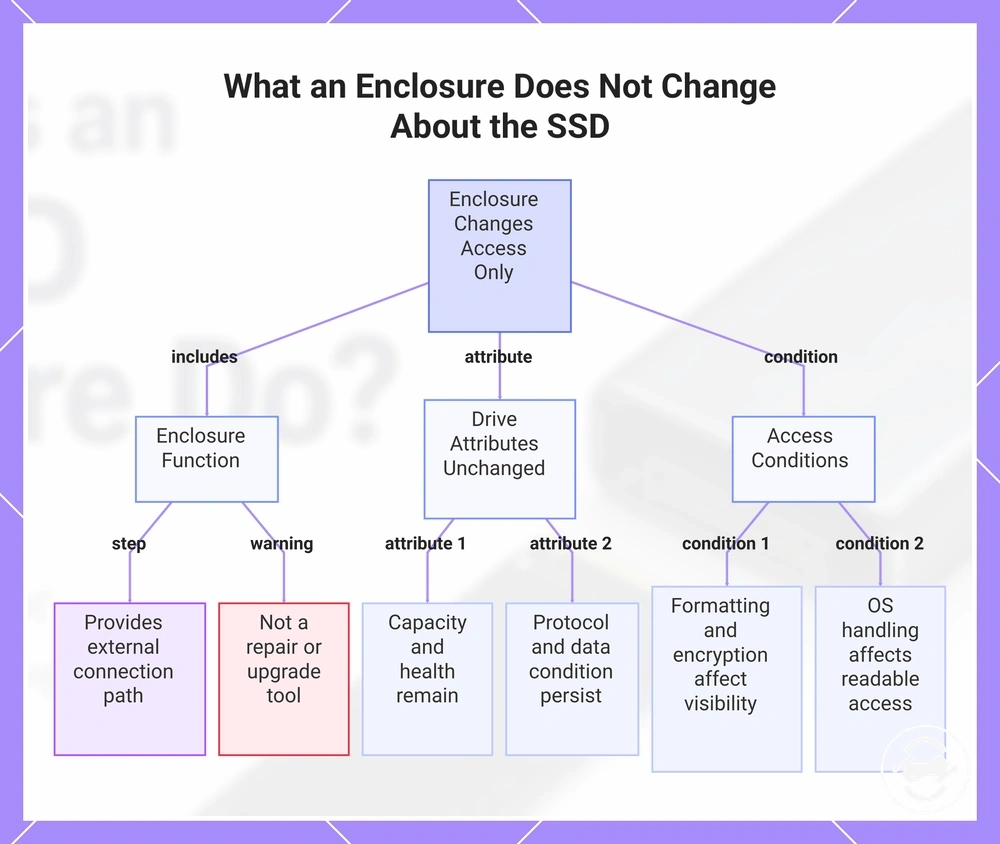
An enclosure changes the access method for an M.2 SSD, but it does not turn the underlying drive into a different storage device. The M.2 SSD still determines its capacity, drive health, protocol limits, and data condition. The enclosure provides an external connection path, but it does not act as a repair tool or upgrade the drive itself.
The underlying drive state continues to influence the result after the SSD is placed in an enclosure. Capacity remains tied to the M.2 SSD, while drive health and data condition can affect what the user experiences. Protocol support, controller behavior, compatibility, formatting, and encryption may also affect visibility and access through the connected system. The final outcome depends on the drive, enclosure support, operating system handling, and data state.
The main distinction is between changing access and changing the SSD itself:
- Enclosure function: Changes how the M.2 SSD connects and is accessed externally.
- Drive characteristics: Capacity, drive health, protocol, and stored data remain related to the underlying SSD.
- Access conditions: Formatting, encryption, and operating system handling may affect visibility and readable access.
This chart explains that an enclosure only changes the SSD's access method while leaving its capacity, health, protocol, and data unchanged, and that formatting, encryption, and OS handling affect visibility.
Common uses for an M.2 SSD enclosure
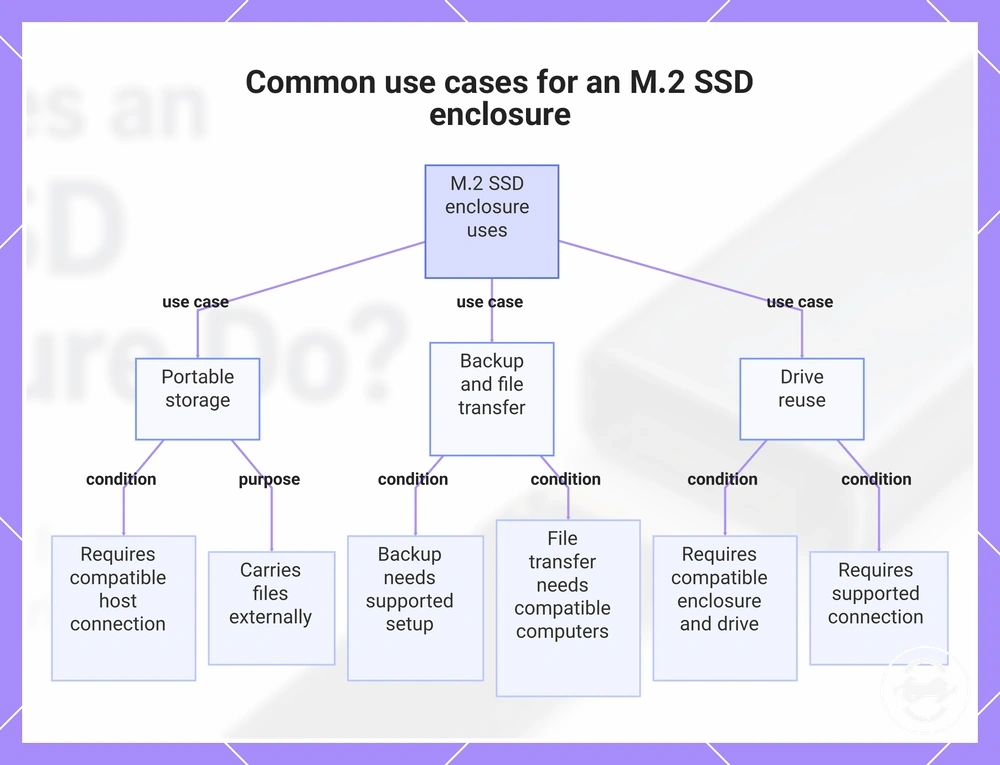
An M.2 SSD enclosure is commonly used for portable storage, backup, file transfer, drive reuse, and data access through external storage. These uses allow an M.2 drive to serve different situations while depending on compatibility, setup conditions, and the connected device. The enclosure provides external access for an M.2 SSD, but it does not replace the need for supported hardware and readable storage conditions.
Common use cases depend on the purpose and the required outcome. A spare SSD may be used as portable storage for carrying files, as an additional location for backup copies, or for transferring data between compatible computers. Drive reuse allows an existing M.2 SSD to be accessed externally when the enclosure supports the drive and connection requirements. The result depends on factors such as compatibility, recognition, operating system support, and the condition of the stored data.
The main usage situations can be grouped by the intended use case:
- Portable storage: An M.2 SSD can be carried as external storage when the enclosure and host device support the required connection.
- Backup: An enclosure can provide access to a spare SSD for storing additional copies of data when the setup supports the required conditions.
- File transfer: An enclosure can help move files between compatible computers through external storage access.
- Drive reuse: An existing M.2 SSD can be reused externally when the enclosure, drive, and connection conditions are supported.
This chart shows the main use cases for an M.2 SSD enclosure and the conditions required for each use.
Portable storage, backup, and file transfer
An M.2 SSD enclosure supports portable storage, backup target use, and file transfer by allowing an M.2 drive to be used for external data movement. These uses depend on conditions such as capacity, formatting, file system readability, port speed, and connection reliability. The enclosure supports these situations while the final outcome depends on the drive, cable, and connected system.
A spare SSD in an enclosure may be used as a transfer drive for moving large files between compatible computers or as a backup target for storing additional copies of data. File transfer and backup use can be influenced by port speed, cable reliability, formatting, and whether the operating system can read the file system. These conditions help determine how the external storage use performs in a given setup.
Portable storage, backup, and file transfer uses can be understood through the main conditions that affect the outcome. For more detail on backup and file transfer uses, common factors include:
- Capacity: The available storage space affects how much data can be stored or moved.
- Port speed: The connection capability can influence file transfer behaviour.
- Formatting: The file system and operating system support can affect readability.
- Connection reliability: The cable, enclosure, and host device conditions can influence transfer results.
Accessing or reusing an existing M.2 drive
An enclosure can help access or reuse an existing M.2 drive removed from another device when the drive and enclosure support the connection requirements. The enclosure provides a way to use an existing M.2 drive externally, while data access depends on conditions such as file system readability, encryption, and drive health. This makes the enclosure a reuse option rather than a guaranteed access or recovery method.
A laptop upgrade drive or spare M.2 drive may be reused for external access when the enclosure support, operating system, and drive condition allow it. The file system and encryption state can affect whether data can be read, while drive health can influence the expected outcome. An existing M.2 drive in suitable condition may become useful for reuse, but unsupported, encrypted, or unhealthy drives may have limitations.
The main conditions that shape existing drive reuse include:
- Enclosure support: The enclosure must support the existing M.2 drive and connection requirements for access.
- File system: The operating system must be able to read the file system for normal data access.
- Encryption: Encrypted drives may require the correct access conditions before stored data can be viewed.
- Drive health: The condition of the drive can affect whether reuse and access are possible.
Basic requirements before an enclosure can work
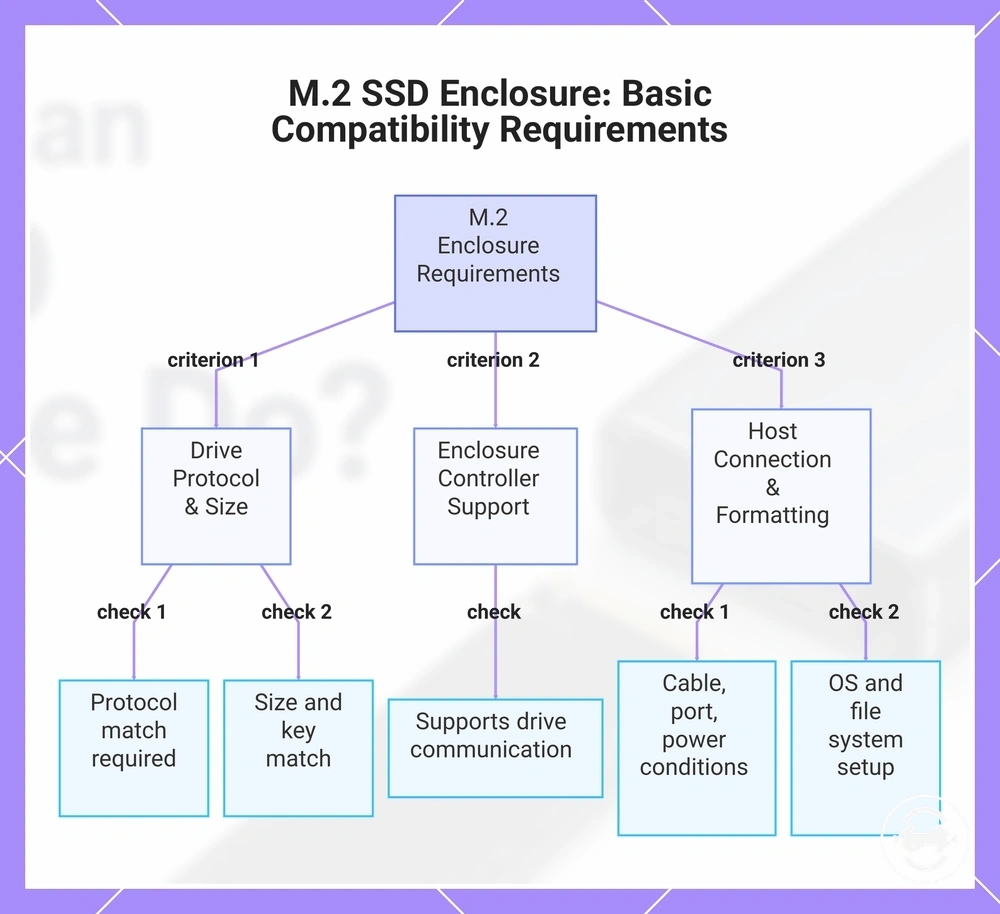
An M.2 SSD enclosure can work when the drive, enclosure, and computer connection match the required support conditions. The enclosure must align with factors such as drive protocol, physical size, key type, controller support, and the external connection path. These requirements define the basic compatibility boundary before an enclosure can recognise and access a drive.
The main setup conditions include drive protocol, physical size, key type, enclosure controller support, cable, host port, power, and formatting requirements. The drive and enclosure must support the same connection conditions, while the host port and cable provide the external link to the computer. The operating system and formatting state can affect whether the connected storage becomes readable. Recognition depends on the combined support conditions of the M.2 drive, enclosure, and host device.
The basic requirements before an enclosure can work can be checked through these criteria:
- Drive protocol: The enclosure must support the M.2 drive protocol used by the drive.
- Physical size and key type: The drive dimensions and connector key type must match the enclosure support conditions.
- Controller support: The enclosure controller must support communication with the selected M.2 drive.
- Host connection: The cable, host port, and power conditions affect the external connection.
- Formatting: The operating system and file system setup can affect readable storage access.
This chart shows the key compatibility conditions that must be met for an M.2 SSD enclosure to recognize and access a drive.
Drive type and physical fit
Drive type and physical fit determine whether an M.2 drive is supported by an enclosure. Physical similarity does not always mean electrical compatibility, so the drive protocol, key pattern, drive length, and seating conditions must match the enclosure support requirements. These drive-side conditions define whether the M.2 drive can connect and be detected correctly.
The main drive attributes include NVMe or SATA support, key pattern, drive length, and secure seating. An M-key or B+M-key design can affect connector matching, while a common 2280 drive length may require suitable enclosure space and mounting support. The M.2 drive should seat correctly in the enclosure tray, and mismatched protocol, fit, or seating conditions may prevent expected access.
Drive type and physical fit can be separated into the main criteria that influence enclosure support:
- Drive protocol: NVMe or SATA support depends on the enclosure controller and supported drive requirements.
- Key pattern: M-key and B+M-key configurations affect connector matching between the drive and enclosure.
- Drive length: A length such as 2280 requires suitable physical space and mounting conditions.
- Seating: Correct positioning in the enclosure tray helps maintain the intended connection condition.
Computer port, cable, and first-use setup
Computer port, cable, and first-use setup conditions affect how an M.2 SSD enclosure is recognised and how transfer behaviour is handled. The host port, cable rating, operating system, formatting state, and power delivery all influence the computer-side connection path. These conditions help determine whether the connected storage becomes accessible and how the system communicates with the enclosure.
The host port may use a USB-C, USB-A, or Thunderbolt connection path depending on the supported setup. Cable rating can influence transfer behaviour, while the operating system and formatting state can affect recognition and readable storage access. Power delivery can also influence enclosure operation depending on the host device and connection conditions. Detection, formatting, and transfer speed are related but separate outcomes that depend on different parts of the setup.
The main computer-side conditions can be grouped by what each element verifies:
- Host port: The USB-C, USB-A, or Thunderbolt path must provide a supported connection between the enclosure and computer.
- Cable rating: The cable support condition can influence available transfer behaviour.
- Operating system: The system must recognise the connected storage and handle the file system conditions.
- Formatting: The storage format can affect whether the drive is readable after connection.
- Power delivery: Available power conditions can influence enclosure operation and connection stability.
These computer-side conditions help explain why the connection path alone does not define real transfer performance.
When an M.2 SSD enclosure makes sense
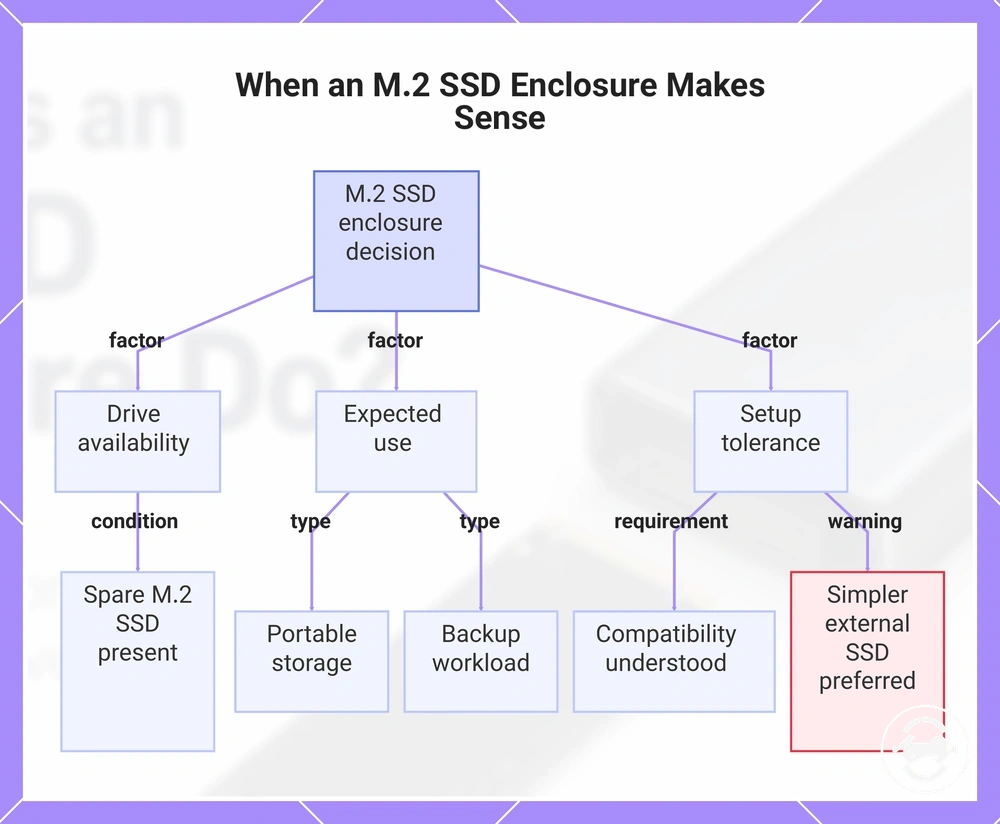
An M.2 SSD enclosure makes sense when an available M.2 drive, intended use, and setup conditions align with the need for external storage. It can be suitable for reusing a spare M.2 SSD, creating portable storage, or supporting a specific backup workload or transfer use case. The decision depends on the drive already available, the expected use, and the level of setup tolerance required.
A spare M.2 SSD may fit an enclosure use case when reuse provides value and the user has confidence that the drive, enclosure, and host device are compatible. Portable storage, backup workload needs, and file transfer requirements can influence whether this approach is suitable. A ready-made external SSD may be a simpler option when setup effort or compatibility decisions are a concern. The most suitable choice depends on the user's situation, available hardware, and willingness to manage the setup conditions.
The main decision signals can be grouped by situation:
- Spare M.2 SSD: An enclosure may make sense when an existing drive is available and reuse is a useful outcome.
- Portable storage need: An enclosure can fit when the goal is using an available M.2 SSD as external storage.
- Backup workload: An enclosure may suit a user who needs an additional storage option for a specific backup use case.
- Compatibility confidence: An enclosure is more suitable when the drive, enclosure, and host setup conditions are understood.
- Setup tolerance: An enclosure may be less suitable when a simpler external SSD option is preferred.
This chart shows the key factors and conditions that determine whether an M.2 SSD enclosure is a suitable choice.