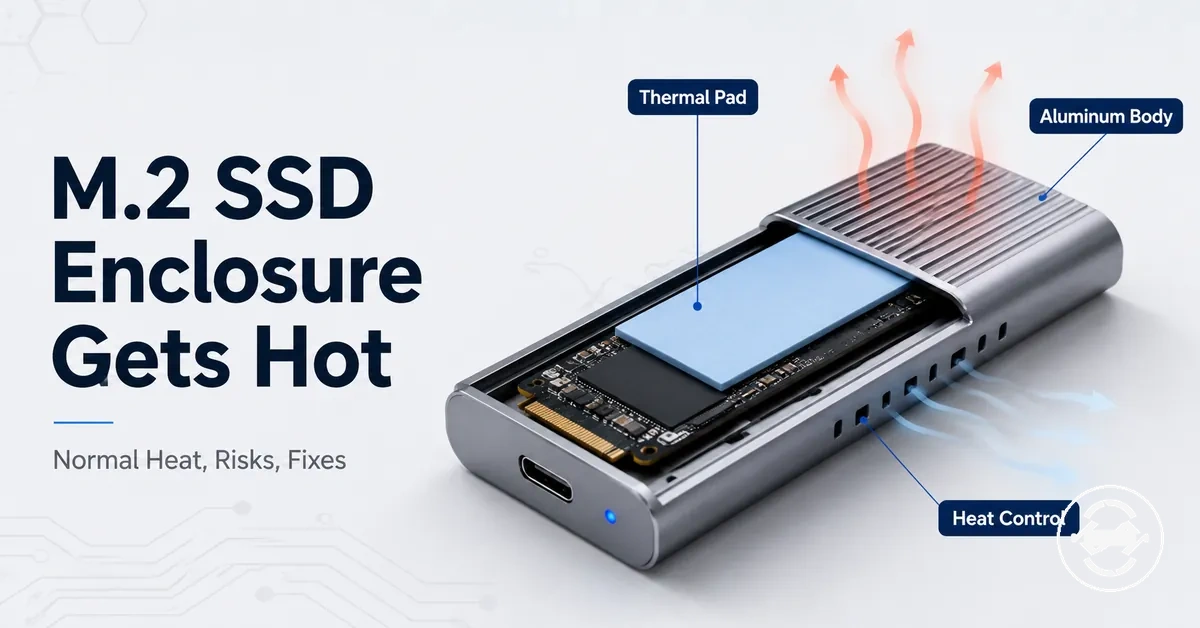
M.2 SSD enclosure heat and overheating
A M.2 SSD enclosure can get warm or hot during use, and that heat is not automatically overheating. The safer way to judge it is by the workload, temperature behavior, visible symptoms, and stability of the drive. A warm enclosure during active use is often less concerning than heat that appears with thermal throttling, disconnects, errors, or unstable detection.
An M.2 SSD enclosure creates a small heat-management space around an internal M.2 SSD, so the NVMe SSD, controller, thermal pad, and enclosure body all affect how heat moves. During a sustained workload, the controller can create heat buildup, while the thermal pad and enclosure body may spread that heat to the outside surface. For broader context on enclosure types and decision checks, use the M.2 SSD enclosure hub. Normal warmth is usually about heat being transferred; overheating is more concerning when heat is paired with instability or repeated symptoms.
A warm enclosure at idle, a hot-to-touch enclosure during a large file transfer, speed drops after warming, or disconnects during long transfers can point to different levels of concern. Surface temperature alone may not match the internal sensor or SMART reading, so safe temperature judgment depends on the SSD model, enclosure design, workload, and symptoms. If heat rises during normal use or appears with errors, caution is safer than assuming the enclosure is working normally.
A hot surface does not always mean the SSD is failing. The useful boundary is behavior: normal heat can appear during active transfer, while overheating is more likely when heat changes performance, detection, or stability.
When M.2 SSD enclosure heat is normal
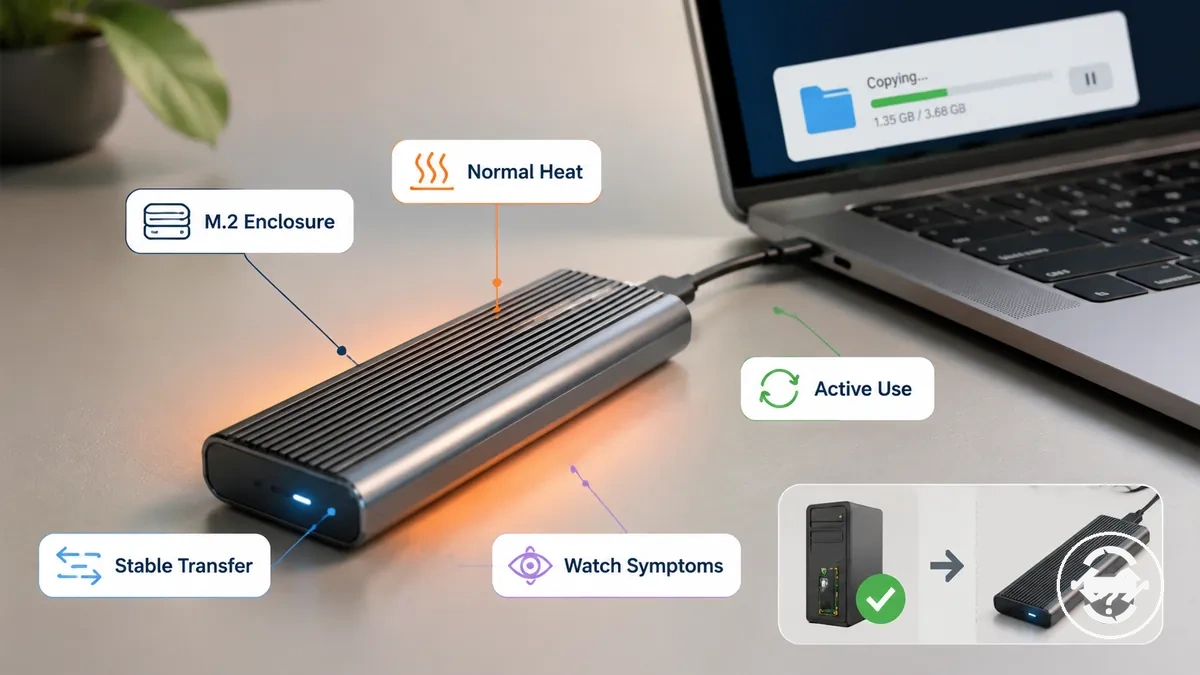
M.2 SSD enclosure heat is often normal during active use, especially during sustained transfers or an NVMe workload. The enclosure body may feel warm or hot-to-touch because heat is being moved away from the internal drive and spread through the case. Workload and stability are the main checks: a stable transfer with no symptoms is less concerning than heat paired with errors, disconnects, or repeated speed drops.
This visual clarifies when M.2 SSD enclosure heat is usually normal under active use or a transfer context. It frames enclosure warmth as a workload-and-stability condition, not as a universal temperature number.
At idle or light use, a warm enclosure can still be a watch condition rather than a failure sign, especially if background activity, host power, enclosure material, or ambient heat affects the surface. During sustained transfers, the same enclosure can feel hotter because transfer duration and NVMe workload keep the controller active for longer. Touch alone does not prove risk; stable behavior matters more than the surface feeling warm.
A hot exterior does not always mean the SSD is failing. Normal warmth becomes more concerning when the heat keeps rising under similar use or appears with symptoms such as unstable detection, errors, disconnects, or speed drops.
These conditions usually support normal heat rather than immediate overheating:
- The M.2 SSD enclosure becomes warm during active use and the transfer remains stable.
- The enclosure is hot-to-touch during sustained transfers but cools after the workload ends.
- Idle warmth appears without errors, disconnects, or detection changes.
- The enclosure material or contact surface spreads heat outward instead of trapping it inside.
- Temporary surface heat matches a long workload duration rather than appearing suddenly with symptoms.
Warm enclosure at idle or light use
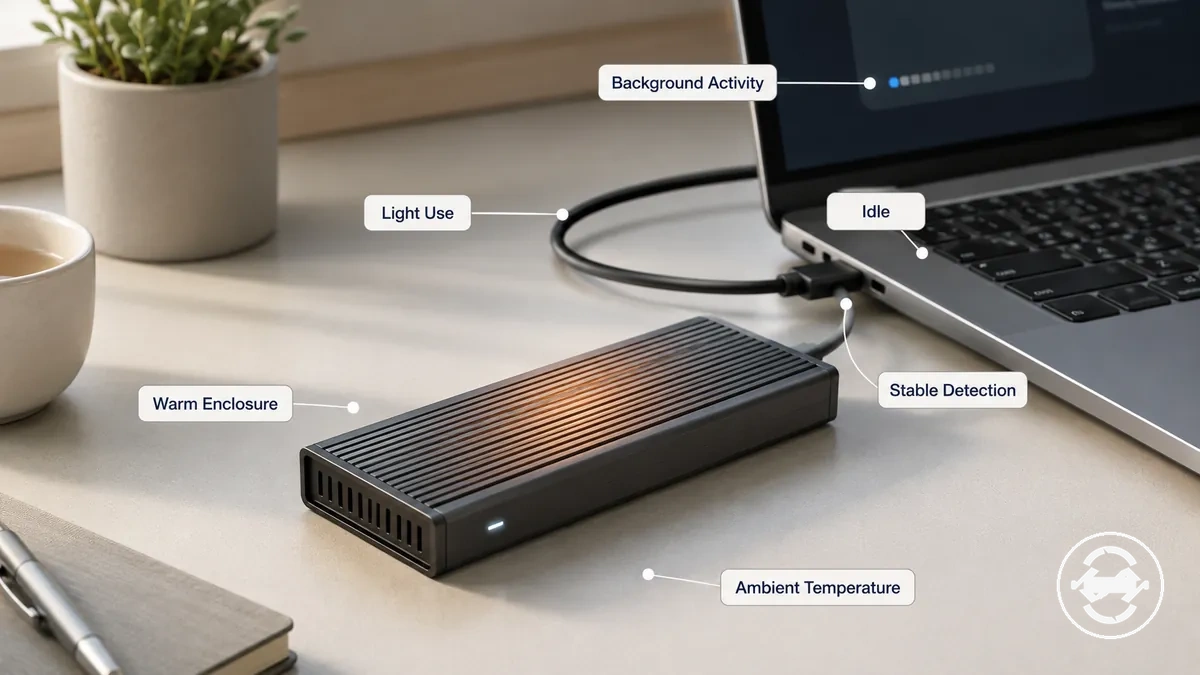
A warm enclosure at idle or light use can be normal when the drive remains stable. Mild surface warmth may result from background activity, host power, or ambient temperature even when there is little workload. A connected M.2 SSD enclosure does not need to feel completely cool to be operating normally. Treat it as a watch condition if the warmth continues to increase without added workload or if stable detection changes.
This image clarifies a warm enclosure at idle or light use with a stable connection context rather than a heavy transfer or failure scene. It helps distinguish harmless idle surface warmth from unusual idle heating.
The following checklist helps distinguish harmless idle surface warmth from unusual idle heating:
- The drive maintains stable detection while the enclosure remains connected.
- Surface warmth stays mild instead of increasing steadily over time.
- Background activity or host power may explain light heat during idle or light use.
- Ambient temperature can make the enclosure feel warmer than expected.
- No errors or unexpected disconnects appear while the drive remains connected.
Hot enclosure during large file transfers
A hot enclosure during large file transfers is more expected than the same level of heat during idle use. Sustained writes increase controller activity for longer periods, especially when file size and transfer duration keep the workload continuous. As the M.2 SSD enclosure spreads heat through the enclosure body, the external case can become noticeably warm or hot. During a long copy of large video files, for example, temporary heat can occur while performance remains stable. The more important check is whether the connection and performance remain stable throughout the transfer.
This image demonstrates hot enclosure behavior during large file transfers and organizes heat as a workload-duration effect rather than an emergency symbol. It highlights how heat spreading during sustained writes differs from idle warmth without implying that every hot enclosure is normal.
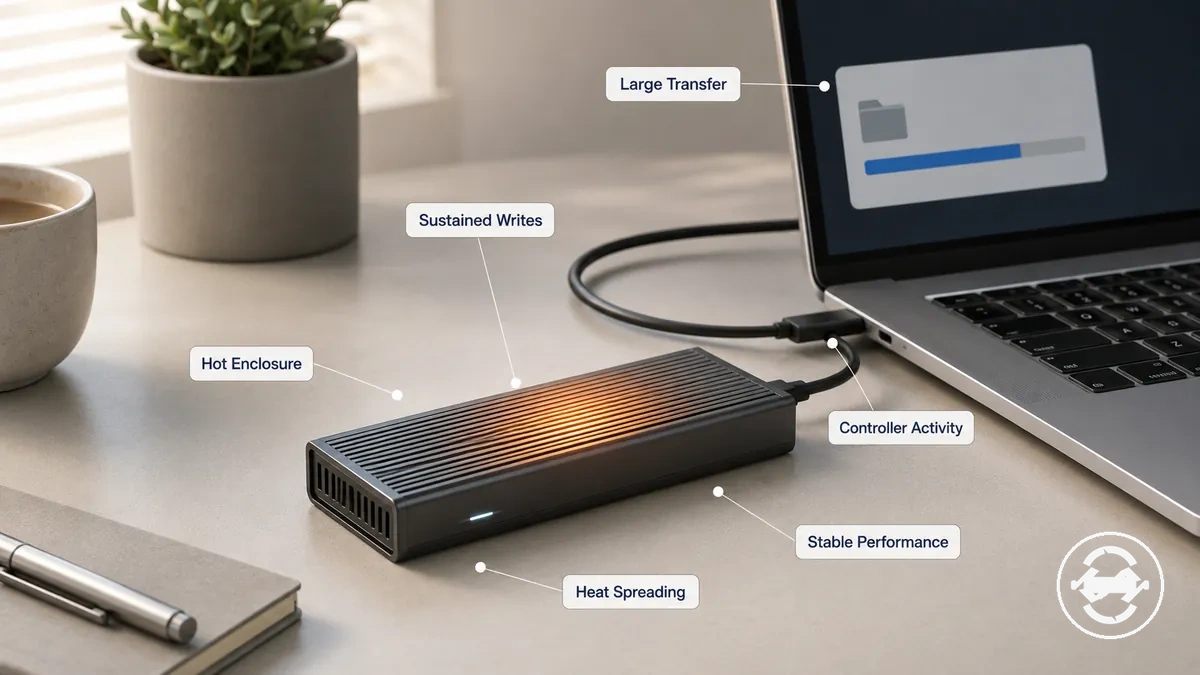
Temporary heat during a sustained transfer can be normal when performance remains stable and the connection stays reliable. Heat becomes a stronger watch cue when it appears alongside repeated errors, disconnects, or unexpected performance changes rather than transfer duration alone.
Safe temperature ranges for an enclosed M.2 SSD
Safe temperature for an enclosed M.2 SSD depends on the SSD model, controller, enclosure design, workload, and signs of throttling or instability. Safe interpretation comes from considering the workload, the controller, and the drive's behavior rather than relying on a single temperature value. An internal sensor or SMART reading usually provides a more useful reference than touching the enclosure surface. The enclosure surface can feel much warmer than the internal SSD sensor, so surface temperature alone should not be treated as the final measure.
This image explains that safe temperature interpretation for an enclosed M.2 SSD depends on sensor readings, surface temperature, workload, and symptoms rather than a universal temperature number. It distinguishes enclosure heat perception from the internal SSD sensor to reduce confusion.
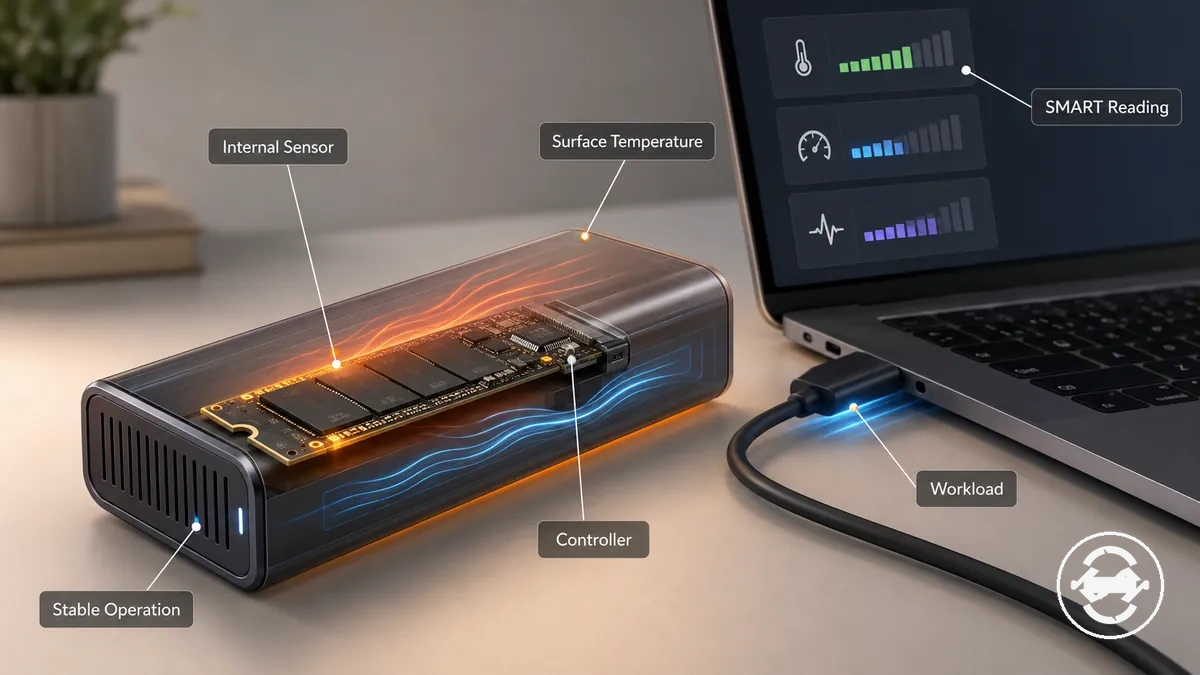
Temperature interpretation begins by separating internal sensor readings, enclosure surface feel, workload, and symptoms. During heavier workload, controller activity can raise the internal sensor reading while heat spreading makes the enclosure surface feel warmer. A SMART reading or utility can help interpret internal drive temperature, whereas surface temperature mainly reflects how heat leaves the enclosure. The table below is an interpretation guide rather than an authoritative temperature range.
| Reading or condition | Workload context | Symptom pattern | Suggested response |
|---|---|---|---|
| Internal sensor or SMART reading | Idle or active workload | Normal operation with no throttling or instability | Interpret by SSD model, controller, and workload |
| Warm enclosure surface | Sustained workload | Performance remains stable | Compare surface feel with the internal sensor reading |
| Increasing sensor reading with symptoms | Extended workload | Throttling or instability appears | Reduce workload and assess cooling or enclosure conditions |
| High surface heat without sensor confirmation | Any workload | Condition remains uncertain | Check a SMART reading or utility before deciding on further action |
Heat signs that suggest a real problem
Heat becomes a real problem when it appears together with performance drops, disconnects, errors, rising temperature, or unstable detection. A warm enclosure by itself is not enough to indicate failure. Repeated thermal throttling, recurring instability, or symptoms that return under similar workload conditions are stronger warning signs than surface heat alone. The key diagnostic pattern is heat combined with changing drive behavior rather than heat by itself.
Judge heat signs by their timing, recurrence, and effect on normal operation. A symptom that appears only during a sustained workload and disappears after cooling may suggest a different response than one that continues during light use. Borderline cases can often be monitored when performance remains stable and no instability appears, while repeated symptoms may justify pausing use, checking the enclosure fit, reseating the SSD if appropriate, or stopping use until the cause is investigated. The checklist below separates heat alone from heat plus failure signals.
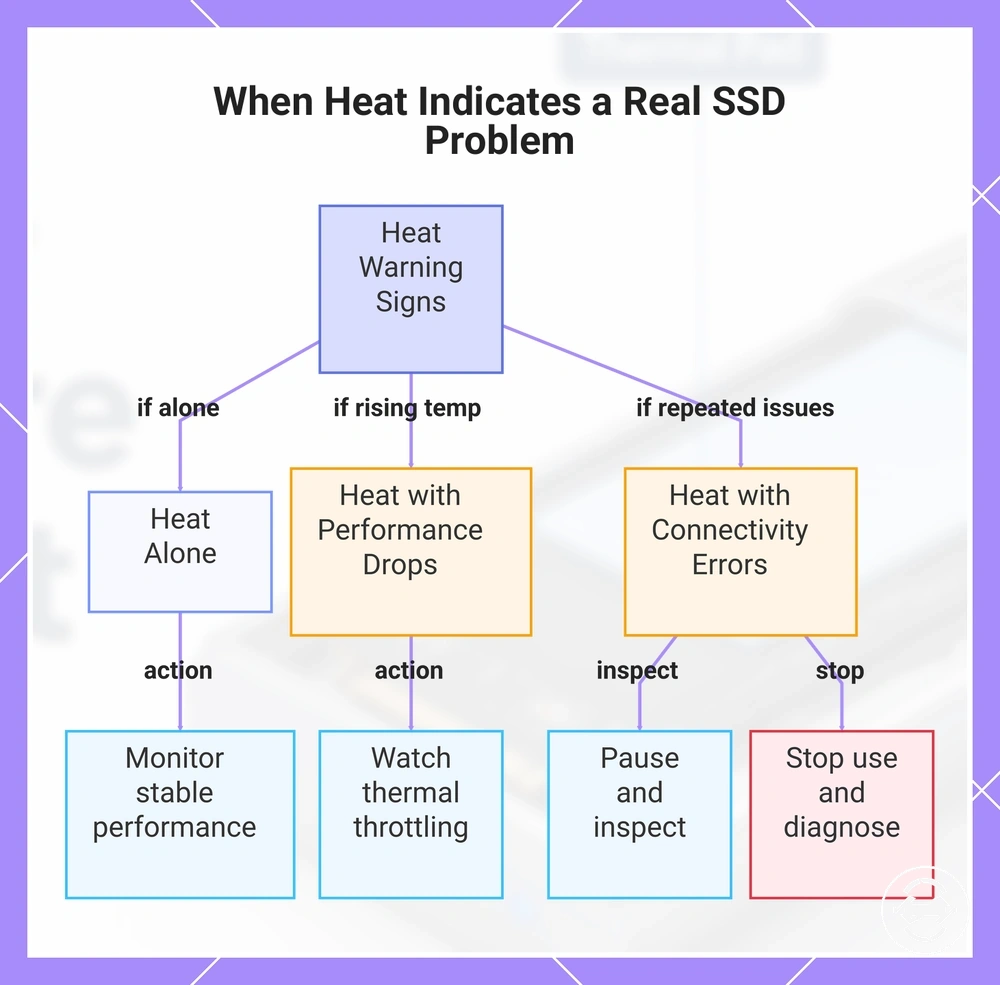
- Warm enclosure only: Monitor if performance remains stable and no other symptoms appear.
- Performance drops with rising temperature: Watch for possible thermal throttling during sustained workload.
- Repeated disconnects or unstable detection: Pause use and inspect the enclosure or SSD connection before continuing.
- Errors that recur with heat: Treat repeated errors as a warning sign and continue diagnosis before extended use.
- Heat with multiple repeated symptoms: Stop using the enclosure until the underlying cause is identified.
This chart shows how to distinguish harmless heat from heat that signals a real SSD problem, based on the presence of other symptoms.
Heat with thermal throttling or speed drops
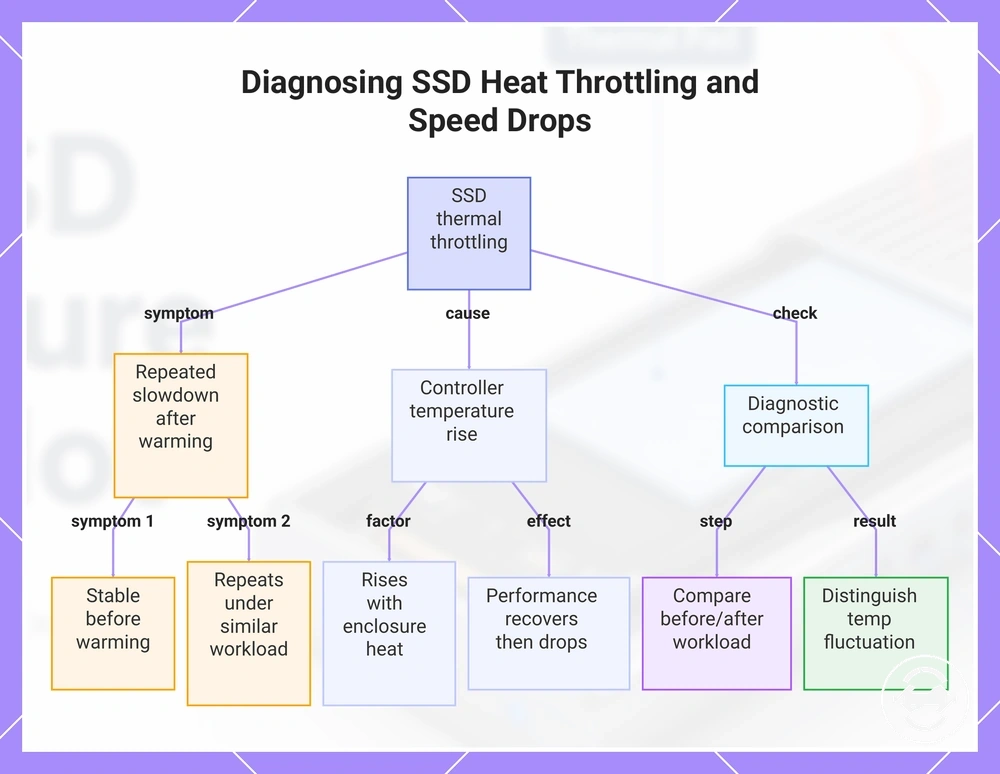
When heat is followed by thermal throttling or speed drops during or after a sustained workload, the SSD controller temperature may be affecting transfer speed. Performance can slow as the enclosure warms, especially during long transfers that keep the controller under continuous load. Repeated slowdowns after warming are a stronger diagnostic clue than a single isolated reduction in transfer speed.
If transfer behavior changes after the enclosure has warmed, compare performance before and after the same workload to see whether the slowdown is repeatable. This comparison helps distinguish a temporary fluctuation from a heat-linked slowdown. For broader information about speed and throttling, see the dedicated guide after confirming that heat and repeated slowdowns occur together. The checklist below compares transfer behavior before and after warming.
- Transfer speed is stable before warming but repeatedly slows after a sustained workload.
- Repeated slowdowns occur under similar workload duration rather than at random.
- SSD controller temperature rises as enclosure heat transfer increases during extended activity.
- Performance improves after cooling but slows again under a similar workload.
This diagnostic chart shows the symptom pattern, the underlying cause (controller temperature rise), and the key comparison test to confirm heat-linked slowdowns.
Heat with disconnects, errors, or unstable detection
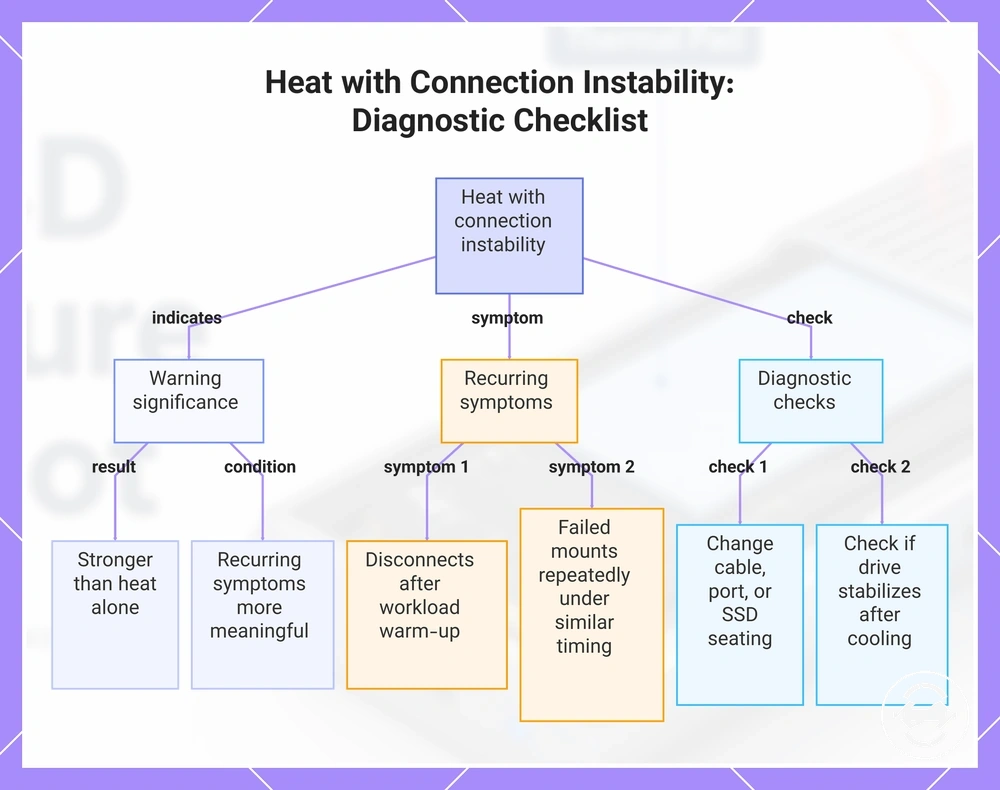
When heat is paired with disconnects, errors, or unstable detection, the warning is stronger than heat alone because connection stability is also changing. Repeated file-copy errors, failed mounts, or disappearing drives during or after a sustained workload may indicate that heat exposure is contributing to the problem. Recurring symptoms under similar workload conditions are more meaningful than a single isolated event, although heat may be only one contributor alongside the enclosure bridge chip, cable, port, or SSD seating.
If a drive disappears during a long transfer and later returns after cooling, compare when the failure occurs and whether it repeats under similar conditions. The checklist below identifies heat paired with connection instability while recognising that cable, port, or SSD seating issues can mimic heat-related behavior.
- Disconnects or file-copy errors recur after the enclosure has warmed during a sustained workload.
- Failed mounts or disappearing drives occur repeatedly under similar workload timing.
- Changing the cable, port, or checking SSD seating changes the symptom pattern, suggesting another possible contributor.
- The drive becomes stable after cooling but the same disconnects or unstable detection return during a similar workload.
This chart shows the key warning signs and diagnostic checks for identifying heat-related connection instability, based on recurring symptoms and test actions.
Heat that keeps rising during normal workload
A rising temperature during a normal workload is more concerning than one hot moment. The useful signal is the temperature trend: whether surface temperature or an internal sensor reading stabilizes, or whether the heat keeps climbing under similar use. If the enclosure keeps getting warmer without a heavier workload, treat the pattern as a caution signal rather than a confirmed failure.
Repeated behavior under the same workload gives a clearer view than checking the enclosure once. Airflow, contact with the enclosure body, and the surrounding surface can affect whether heat stabilizes or keeps climbing. The checklist below tracks heat trend under similar workload conditions.
- Use a similar normal workload each time so the temperature trend is comparable.
- Watch whether surface temperature stabilizes or continues to rise.
- Check the internal sensor when available and compare it with surface feel.
- Make sure airflow and contact conditions are not changing between checks.
- Pause and investigate further if rising temperature appears with symptoms or stability changes.
Common causes of an M.2 SSD enclosure getting hot
M.2 SSD enclosure heat usually has multiple possible causes rather than a single fault. Workload, controller activity, thermal pad contact, enclosure material, airflow, surface contact, and ambient heat can all influence how much heat is generated, transferred, or retained. Looking at these conditions together helps explain why one enclosure may feel much warmer than another even during similar use. The main causes can be grouped into workload, contact, material, and environmental conditions.
Heat generated by the SSD is different from heat transferred or retained by the enclosure. Sustained workload and controller activity generate heat inside the SSD, while thermal pad contact and the enclosure body transfer that heat toward the outer surface. Enclosure material, airflow, surface contact, and ambient heat can influence whether heat spreads normally or contributes to heat buildup and possible throttling risk. The table below summarizes these common causes and their typical heat-related behavior.
M.2 SSD enclosure heat usually comes from workload, heat transfer, enclosure design, or contact conditions rather than a single component. The table below organizes these causes without suggesting repair steps.
| Part or condition | Heat-related attribute | Likely heat behavior | Possible result |
|---|---|---|---|
| Workload and controller | Heat generation | More internal heat during sustained activity | Normal heat spreading or increased heat buildup |
| Thermal pad contact | Heat transfer to the enclosure body | Even or uneven thermal contact | Uniform warmth or localized hot spots |
| Enclosure material | Passive cooling characteristics | Heat is spread across the enclosure surface | Warmer external case during use |
| Airflow, surface contact, and ambient heat | Heat dissipation conditions | Heat may leave the enclosure more slowly | Greater heat buildup and possible throttling risk |
NVMe workload, controller heat, and sustained transfers
NVMe workload creates controller heat as an NVMe SSD processes data, and sustained transfers can make that heat more noticeable inside an M.2 SSD enclosure. Controller heat, NAND activity, sustained write duration, and transfer speed all contribute to heat buildup, while enclosure heat dissipation influences how quickly that heat moves through the enclosure body. A short burst transfer may produce only brief warmth, whereas longer writes can keep controller load and NAND activity elevated for longer, depending on the drive, enclosure, and workload. As sustained transfer duration increases, enclosure heat often becomes more noticeable because heat has more time to accumulate and dissipate through the enclosure.
Example: A brief burst transfer may create only temporary warmth, while a long sustained write can produce more noticeable enclosure heat because controller heat and NAND activity remain active for a longer period.
Poor thermal pad contact inside the enclosure
Poor thermal pad contact can limit heat transfer from the SSD component to the enclosure body, making the drive warmer even when a thermal pad is present. If pad thickness, compression, or alignment does not create proper contact with the controller or heat spreader, heat may remain concentrated instead of moving efficiently into the enclosure body. This can contribute to hot spots and a limited cooling effect. Effective heat transfer depends on correct thermal pad contact rather than simply having a pad installed.
A thermal pad can be present but still be ineffective if it does not touch the correct contact surface or compress properly after the enclosure is closed. The checklist below helps verify thermal pad contact inside the enclosure.
- Check that any protective film has been removed before the enclosure is closed.
- Confirm the pad is aligned with the controller or heat spreader contact surface.
- Verify the pad compresses lightly when the enclosure is fully assembled.
- Ensure pad thickness allows proper contact without forcing the SSD or enclosure.
- Look for signs that poor contact may be causing hot spots or limiting heat transfer.
- Confirm the enclosure closes normally so the contact surface remains consistent.
For broader guidance on thermal pad during installation, refer to the installation guide after verifying contact quality.
Enclosure material, airflow, and passive heat transfer
Enclosure material, airflow, and passive heat transfer determine how heat moves away from an M.2 SSD and how warm the enclosure surface feels during use. An aluminum or plastic body, enclosure mass, surface exposure, desk contact, airflow, and ambient temperature can all influence cooling behavior. These attributes affect whether heat is spread through the enclosure or retained for longer, but enclosure material alone is not the complete explanation. Passive heat transfer depends on the interaction between material, contact, and the surrounding air, separating heat spreading from heat trapping.
It is a common assumption that an aluminum enclosure is overheating because it feels hotter. In many cases, aluminum can feel hotter because it transfers heat to the surface more effectively, while a plastic enclosure may feel cooler even though heat may remain inside differently depending on its design and surrounding conditions.
| Attribute | Heat behavior |
|---|---|
| Aluminum enclosure | Can spread heat to the outer surface more effectively, making the enclosure feel hotter while supporting passive heat transfer. |
| Plastic enclosure | May transfer or retain heat differently depending on enclosure mass, surface exposure, desk contact, airflow, and ambient temperature. |
For a broader comparison of aluminum versus plastic materials, see the dedicated guide after considering how enclosure material, airflow, and passive heat transfer work together.
Safe ways to cool an M.2 SSD enclosure
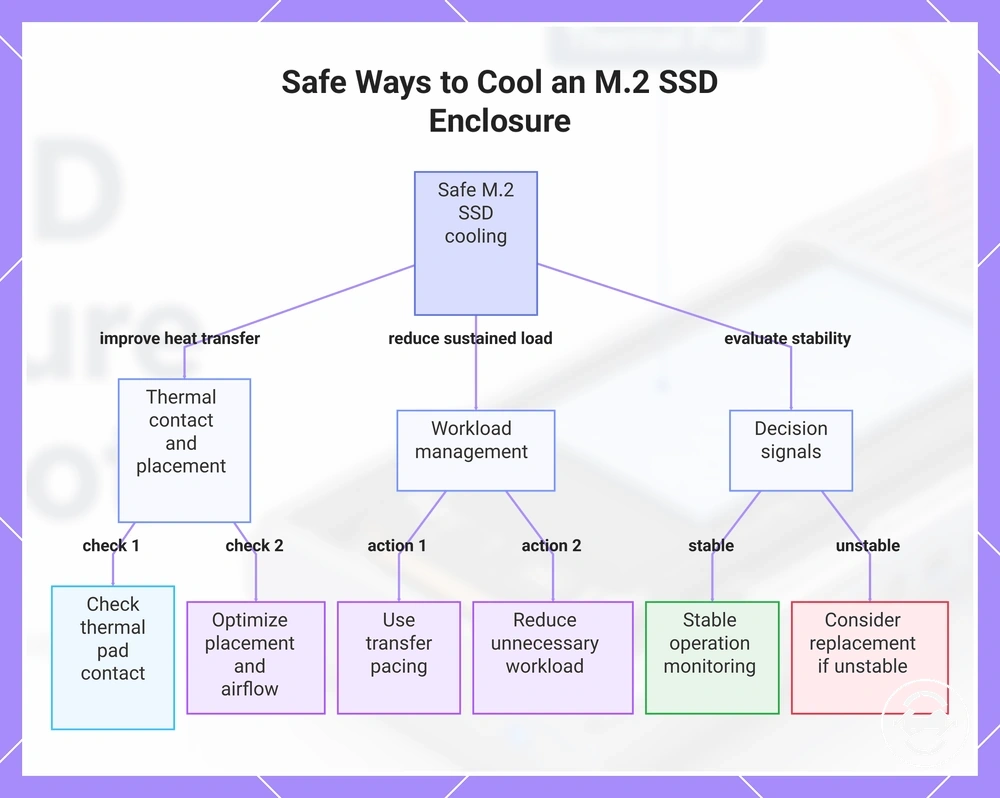
Safe cooling for an M.2 SSD enclosure starts with gradual risk reduction rather than aggressive hardware changes. The goal is to improve heat transfer, reduce sustained load, and avoid unstable operation without risky modification. In many cases, improving thermal pad contact, enclosure placement, airflow, and workload management can reduce heat buildup. Prioritize these non-invasive actions before considering more extensive troubleshooting.
Safe cooling should improve heat transfer and reduce sustained load while maintaining stable operation. The checklist below follows condition-to-action-to-effect logic and helps identify when simple adjustments may be enough and when recurring instability suggests that further troubleshooting or replacement is a safer option.
- Check thermal pad contact: If heat transfer appears limited, verify thermal pad contact with the SSD and enclosure body. Better contact can improve heat transfer when the fit is correct.
- Improve enclosure placement: If the enclosure sits where airflow is restricted or ambient heat is high, move it to a location with better airflow and surface exposure to help reduce heat buildup.
- Use transfer pacing: If sustained transfers generate excessive heat, pause transfers between large workloads to reduce continuous controller activity and heat accumulation.
- Reduce unnecessary workload: If background tasks keep the SSD active, workload reduction can lower sustained heat generation and support more stable operation.
- Allow passive cooling features to work: If the enclosure includes cooling features, avoid blocking airflow or the enclosure body so passive heat transfer can function as intended.
- Watch for decision signals: If these adjustments reduce heat and the enclosure remains stable, continued monitoring may be sufficient. If unstable operation, repeated disconnects, or recurring throttling continue, further troubleshooting or replacement may be a safer next step than additional cooling changes.
This chart shows safe cooling actions and decision signals for an M.2 SSD enclosure, from non-invasive adjustments to evaluation of stability.
Improve thermal pad placement and heat contact
Improving thermal pad placement focuses on better heat contact rather than changing components. Correct thermal pad placement can improve heat transfer between the SSD and the enclosure body when the pad is aligned with the intended contact surface and the enclosure closes properly. Use the checklist below to verify thermal pad placement and heat contact while maintaining proper fit and safe handling.
- Remove any protective film before closing the enclosure.
- Align the thermal pad with the intended contact surface, such as the controller area or other designed heat-transfer contact.
- Check that the pad makes light, even compression when the enclosure is fully closed.
- Confirm the contact surface remains covered after enclosure closure without shifting pad alignment.
- Make sure the enclosure closes normally and the fit does not require forcing the SSD or enclosure body together.
Use airflow, placement, and transfer breaks to reduce heat
Usage adjustments can help reduce heat buildup during transfer sessions by improving airflow, placement, and workload pacing. Open-air placement, suitable surface choice, and transfer breaks can support a lower temperature trend during sustained transfer duration, especially when ambient heat is high. These adjustments help manage heat buildup but do not replace troubleshooting if recurring errors or unstable hardware behavior continue.
The checklist below organizes airflow, placement, and transfer breaks by practical use condition.
- Place the enclosure in an open-air position with unobstructed airflow, and avoid a covered enclosure during extended transfers.
- Choose a firm desk surface instead of fabric, and avoid stacked positions that can restrict surrounding air and increase heat buildup.
- Use transfer breaks during long transfer duration when practical to support workload pacing and reduce continuous heat generation.
- Reduce simultaneous storage activity when possible to lower sustained workload and heat accumulation.
- Monitor stability together with temperature trends. These usage adjustments can help manage heat buildup but do not by themselves resolve recurring errors or hardware faults.
Choose enclosure cooling features without over-expanding the fix
Cooling features are decision signals rather than guaranteed fixes for enclosure heat. An aluminum body, thermal pad, heatsink-like contact, ventilation, tool-free fit, and SSD compatibility can support a better heat-management outcome when the enclosure and SSD are compatible and correctly assembled. These features help interpret enclosure design within heat troubleshooting rather than replacing diagnosis of recurring thermal or stability problems. Their value depends on compatibility, correct assembly, and effective thermal contact.
The list below organizes cooling-related enclosure features by condition and expected heat-management role.
- Aluminum body: Can support passive heat transfer when the enclosure design provides effective thermal contact.
- Thermal pad: Can improve heat transfer when it makes proper contact after correct assembly.
- Heatsink-like contact: Can help move heat toward the enclosure body when the contact surface aligns correctly.
- Ventilation: Can support passive cooling when surrounding airflow is not restricted.
- Tool-free fit and SSD compatibility: Can support a more consistent heat-management outcome when the SSD fits correctly and the enclosure is assembled as intended.
Heat risks for the SSD, enclosure, and data
Heat risks depend on heat intensity, duration, workload, and accompanying symptoms rather than normal warmth alone. A warm M.2 SSD enclosure during sustained activity is not, by itself, a sign of immediate damage. Greater concern arises when unmanaged heat appears with throttling, instability, repeated copy errors, or disconnects during data transfer. The strongest risk signal is heat combined with instability, not a warm enclosure by itself.
When unmanaged heat continues during demanding workloads, the SSD controller may throttle performance and the enclosure bridge chip may contribute to instability under some conditions. Interrupted data transfer or active filesystem activity during repeated disconnects can increase the chance of copy errors or other data risks, while recurring thermal stress may raise long-term reliability concerns. Repeated symptoms deserve closer attention than isolated events. The table below summarizes practical heat risks by component and activity.
| Component or activity | Heat-related condition | Possible outcome |
|---|---|---|
| SSD controller | High heat during sustained workload | Throttling and reduced transfer performance |
| NAND | Repeated unmanaged heat | Long-term reliability concern |
| Enclosure bridge chip | Heat combined with instability | Disconnects or transfer interruption |
| Data transfer and filesystem activity | Interrupted operation during active writes | Copy errors or increased data risk |
| User interruption | Disconnecting during active filesystem activity | Higher risk of incomplete transfers |
For broader guidance on safe use and maintenance, review practices that help reduce recurring instability alongside heat management.
When to stop using or replace the enclosure
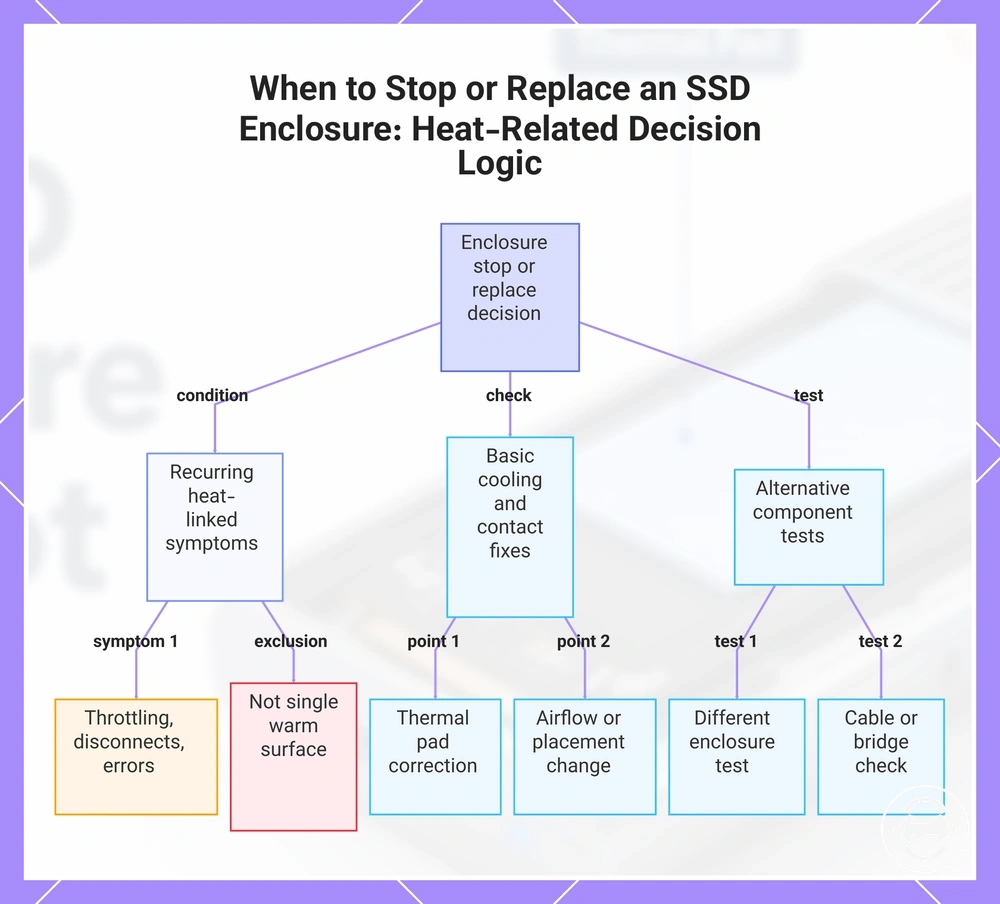
Stop using or replace the enclosure when heat repeatedly appears with throttling, disconnects, errors, unsafe handling, or failure after basic cooling and contact checks. A single warm surface is not enough to make a replacement decision. Repeated symptoms matter more when thermal pad correction, airflow changes, or safer placement do not improve stability. Separate recurring heat-linked failure from surface warmth alone before treating replacement as the safer next step.
If instability repeats during transfers, stop the transfer when safe, back up important data if the drive remains accessible, and avoid continued use until the pattern is checked. Testing the SSD in another compatible enclosure or host setup can help separate an enclosure issue from an SSD issue when the SSD works normally elsewhere. Cable issues or bridge instability may also mimic heat-related failure, so the decision should be based on recurring behavior rather than one hot moment. The checklist below supports a stop-or-replace decision based on repeated symptoms, not surface warmth alone.
- Stop using the enclosure if throttling, disconnects, or errors recur after the enclosure warms.
- Consider replacement if thermal pad correction and basic cooling changes do not reduce repeated symptoms.
- Pause transfers and back up data when transfer errors or unstable detection appear during active use.
- Check whether cable behavior or bridge instability changes the failure pattern before assuming heat is the only cause.
- Test another enclosure when the SSD works normally elsewhere but the same enclosure keeps showing recurring failure.
- Use broader slow transfer problems guidance only after the stop-or-replace logic is clear.
This chart shows the key criteria for deciding to stop using or replace an enclosure when heat-related symptoms appear, focusing on repeated failures rather than a single warm surface.